 Products





Ready to get started?
No matter where you are on your CMS journey, we're here to help. Want more info or to see Glide Publishing Platform in action? We got you.
Book a demoHybrid CMS or headless CMS? It mostly comes down to who builds the front end and the preview. Here’s what each means, and how to choose.

Newer CMS options have real advantages over traditional, legacy systems and even over today's headless CMS, deeply affecting how businesses manage and deliver content. Is your head spinning with all the different content management systems on offer? Monolithic, decoupled, headless, headless-plus, and hybrid CMS are more than just terms - they represent fundamental differences in how a CMS works and can be used.
Here we cut through the noise and separate the useful from the useless, and the good-for-today from the bad-for-tomorrow.
Before we start, let's ground ourselves in what each term means.
What is a hybrid CMS?
A hybrid CMS gives you both ways of working in one system: API-driven delivery to any channel, plus built-in templating and preview tools so content teams can manage the front-end presentation without a developer. Not everyone agrees on these terms, so here's how we use them: hybrid, decoupled and headless-plus all mean a CMS that delivers content by API and has templating and peview built in.
What is a headless CMS?
A headless CMS separates where content is stored (the body) from where it is displayed (the head). Content goes to any front-end website, app, newsletter, or device, through APIs. Developers pick their own front-end framework, but there are no built-in tools for previewing or laying out content.
For a deeper look, read "What is a headless CMS?"
Hybrid CMS vs headless CMS: the difference in one line
A headless CMS gives developers maximum flexibility and expects them to build the presentation layer. A hybrid CMS keeps that flexibility but adds editor-facing tools, so content teams can preview, edit, and publish without waiting on development.
| Factor | Headless CMS | Decoupled/hybrid CMS | |
|---|---|---|---|
| Content delivery | API-driven | API-driven, plus built-in templating | |
| Presentation control | Built entirely by developers | Built-in tools, with API flexibility retained | |
| Content preview | Difficult without extra tooling | Real-time, multi-device, in-context | |
| Workflow and collaboration | Usually minimal, built by you | Version control, status-driven workflows, distributed editing | |
| Best for | Teams with strong dev resources needing full front-end control | Teams wanting flexibility plus editor-friendly tools out of the box |
Unsure what side you're on? Connect with a Glide CMS product specialist and we'll talk you through it.
A monolithic CMS ties content and presentation together in one system. Users often log into the website itself to access the CMS, so the two are inextricably linked. This coincided with the explosive growth in self-managed websites, and back when a CMS only had to control a small website, it was enough. Being easy to use and making sites intuitive to control was a real plus, but the downsides grew over time.
A headless CMS separates the stored content (the "body"), the databases of words, images, videos, and data, from the presentation layer where content is viewed, also known as the front-end (the "head"). This contrasts with the older monolithic CMS, where content and site are tightly interwoven. That tight link brought problems that grew over time:
As organisations needed to feed multiple channels and destinations at once, more CMSs became headless by default. That removed many of those drawbacks and let content and channel be managed independently, using APIs to deliver content to various front-end frameworks or devices.
What to look for in a headless CMS:
Decoupled CMSs, also known as hybrid CMS or headless-plus CMS, build on the headless concept by adding features that meet the need for more out-of-the-box solutions and delivery options. You get the flexibility of headless architecture with the user-friendly, built-in features of traditional CMS.
What to look for in a decoupled/hybrid CMS:
A prime example of a decoupled CMS is Glide CMS, which can run in either headless or hybrid mode based on need.
That adaptability gives Glide CMS unusual flexibility to power highly custom front-ends alongside integrated templating. Running in either mode lets publishers and media companies tune their content strategies to changing audience needs while sticking to publishing best-practices honed over 30 years. Our view: a CMS that lets you make a cool website but makes users work twice as long to finish a piece of content, is giving with one hand while slapping you with the other.
Glide CMS also includes a suite of native AI tools in GAIA. GAIA includes AI-driven content summaries, drafting aids, language translation, text-to-voice, and pre-publishing quality checks, none of which require additional setup or dev work to use.
GAIA speeds up content creation, improve quality and accessibility, and make it easier to reach a global audience. Whether you deliver content through APIs for maximum flexibility or use the built-in tools for creation and preview, Glide CMS fits how you work, not the other way round.
Helping close the gap further is Glide Deliver, an optional delivery stack we build and maintain, available to all customers at no extra cost. It covers CDN, caching, serverless compute, and security on AWS, and comes with a developer CLI, prebuilt platform packages, and infrastructure defined in code. Some customers use it to fully power sites and experiences, others use elements to handle key jobs quicker: route discovery, caching, page geometry, taxonomy resolution, and other scaffolding tasks. Add Glide NPM and Next.js packages, plus a Next.js bootstrap app for front-end-as-a-service platforms such as Vercel and AWS Amplify, and you've got a head start on whatever front end you choose.
Flexibility vs Control
Headless CMSs give developers flexibility to build custom front-end experiences. By separating content from presentation, developers can choose the best tools and frameworks for their needs. But that can cost control over the final presentation, requiring more development resources to get the desired look and feel, leaving CMS users disconnected from what audiences actually see. That's a real major drag when something needs changing quickly.
Hybrid CMSs bridge the gap: API delivery and traditional templating in one, as Glide CMS does. You get more control over presentation without giving up headless flexibility. Content creators can use built-in tools to manage and preview content, reducing dependency on developers for routine updates.
A practical example in Glide CMS is the classic breaking news scenario, where editors can build new sections or pages without needing a developer on hand or to do a release.
User experience for content creators
One of the main challenges with headless CMS is their complexity for non-technical users. Because content delivery is API-driven, content creators might lack the tools to preview and edit content in real time, leading to a disjointed user experience.
A generic headless CMS may also structure its image management tools to suit a developer building a website which places an extra burden on users managing image assets. These drawbacks mean development demands from content teams using pure headless CMS can become dominated by requests to improve the CMS user experience rather than the end product.
Decoupled CMS address this by leaning into the sector's needs and building tools that help both users and the wider business.
In Glide CMS, that means editor-friendly features such as multi-device preview, notes mode, a variety of publishing options, multi-channel controls, allowing creators to see exactly how content will appear across platforms. In the image management example, as an opinionated CMS, Glide CMS reduces work for developers and users alike.
Workflow & collaboration
Headless CMSs often lack full workflow and collaboration tools, since their primary focus is on content delivery through APIs. This can be challenging for larger or more sophisticated teams managing complex workflows and approvals, and it assumes the business will dedicate resources to build those tools or processes into the base CMS.
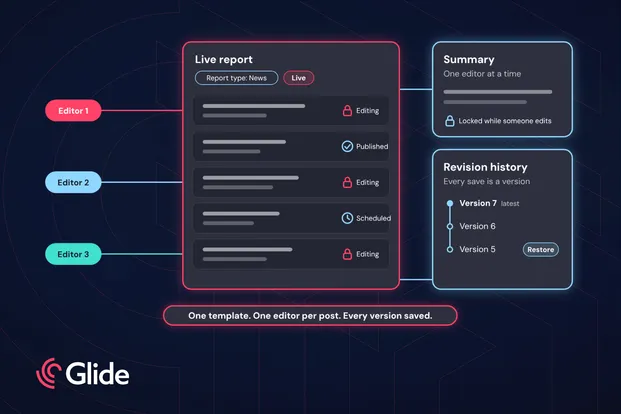
A decoupled CMS built for publishing and media, as Glide CMS is, offers these capabilities with strong workflow and collaboration tools informed by the sector. Features such as version control, status-driven workflows, and distributed editing let teams work together smoothly while keeping content quality and consistency high.
Scalability & performance
Both are built for large volumes of content and heavy traffic, so either can work at enterprise scale. Where they differ is in how much you have to build yourself.
Headless CMSs suit businesses that put outright flexibility at the heart of their approach and understand the scale of development resources needed to build and maintain custom solutions.
Hybrid gives you the same scale and performance with less to build and maintain, because the tools are built in.
So which one? It mostly comes down to who builds and looks after the front end.
Choosing between a headless CMS and decoupled/hybrid CMS depends on your business's specific needs and resources. Headless CMSs give strong flexibility and scalability, making them a good fit for organisations with strong product and development capabilities and a neeed for custom front-ends.
Decoupled CMSs give content creators a more user-friendly, tailored experience out of the box, with built-in tools for previewing, editing, and collaboration, a complete package for teams that want flexibility without giving up ease of use.
Both are how content management works today: they let you be everywhere your audience is.
With Glide CMS you don't have to pick: it runs in either mode, and the AI tools come built in.
Interested in learning more about Glide CMS? Connect with a Glide Product Specialist.
What’s the difference between a hybrid CMS and a headless CMS? A headless CMS gives developers maximum flexibility and expects them to build the presentation layer. A hybrid CMS keeps that flexibility but adds tools for editors, so they can preview, edit and publish without waiting on development.
Is a hybrid CMS the same as a decoupled CMS? Often, but not everyone uses the words the same way. We use hybrid, decoupled and headless-plus for a CMS that delivers by API and has templating and preview built in. Ask each vendor what they mean. [[CONFIRM wording]]
What is a headless-plus CMS? Another name for a hybrid CMS: headless, plus templating, preview and workflow tools built in. Content still goes out by API to any channel.
Is Glide CMS headless or hybrid? Both. It can run either way, depending on what you need.
Do you need developers to use a headless CMS? Yes, usually. They build the front end. A hybrid CMS cuts that dependency for routine updates, because the templating and preview are built in.
Related articles:
No matter where you are on your CMS journey, we're here to help. Want more info or to see Glide Publishing Platform in action? We got you.
Book a demo
