 Products






Ready to get started?
No matter where you are on your CMS journey, we're here to help. Want more info or to see Glide Publishing Platform in action? We got you.
Book a demoGlide CMS Third-Party Widgets let you BYODS... editorial teams can browse, search, and embed live data from any external API directly in the editorial interface without developer involvement or manual copy-paste. Configure once, available to all editors instantly.
Editorial teams need live data from external systems - sports stats, financial figures, product catalogues - but getting it into the CMS usually means developer tickets, manual copy-paste, and stale content.
Glide CMS Third-Party Widgets fix that. They allow you to connect any external API once and editors can browse, search, and embed live data directly in the editorial interface. There's no code, and no developer dependency, and that's why we think it's the most practical solution to an age-old problem available in any CMS today.
For teams working with decoupled or headless architectures, Third-Party Widgets fit naturally by connecting external API data sources into the editorial workflow without requiring bespoke CMS development for each one.
Widgets are configurable containers that sit inside Articles, Collections, Templates, and Live Reports. There are two types:
Third-Party Widgets come in two forms: static HTML snippets, or live API-connected components that pull real-time data on render. It's the second type that separates Glide from every other CMS when it comes to live data workflows.
System Widgets
System Widgets are built directly into Glide CMS. They require a concrete implementation for each component but can be whatever you need them to be, fully flexible and tailored to your publishing requirements. Some examples are common product features and the reusable editorial components mentioned above like Image Galleries, Video or Social Embeds, a Live Report embed, Ad slots, Tables, and so on.
Third-Party Widgets
Third-party widgets work differently. They're configurable HTML snippets, meaning no additional code is required in the front-end application to support them. You register the generic approach for inclusion once, and editors can then use them like any native widget in the CMS, so from their point of view they are as easy to use as out of the box widgets.
Third-party widgets come in two forms:
Together they make Glide CMS a genuine hub for external data and not just a place to write and publish. The benefit for users is a consistent user experience across all widget types whether an editor is placing a native image gallery, a custom betting widget, or a live data feed, the workflow can be the same: configure and publish. It saves effort from development teams, and much legwork during story creation.
Creating a third-party widget in Glide CMS is straightforward. Register the desired externally-hosted widget or custom component via its HTML or URL where HTML lives, and configure how it should behave. Once saved, the widget becomes immediately available to the editorial team. This transforms ticket sheets of bespoke work into simple config tasks.
The entire setup happens within Glide so the overall task becomes no-code, with no front-end pairing or app deployment needed. Developers can register a widget and have it working end-to-end without touching anything outside Glide CMS.
When registering a component, you choose how the HTML is provided. There are two options:
In this example, we're configuring a Match Preview widget using one of API Sports' pre-built widgets, which allows us to easily display dynamic sports data on the website.
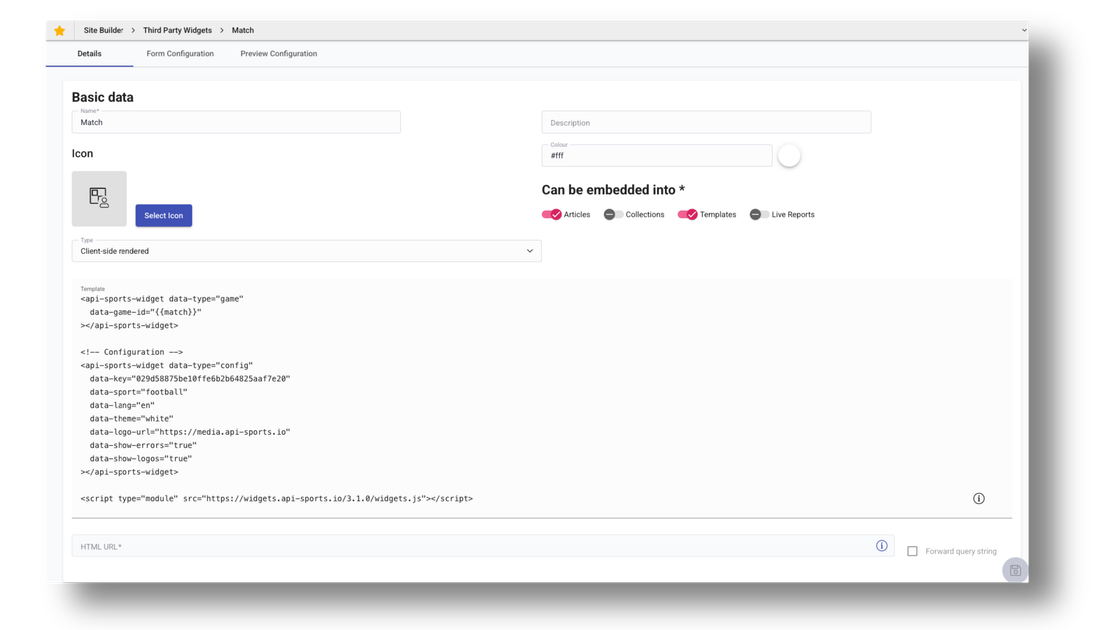
The template field accepts a handlebars template rather than plain HTML, enabling variable interpolation for custom fields. As shown in the image above, the match value is a variable that will automatically be populated with the match ID later in the workflow, since Match is configured as a custom field.
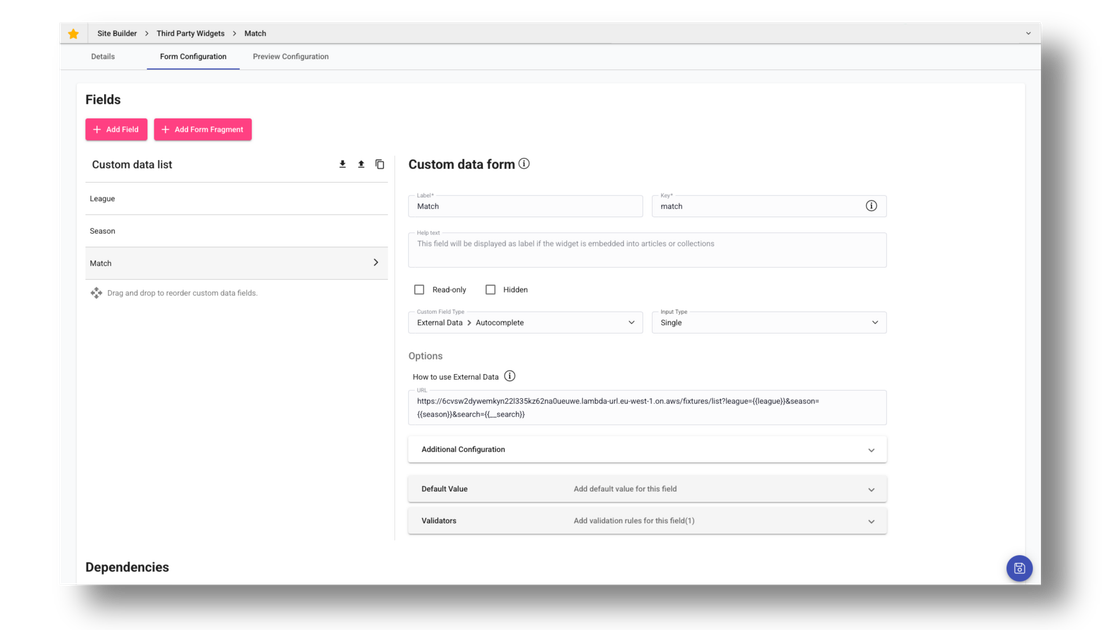
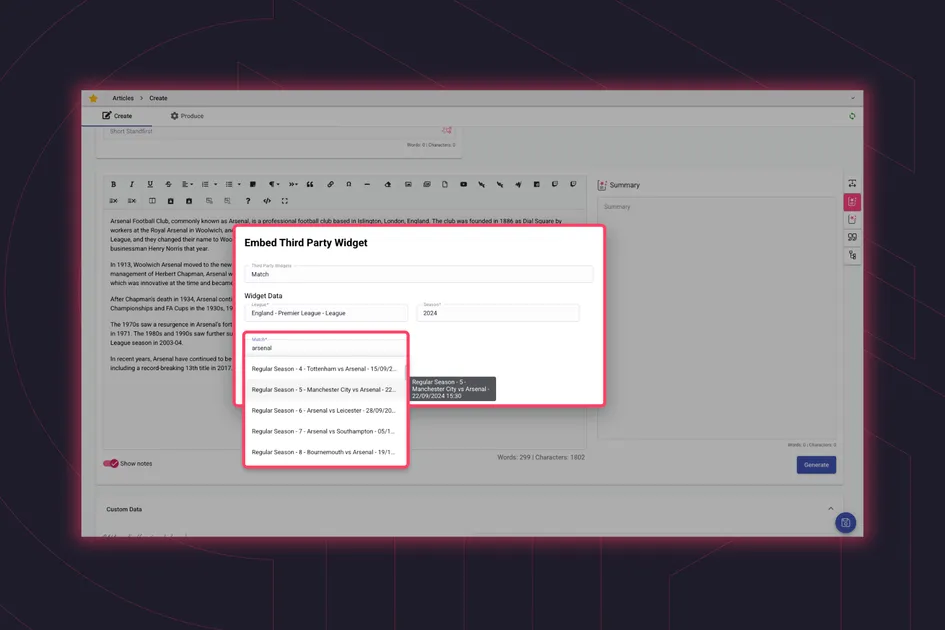
In the image above, we've configured the fields that will be exposed to the editorial team through the widget we're creating. Each time an editor uses this widget, they'll be prompted with a modal asking them to select a League, Season, and Match. The selected Match ID is then used to render the correct match preview.
The League, Season, and Match fields pull data from API Sports in real time, so editors can browse available options directly. This is powered by Glide's external data capabilities; however, only the Match ID is stored, as it's the only variable needed to display the widget on the front end.
Once the components are set up, they will stay independently deployed and versioned. For teams moving towards a micro-frontend architecture, third-party widgets remove a common friction point because the CMS no longer needs to know about or couple to each independently deployed component. Each widget stays owned and versioned by the team that built it, while editors use it like any native CMS feature.
Third-Party Widgets can be placed across content components - Articles, Collections, Templates, and Live Reports - which gives editorial teams the same flexibility wherever they're working. So a widget used in a standard article can be reused in a Live Report for example.
From the editor's perspective, the experience is consistent regardless of whether a widget is native to Glide CMS or a custom third-party component. Third-party widgets sit alongside other native editorial tools - such as Glide Media Digital Asset Management (DAM) - giving editors everything they need in one consistent workplace.
A workflow then can be as straightforward as to drag it in, drop it where it is needed, configure the parameters through a simple visual form builder, and publish. No particular technical knowledge is required.
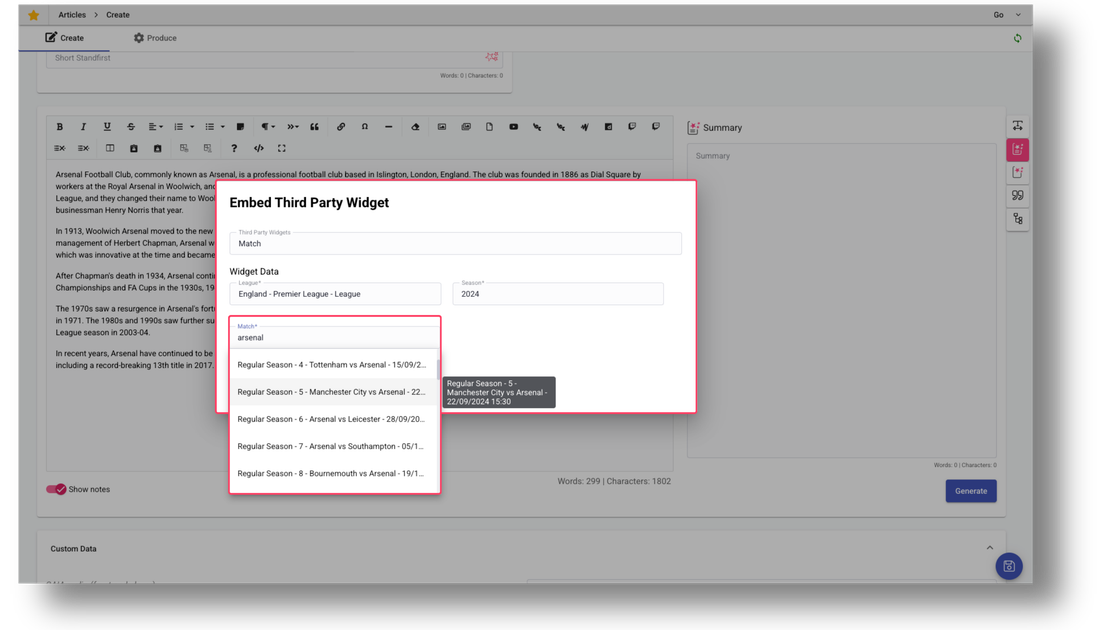
This is where the real-world impact shows up. A sports writer can now embed live stats directly in a match report without having to open a separate dashboard, or commercial team colleagues can place custom ad units which automatically target based on taxonomy and locale, or the data team surfaces visualisations initialised by the article's data range and subject matter.
For your dev teams, third-party widgets in Glide CMS mean deploying and maintaining components independently. No separate back-end integration is required, there's no API development overhead, and yet you keep full control over component logic and styling.
For content teams, Third-Party Widgets mean access to the sort of tools and data sources they rely on without switching between external systems and the CMS or manually copying IDs and data fields into bespoke components. Third Party Widget components adapt automatically to content context, the interface is consistent for all widgets, and there's no dependency on developers for routine embedding of data.
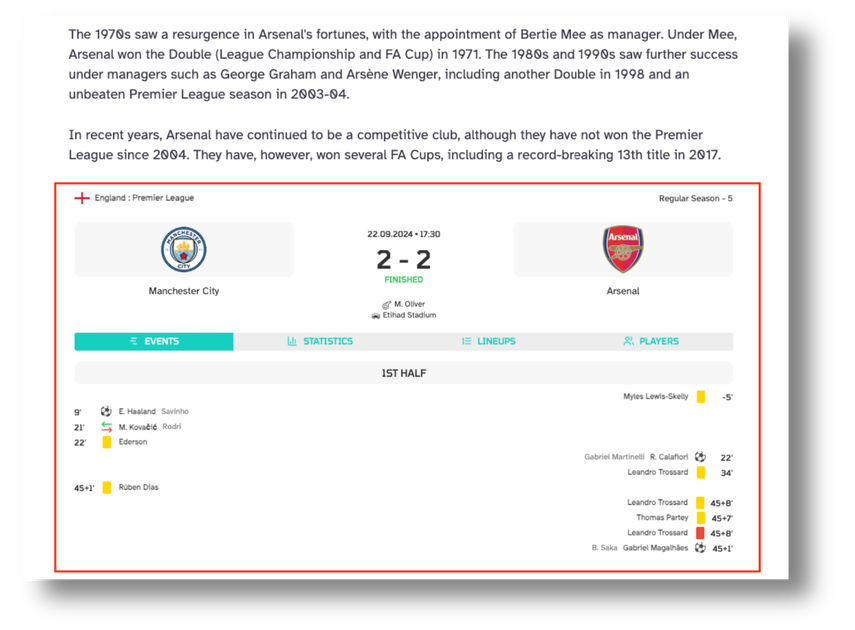
Match Preview widget powered by API Sports, showing the featured match chosen by the editorial team via the CMS.
For the organisation as a whole, it means leveraging existing component investments rather than rebuilding from scratch, extending CMS capabilities with proprietary functionality, and maintaining governance while enabling flexibility across teams.
We've seen the benefits in action. New data sources which were once expected to take weeks to make available have been added in hours, while dev teams aren't buried in integration requests and content stays accurate without manual intervention.
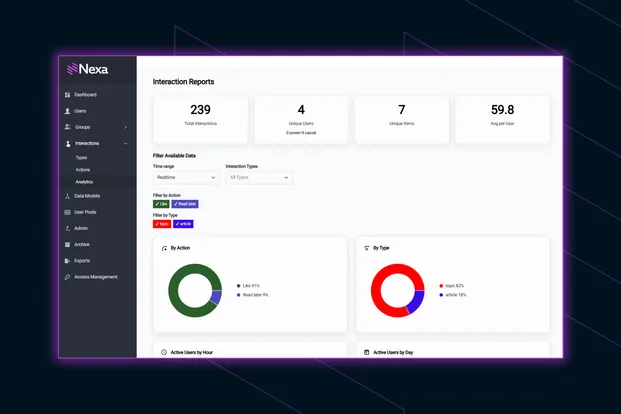
Publishers managing subscriber access alongside custom widgets - perhaps premium stats feeds, exclusive data tools, or paywalled content experiences - can pair Glide CMS with Glide Nexa, GPP's audience interaction platform, which handles identity and entitlements in the same ecosystem, making it straightforward to control who sees what across your content.
Third-party widgets in Glide CMS turn your CMS into more than a place to write and publish. It becomes a hub for all the data and tools your editorial teams rely on - live stats, event listings, product information - all surfaced directly in the workflow, initialised automatically with the right context, without developer dependency.
With widgets handling the tricky data work, Glide CMS’s multi-channel publishing capabilities can distribute it across your website, apps, newsletters, and social feeds in one step.
Want to see how third-party widgets could work for your publishing operation? Connect with a Glide product specialist to explore what’s possible.
Related articles:
No matter where you are on your CMS journey, we're here to help. Want more info or to see Glide Publishing Platform in action? We got you.
Book a demo
