 Products






Ready to get started?
No matter where you are on your CMS journey, we're here to help. Want more info or to see Glide Publishing Platform in action? We got you.
Book a demoFrom the first idea to the first broadcast or first publication of your stories, Glide’s in-CMS AI toolset GAIA handles the time-consuming parts of media workflows so content teams can focus on what audiences love.
Most media and content teams are running leaner and faster than they ever have, all while the expectations of audiences have risen.
This doesn’t necessarily always mean more by volume - more is not always better - it also means being better at hitting the spot and keeping people informed and engaged more meaningfully, and it’s a top priority for content teams to achieve that as standard.
Alongside this, AI tools have flooded the market with promises to conjure good and engaging content from thin air, but content teams - and audiences - have quickly found the limits of generic tools and bots. Most are below the working standards professionals need, also demand extra integration to actually be useful in a workflow, and give legal and data teams nightmares.
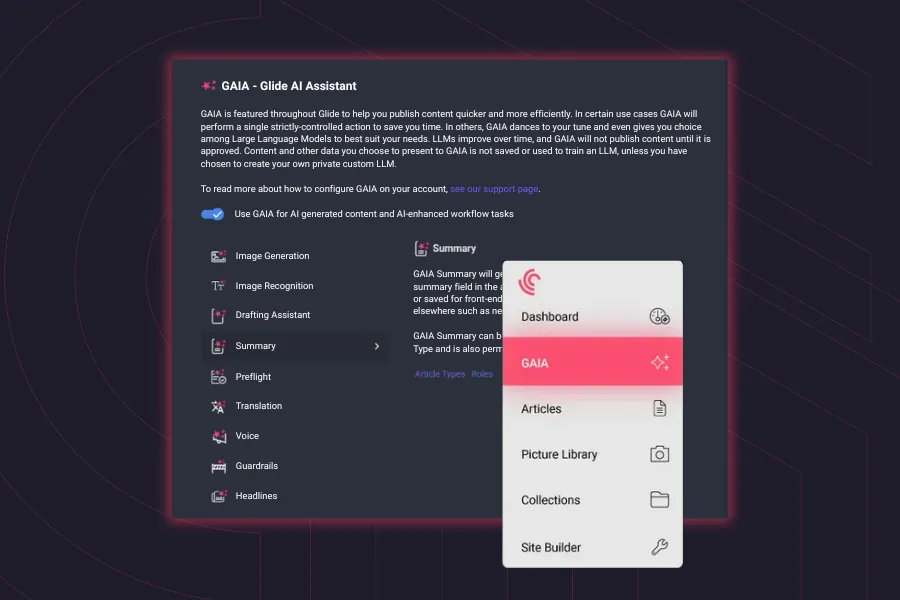
GAIA is Glide's answer to that problem; a suite of AI features built directly into Glide CMS, engrained in the system rather than just bolted on, and designed around how content teams actually work.
Being part of the platform means there is no need for new tools and time spent on integrations. It also means no new contracts or new logins are needed, and the data it works with stays within your control. Tricky things like user access is granularly managed from within the platform, and you can even pick at will which models you use or avoid from a vast selection which is constantly being updated for choice and capability.
Under the hood, GAIA runs on Amazon Bedrock with a choice of large language models (LLMs). Media teams pick the models that suit the tasks best and can change them at any time, while their data stays inside their control and never enters a training set. For an industry that's rightly cautious about AI and protective of its IP, that architecture is now a basic minimum. There is another key GAIA element too for peace of mind: human oversight which comes from keeping humans in the loop throughout.
So what can GAIA today do for you? Here are seven GAIA features your newsroom can turn on now.
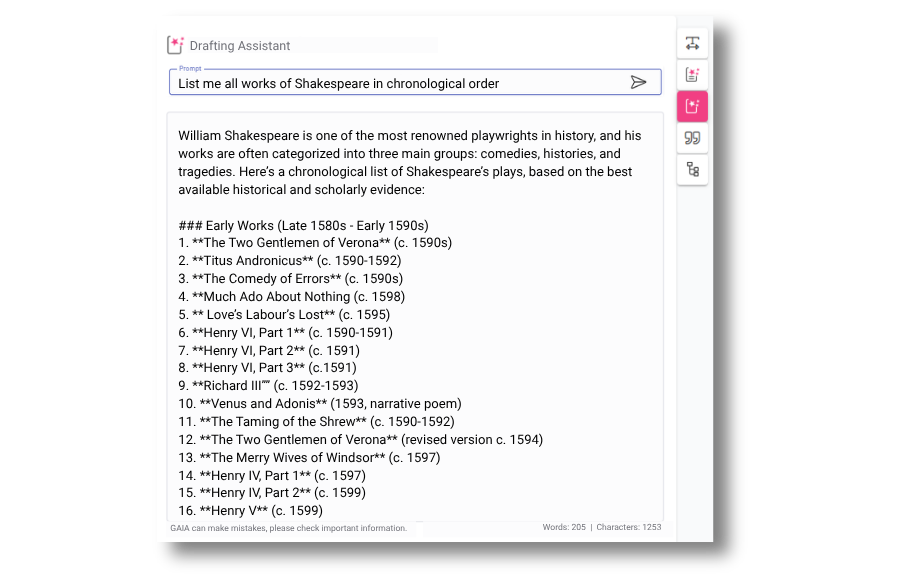
Writing or creating any sizable story means building it from fragments of knowledge, background context, historical stats, lists of key players, comparisons with previous events, and more. In a content team’s workflow, much of the information needed to give a story depth and authority eats up an enormous amount of time and tends to be dotted around other screens and apps.
GAIA Drafting Assistant brings much of it right into the story creation phase of the workflow, sitting inside the article editor as a real-time helper on a broad range of tasks. Need to compile a timeline of events for a breaking story? Or pull together a comparison table, find some historical stats and compare them with today's figures? It can do all that, and more. For reporters working under a deadline, assembling background information can be the most time-consuming task.
Like everything in GAIA, the writer stays in control. Drafting Assistant doesn't write or publish anything on its own. It assembles the building blocks, and the writer decides what to use, and what to discard.
For media and newsrooms where speed-to-publish is a competitive advantage, that's meaningful time back on the clock for every piece.
Now that so many content teams are distributed, both geographically and around the clock, and workflows are shorter, a certain sort of safety net has thinned out or disappeared - that of the fact-checking and style sub-editors trying to catch every missing morsel or content inconsistency before content goes live. That's where GAIA Preflight comes in handy.
Preflight is the quick pre-publish quality check that fills in information gaps. It sits at the top of your article creation screen, a big traffic light indicator which scans the piece for key missing elements which a news story should have, or could be vital to better SEO: has the writer stated where the events took place, the timeframe, the key subjects involved? It gently flags what might be improved and what might be missing before the article travels further in the workflow.
For distributed teams and writers working under pressure, that matters. Preflight can highlight the natural gaps between workflows steps and which come from collaborative teams working on content at different stages. It is also handy when editors picking up a piece cold, as they can see right away which parts need improving or are missing altogether.
The writer still decides what to act on and what gets published. Preflight is there to assist, not to gatekeep.

Utilise Glide GAIA's AI tools to speed live reporting production including report and post headlines, post-event wrap-ups, and summaries.
GAIA Summaries is a perfect example of how AI can help one piece of context go much farther. It means a producer or writer does not have to manually rewrite and repackage those extended fragments of content again and again.
A short summary at the top of an article, or used as a homepage cross-reference or newsletter snapshot, can do wonders for engagement. For readers arriving via search, social, or app notifications, it gives immediate context and a reason to keep reading, brilliant for increased dwell time and interest. Compressing long reads into information-dense summaries isn’t easy and can be disproportionately time-consuming to write, so GAIA Summaries tackles that “time spend”.
GAIA creates instant summaries based on content which writers have already approved, allowing them to fully edit the summary before it gets saved into the workflow, or create new ones on click.
The format is down to you: classic bullet-point fact boxes, narrative descriptors, or a trending “key-takeaways” snapshot. You choose the format that fits your audience and GAIA can apply it consistently, something which is hard to ensure when every writer is doing it manually under pressure.
For publishers looking to improve engagement without adding any extra steps, this is a significant bonus.
International publishing can be such a complex undertaking that a lot of media teams and brands simply avoid it. It can typically lead to separate CMS instances per language, cumbersome third-party translation services, plugins, and a constant friction from returning translated content back into the relevant systems in the right format.
GAIA Translate cuts through all of that. Select an existing article in Glide CMS, and click to transform it into a new language, all within the same interface. One decision tackles the vast majority of workflow and admin issues instantly, translating body text, metadata, tags, quote boxes, and even image captions, and places them in the correct fields in a new localised and fully-editable version, across 75 languages.
The translated articles are fully editable standalone versions in the CMS, conveniently linked to the original for admin overview. From there, local editors can take full control to make it page perfect for the specific audience they work with, with the ability to edit any field or text to adjust headlines, cultural references, idioms, or tone to suit the target audience, while leaving other fields untouched. A headline that works in English might need a completely different angle in French or Arabic, and the editor makes that call.
That review process is where the real value sits. Translation is rarely just Language A into Language B. Idioms and puns don't travel, cultural context shifts, and editorial tone depends on the market. GAIA handles the heavy lifting but the local editor shapes it into something even better with a native eye. Crucially, the original article stays intact throughout to retain the original reference point. Machines remove huge legwork and cost, and people find the balance.
For publishers eyeing new territories but baulking at the cost and time of serving multilingual audiences, Translate can take 90% of the time and a lot of cost out of the process while keeping editorial judgement where it belongs.
For a deeper look at multilingual publishing strategy, including content architecture, taxonomy localisation, and team structuring across markets, see our internationalisation expert guide series.
With so much content consumed on the move, audio articles give publishers a new way to be a part of their audience’s day, even when they don’t have the time or inclination to sit down and read.
GAIA Voice creates audio versions of articles for [placing on website pages, in apps, or extracted through separate channels. Media teams and site owners can present audio alongside original written text, or pull articles together based on topic or interest to create a new audio playlist.
From an integration and file management perspective, the wins are huge., No bespoke integration is needed and there are no third-party audio platforms to manage. To top it off, It echoes the power of Translate to create localised versions for matching with localised text, and even supports local accents and dialects, and offers tone and gender preferences.
Take a piece like Denis Haman's recent commentary on why well-built SaaS has nothing to fear from the agent age, a 2,000-word opinion article that a commuter could listen to in full during a morning train ride, without ever opening the page. That's the kind of content that Voice turns into a new channel with zero extra production overheads.
If you are looking to open up new channels and audiences routes, Voice is a major benefit. Like other GAIA features, it can be turned on and off within the CMS, and applied to specific content easily.
Writing alt-text is one of those tasks that's easy to skip and quite hard to do consistently, especially under deadline pressure. Meanwhile, alt-text is a key SEO lever, and also has knock-on benefits for future search in the image library too.
Skipping it, something which can be appealing in the moment, can have long term negative consequences.
GAIA Alt-Text helps remove this by suggesting descriptive alt-text at the moment an image is uploaded into the CMS. Rather than leaving it as an afterthought, GAIA brings it into the natural upload workflow so editors and writers get a ready-to-use suggestion right where they need it.
They can accept it, edit it, or ignore it, but the hard work is already done, and you can even set business rules to force its inclusion so ignoring it at all isn’t an option. The benefits are immediate: faster workflows with far less context-switching, consistent compliance so images don't go live without metadata, better SEO from accurate descriptions which search engines can now index, and accessibility built-in by default for screen reader users.
For content teams publishing at volume, GAIA Alt-Text turns a commonly skipped step into a non-issue.
Finding the right image for an article can be a really tedious process, especially when you have a huge image library.
It can mean searching your image library by filename, caption, or generic terms, while hoping that something relevant emerges. If you're unlucky and it doesn't, it means either searching more widely, or simply settling for something that's close enough to the topic.
GAIA Image Recommendations combines traditional metadata search with AI-powered suggestions, based on the content of the article itself. Once enabled, a recommendation panel becomes instantly visible in the article creation screen sidebar, and you're just a click away from the perfect image for your article.
The system will surface relevant images from your existing media library, which can be dragged and dropped directly into the content area. Each image includes everything you need - caption, credit, and alt-text - so editors can quickly check suitability.
The feature works entirely with the existing media library, so every suggestion is an image the team already has access to in the DAM, which cuts the need for external stock searches and licensing questions.
The common thread tying all of GAIA’s features together is that they live inside Glide CMS, at the point of need, with no dev work required to activate and no data leaving your control.
These aren't tools that require a transformation programme or a lengthy integration roadmap with extra developers. They are settings which can be toggled on and off and give content teams immediate capability.
GAIA’s toolset keeps growing, with new features continually being added and delivered as part of the Glide feature set at no extra cost to access. What's here today is already making a measurable difference to publishing speed, content quality, and editorial productivity across Glide customers, and there's much more on the way.
Related articles:
No matter where you are on your CMS journey, we're here to help. Want more info or to see Glide Publishing Platform in action? We got you.
Book a demo
