 Products








Ready to get started?
No matter where you are on your CMS journey, we're here to help. Want more info or to see Glide Publishing Platform in action? We got you.
Book a demoIf you are using a CMS to produce your content, doing all your picture tasks in a separate standalone system can add work, tech debt and cost. Glide Media puts what you need where you need it - in the CMS.
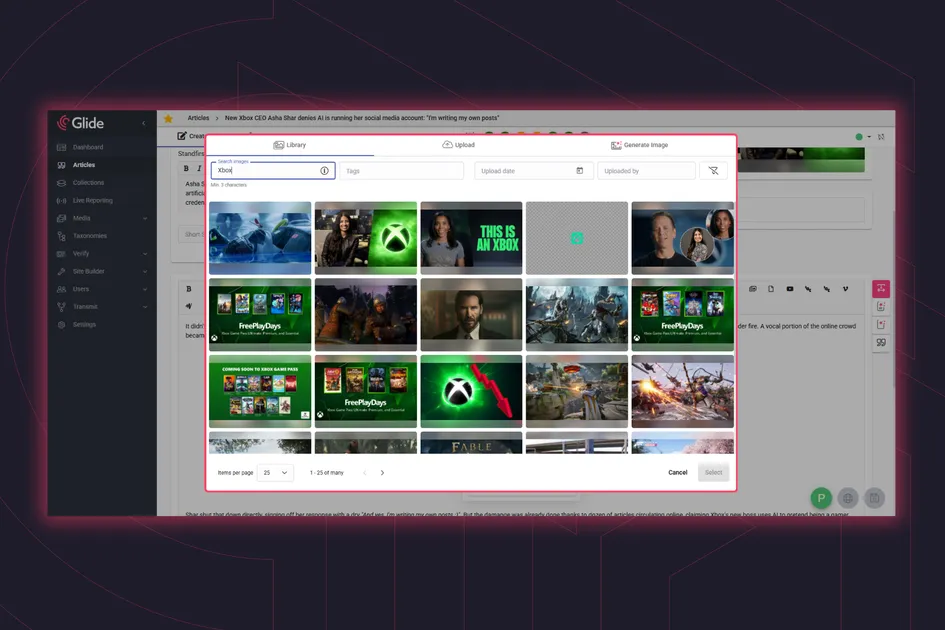
Media brands and content teams routinely need to handle thousands of images daily - all of which require tight usage control, rapid turnaround, and consistent SEO and metadata tagging. With production workflows and publishing channels having to cater to multiple formats and audiences, the people making and publishing content need fast, reliable access to media assets suited to all audiences with the minimum fuss to make them usable.
What they don't want is for all the images and media assets to be in separate systems or storage that forces them to cross-post data and assets into their working CMS and mark them up all over again, or each time they get used, but unfortunately that's quite a common scenario for many media teams.
Legacy digital asset management (DAM) systems, or less formal folder-based storage methods which look suspiciously like the manual approaches from years ago, create more problems than they solve. Common pain points include:
It’s what happens when DAM systems sit separate from publishing workflows, where time, which should go into creating better content, instead goes into file management and admin. What should be straightforward becomes anything but.
Good news though: the pain and cost is not inevitable.
Glide Media is Glide CMS’s built-in DAM which washes away these pain points by giving editorial teams everything they need directly within the CMS people already use. It’s a key feature that makes editors’ lives considerably less complicated versus the inefficiencies of separate systems and workflows, while also reducing cost and complexity for tech teams.
Most general multipurpose DAMs are created to cover a wide variety of generalised use cases, fine for basic tasks and low intensity work, but which can be found wanting and become expensive and restrictive in higher-intensity and more focused use cases - such as for media and publishing sites where the whole business rests on content production, and the penalties for mismanagement of large volumes of images can be high.
In the same way that a specialist CMS develops certain traits and attributes suited to its sector which will not be found in a general CMS, as is the case with a generic DAM versus one that features specialised utility. Like Glide CMS itself, Glide Media is purpose-built for publishers so features map directly to how editorial and content teams actually work, designed specifically for publishing to large audiences at scale: daily news publishers, magazines, sports organisations, or anyone doing rich visual storytelling with complex image handling needs. This also applies to cost and maintenance, upgrade development, feature additions, and so on.
Images sit alongside audio, PDFs, files, and other assets in a single searchable environment, supporting multimedia storytelling without forcing editors into parallel workflows. Meanwhile, serverless architecture keeps costs to a minimum while allowing the overall system to scale rapidly as befits modern products and MACH architecture.
What about video?
Video management is a very specific task demanding capability around delivery and data, adaptive bitrate streaming, multi-format encoding, frame rate conversion, player optimisation, ad monetisation, rights management, and suites of data and audience consumption tools. It's why we integrate natively with best-in-class video platforms such as Brightcove, JW Player, Dailymotion, Vimeo, and Ex.Co, who brilliantly do what they do while we focus on editorial workflows and content tools built for publishing at scale.
The range of improvements Glide Media brings to teams isn't rooted to one single feature. Instead it's the deep-seated tackling of multiple small, repetitive tasks which quietly consume editorial time and creative work. Most legacy workflows ask editors to think about things they shouldn’t need to think about - dimensions, formats, resizing, captions, alt-text, credits, other metadata, and other production tasks. Glide CMS allows you to automate most of these without editors having to do anything, but still being able to instantly select and refer to images while they write without needing to access any other systems or licences.
Serving the same high-resolution original asset everywhere - thumbnails, banners, mobile - quietly kills page performance and inflates delivery costs. Pre-defined renditions mean the right crop at the right resolution is served every time, and critically, it's editors and library managers making the call on what's retained or removed from an image.
Every image uploaded to Glide is automatically processed into predefined renditions configured to match your publishing requirements. Sizes, aspect ratios and scaling behaviour are defined once, centrally. Editors upload the original image and move on. Glide Media takes care of how that image appears as a homepage promo, an inline image, a sidebar asset or a social share. No manual resizing or "on the fly" cropping which slows page load times and places all editing logic on a front-end tool.
Glide imposes no practical limit on image file size, and keeping the high-res original in the library means you're never locked into yesterday's rendition rules. If your design changes, a new platform launches, or you need to repackage archive content, the source material is already there. On the delivery side, correctly sized renditions have a direct impact on page load speeds, critical where page speed is an SEO signal as well as a user experience. Serving bloated images is one of the most common and avoidable drags on search performance. Getting this right at the point of upload, automatically, is the kind of detail that compounds quietly in your favour over time.
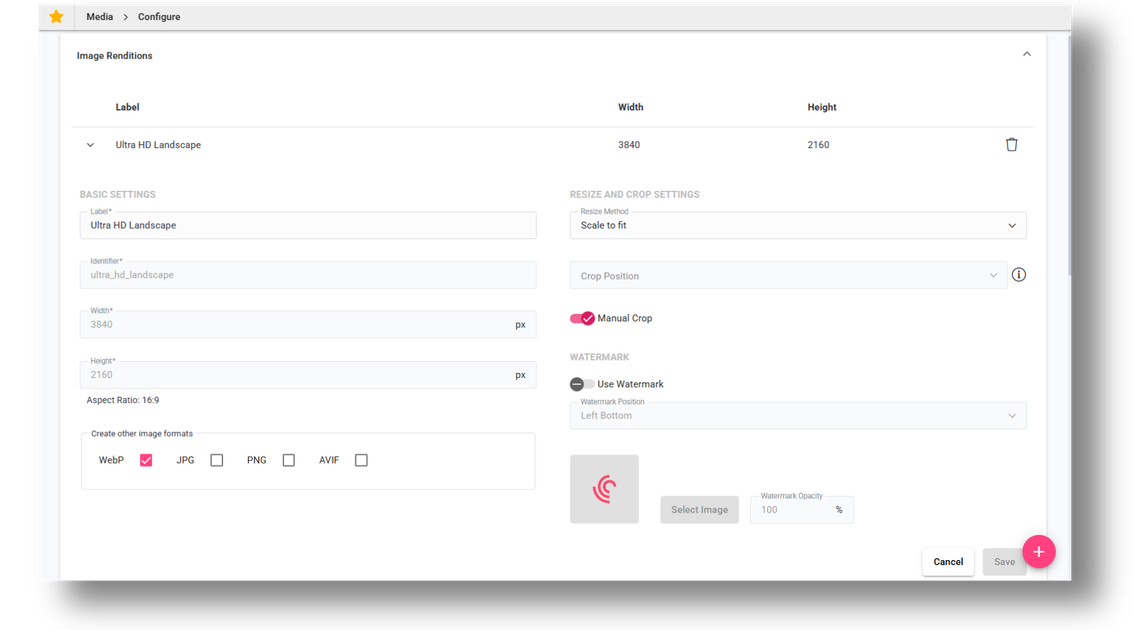
Glide CMS renditions settings for optimised image delivery
Glide Media also supports automatic format conversion, ensuring images are delivered in the optimal format for front-end performance, where format choice has a direct bearing on file size, load speed, and search ranking - and the standards are still moving. It means you can load an image of one type, and convert it instantly to another which best suits your end goals - a good way of avoiding errant SEO image warning reports.
A quick guide to image formats and what they mean for publishers:
| JPEG |
|
| PNG |
|
| WebP |
|
| AVIF |
|
Alongside this, storing the original high-resolution image is what makes all of this future-proof. As format standards continue to evolve, Glide can reprocess and redeliver from source, so your archive doesn't become a casualty of the next great shift in web standards - or your next set of design ratios.
Watermarking can be applied automatically and by business rules. If, for example, you want to mark your social media images with your logo, but not your website versions, it's automated easily without needing to mess around with editing software or create separate versions.
At the point of upload, images can be cropped and focal points can be determined. This works per rendition too, giving you proper control over how images are presented across different scenarios.
Define cropping rules, say, only for the article promo rendition while leaving others untouched, or set focal points, ensuring the important bit of the image - like someone’s face, a product, or whatever matters - stays in frame across all those different aspect ratios. The system respects your decisions rather than mindlessly centre-cropping everything.
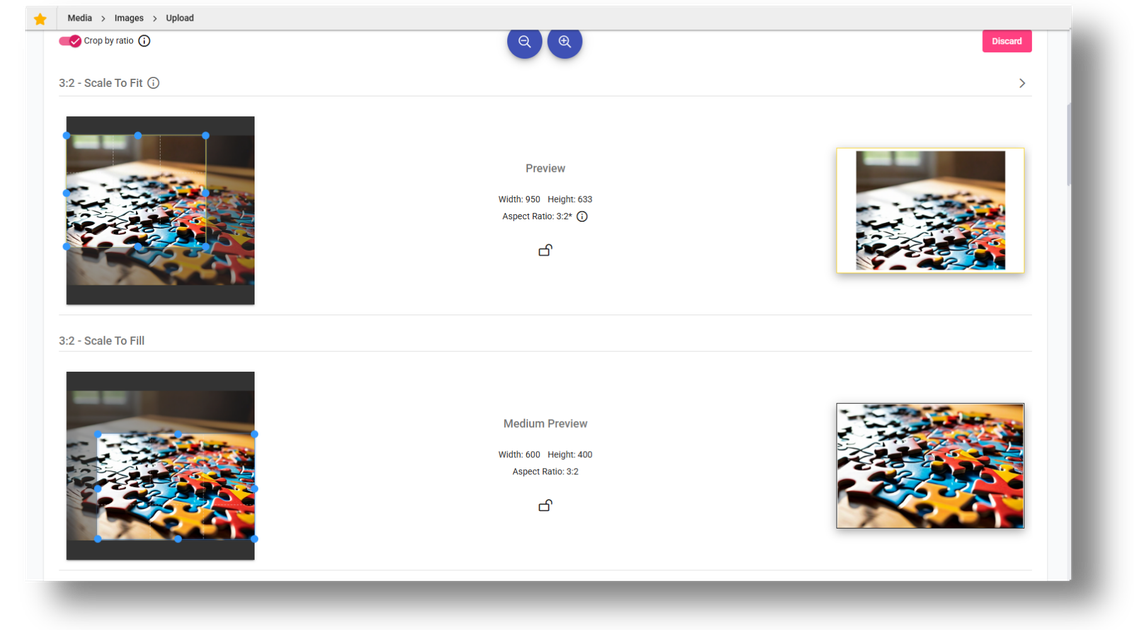
Per-rendition image cropping in Glide CMS
Glide Publishing Platform is part of the global metadata body IPTC, and all the IPTC and EXIF metadata is automatically extracted and noted on image upload. Captions, credits, copyright information, alt text, and image tags - all pulled from the image file itself, will be automatically added. This gives your media library a structured foundation from day one and makes the whole library searchable and reusable.
This information can, of course, be changed at the point of upload or any time later, but starting with structured data rather than blank fields makes everything easier. This isn’t just good housekeeping, it’s what makes a library of millions of images actually usable rather than a digital junk shed where the flat-nose pliers are nowhere to be found as you scramble to fix a thing with the clock ticking.
Publishers are constantly under pressure and deadlines, and no two newsrooms are quite the same. This means that the technology behind their operations has to adapt to that reality rather than forcing uniform processes across every editorial team.
Glide CMS and Glide Media are built on this principle. The platform ships more than 15 updates a year, with improvements and new features released monthly, developed in direct response to how publisher requirements are changing. Recent additions like AI-powered alt-text generation are a good example of the direction of travel: practical tools that remove a low-value but time-consuming task from an editor's day. As the demands on editorial teams evolve, so does the platform.
The result is a CMS that not only keeps up, but propels you forward. Editors work within familiar constraints without worrying that the system will slow them down or fail when it matters most. They work as they normally would. The system simply removes the friction around them.
Libraries grow quickly. What starts as a few thousand images becomes hundreds of thousands, then millions. Finding the right image shouldn’t require speed-dialling Indiana Jones.
Glide CMS offers powerful search and filtering options based on any entered metadata, making it easier to identify just the right image you’re looking for, and even greater power comes from combining filters to narrow down the search results.
An image your editor uploaded last Tuesday? Easy. Need all images tagged with “Premier League” with a specific credit? Two filters, instant results. This makes it easy to find what you need just when you need it, which is the entire point.
Images can be inserted directly into articles without disrupting the main image library, and without duplication. Assets retain their original metadata in the library, but you can also adjust things at the article level.
Maybe you want to change the caption of an image for one specific article because the context is different, but it’s the perfect image for it. Changing it on the article level will not alter the metadata stored in the image library. Or upload directly within an article during editing, which gets stored in Media for future use. Article-specific adjustments don't require creating duplicate assets or messing up your organised library.
Creating galleries in Glide CMS is extremely easy and efficient; editors can search existing images or upload new ones and build rich visual stories in a matter of minutes. Metadata can also be adjusted at the gallery level, allowing captions or descriptions to be tailored to how images are presented together rather than individually.
Galleries can then be embedded directly into articles with ease. This is particularly useful in collaborative workflows, where one editor assembles the gallery while another works on the article - once complete, the gallery can simply be inserted in place without interrupting the publishing flow.
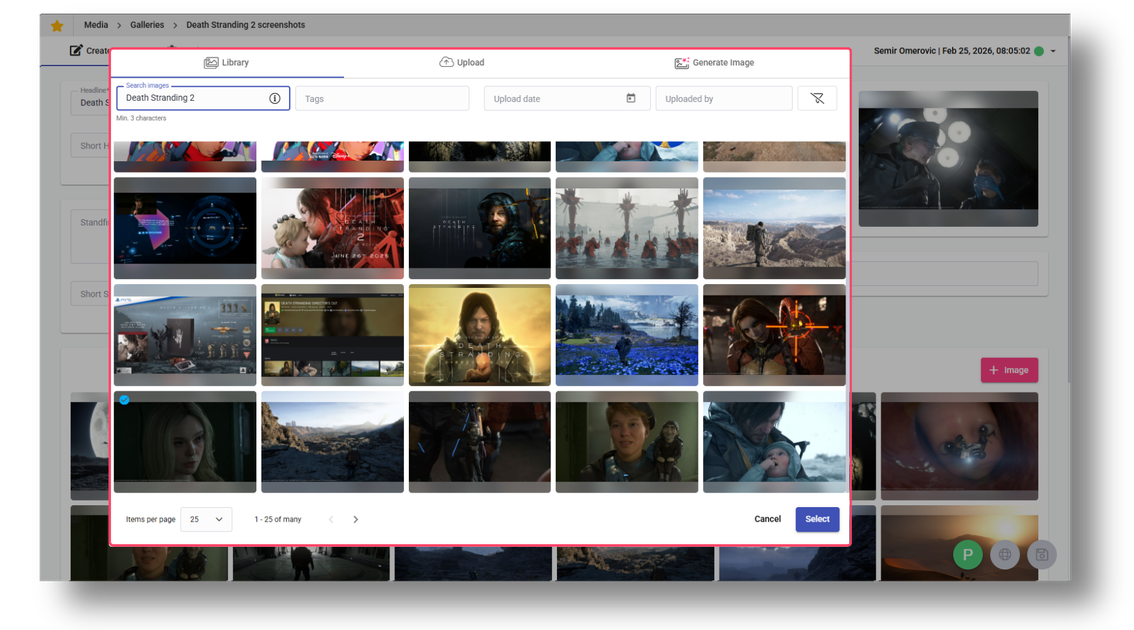
Editors can quickly assemble galleries from existing or newly uploaded images
Glide Media is built to handle large libraries without compromising performance, all of which makes it easy to manage millions of assets and upload them and deliver them just the way you want on the front end - fast and reliable, not grinding to a halt because your library’s grown beyond what the system can handle.
Assets are prepared once and then delivered everywhere according to predefined channel rules. Websites, newsletters, and third-party platforms all receive what they need to receive.
Role-based permissions match how organisations actually work, avoiding the all-or-nothing approach that either restricts too much or protects too little, and are enforced across the system without slowing editors down, including your image workflows. Teams that don’t need upload access can still search images, or your picture desk can take care of everything, protecting brand standards while everyone else accesses what they need.
You can also apply tags to images which will be visible when searched, e.g., ‘’one-time use’’ for licensed images that can’t be reused beyond a specific article, ‘’embargo until…’’ for content with publication restrictions, or whatever discipline you need.
Publishers work with external providers, perhaps need AI assistance, or have complex ecosystems that still need to connect to the CMS. Glide CMS connects to what matters without the need to abandon systems that work.
Glide Media supports AI image generation through Glide's suite of native AI tools, GAIA, directly within the CMS. Options around large language models (LLMs), image styles, positive and negative prompts, provide support for rapid experimentation without leaving your publishing environment.
If generated images are accepted into the library, Glide CMS retains the prompt and other key details vital for audit trails and library management the details of who prompted it and when, LLM details, and automatically applies an “AI” tag onto the image metadata so you have clear oversight of what images are AI-generated, avoiding any complications or confusion. Transparency matters, especially as regulations around AI content evolve!
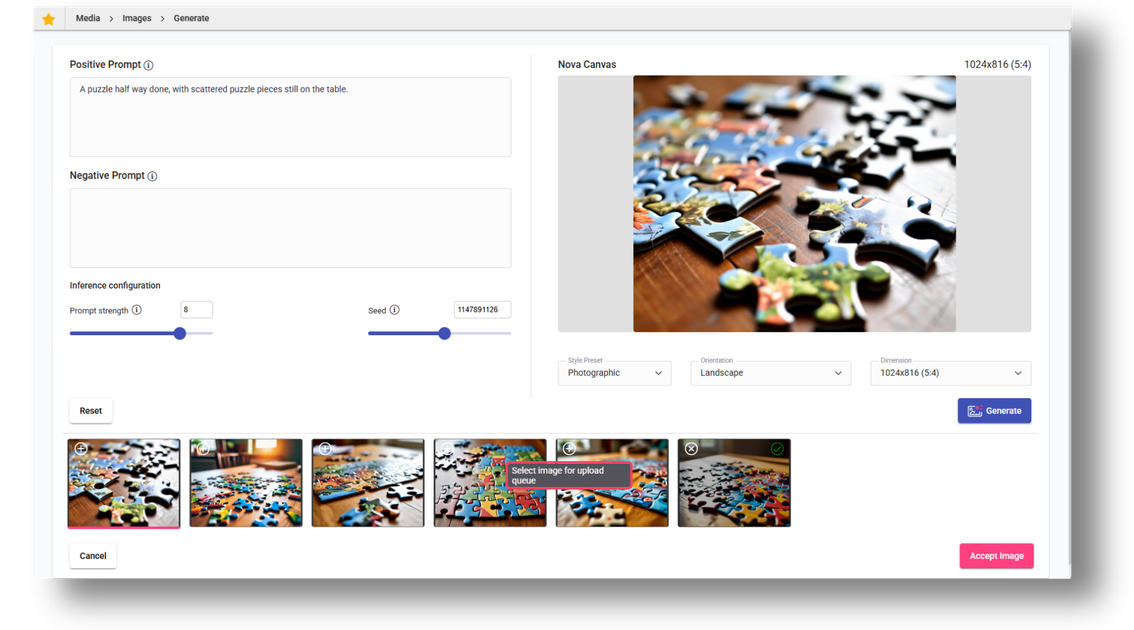
Generating images with GAIA, Glide's native AI tools
AI-assisted addition of alt-text from the image context is also supported, with innovative Celebrity Recognition and other AI image recognition features assisting with tagging and metadata, making your library more searchable without having to fill in umpteen fields manually per image.
Using Getty Images is straightforward with the iconic image library natively integrated into Glide CMS. You just connect your account and it allows editors to search, preview and select licensed Getty images from within the CMS, removing the need for shared or new Getty logins, and no downloading and reuploading when instead licensed images go straight into your library with proper metadata and go through Glide’s image optimisation pipeline just as any other image.
For organisations with complex media ecosystems, Glide also supports custom integrations whereby other systems can be integrated via our separate External Apps feature where editors can browse the third system's assets and pull them directly into Glide Media for editorial use.
Glide CMS still works as your central hub, but you’re not forced to abandon existing investments in specialised asset management if that doesn’t make sense for your organisation.
Glide Media brings digital asset management where it has the most value, into the CMS right where editorial teams work. Integrated with existing publishing workflows, and designed specifically for the needs of modern high-volume publishing. It's a foundational part of publishing and of Glide CMS, giving editors better levels of control and less work to do.
What it means in practice:
No more jumping between systems, no more manual file preparation, no more searching through poorly organised folders hoping you'll recognise the right image when you see it. Media management should enable great journalism and visual storytelling, not get in the way of it.
To learn more about Glide CMS’s DAM or to see the platform in action, connect with a Glide product specialist.
Related articles:
No matter where you are on your CMS journey, we're here to help. Want more info or to see Glide Publishing Platform in action? We got you.
Book a demo
