 Products






Ready to get started?
No matter where you are on your CMS journey, we're here to help. Want more info or to see Glide Publishing Platform in action? We got you.
Book a demoThe ability to deliver content across all digital channels isn’t a nice to have, it’s a must have. Here is how Glide CMS handles multichannel publishing and automates the repetitive distribution work while keeping editorial teams in control of what content goes to which channels.
Audiences expect content everywhere, instantly, that’s the reality of digital publishing today. A single breaking story might need to reach millions of website visitors, hundreds of thousands of app users, and subscribers across multiple newsletters.
For most editorial teams, this means hours spent copying, pasting, and reformatting the same content. A story that took 30 minutes to write takes another 15 to distribute, and when you’re publishing 500 stories a day those extra clicks mean a lot of time lost to repetitive tasks.
If you’ve ever watched a newsroom scramble to push the same story across their website, mobile app, social channels, three different newsletters, and print CMS - all while the clock is ticking on breaking news - you know the pain of multichannel publishing done manually.
You might hear multichannel and omnichannel publishing used interchangeably, and for good reason, they both come from the same need. Multichannel publishing focuses on the mechanics: getting content distributed across multiple platforms efficiently, while omnichannel publishing is more of a marketing-centric strategy: creating a consistent, integrated customer experience across all touchpoints.
In practice, you need both. The infrastructure to distribute content everywhere (multichannel) enables the strategic approach of meeting audiences wherever they are with the right message (omnichannel). Glide CMS’s multichannel publishing capabilities support both needs, whether you need operational efficiency or to build a cohesive audience experience across channels.
Editorial teams need a CMS that treats multichannel publishing distribution as the norm one that automates the repetitive parts while giving users control over what goes where and how it’s presented.
Multichannel publishing in Glide CMS lets editors distribute content from a single workspace to multiple platforms and channels. Write once, publish everywhere - or selectively curate what goes where. No duplicate work, no copying and pasting, no reformatting the same story five times before lunch.
Your CMS becomes the single source of truth that can push content everywhere while adapting to each platform’s requirements. A breaking news story can go live on your website, push to your mobile apps, get formatted for your newsletter, and appear on social feeds - all from one place, with one workflow.
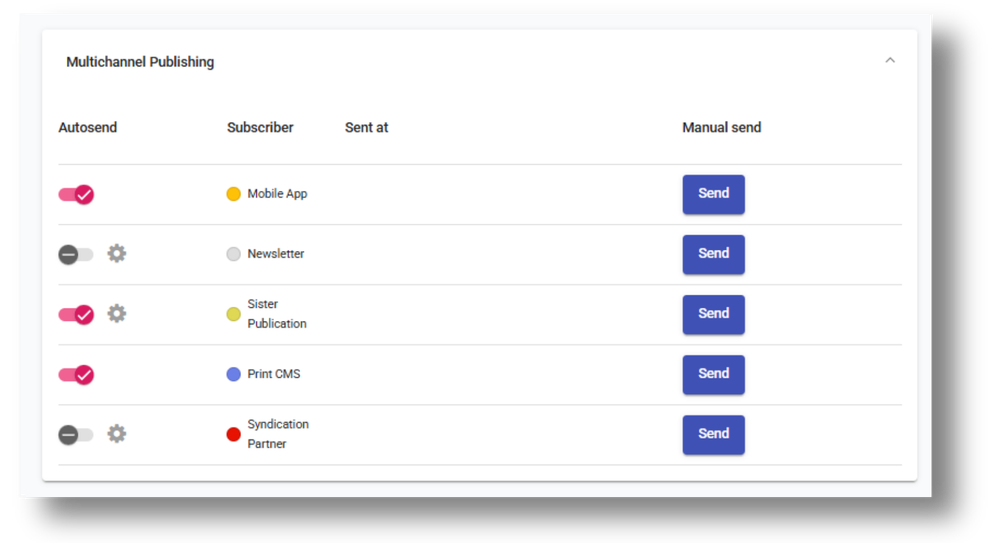
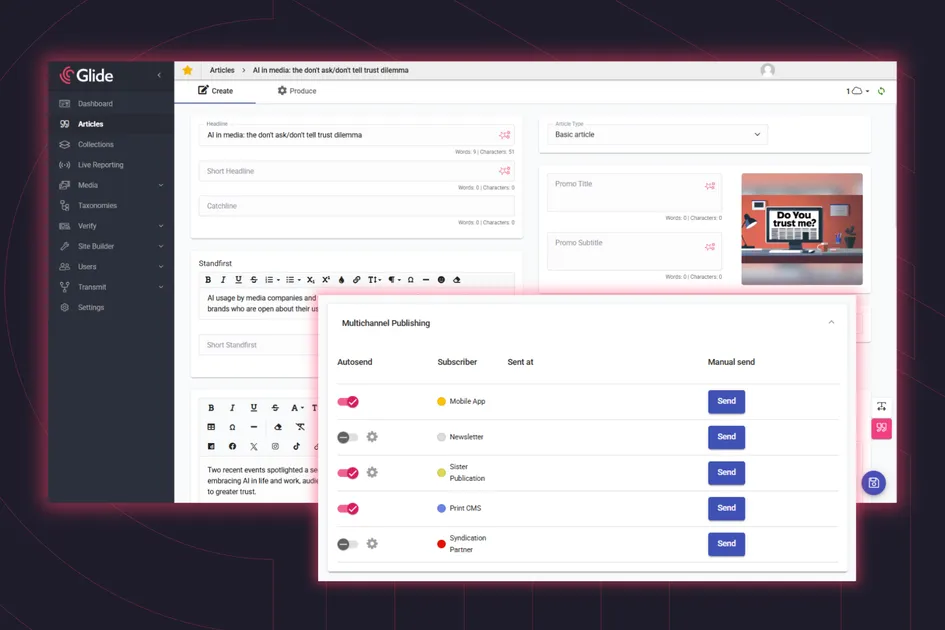
Glide CMS offers both automated and manual channel publishing options
This matters most for high-volume news publishers pushing hundreds of stories daily, multi-platform media organisations managing websites alongside apps and social channels, publishers with sister publications sharing content across brands, and teams juggling print and digital simultaneously. If you’re reaching audiences across diverse channels, you need a CMS that treats multichannel distribution as a core capability, not an afterthought.
Multichannel publishing in the Glide CMS is built around two components: Glide Transmit and the content process workflow.
Glide Transmit: the distribution engine
Glide Transmit is a pub/sub service that listens for events within Glide CMS, from content updates to status changes to publishing actions, and manages distribution across channels. When something happens to an article, Transmit knows about it and can act on it.
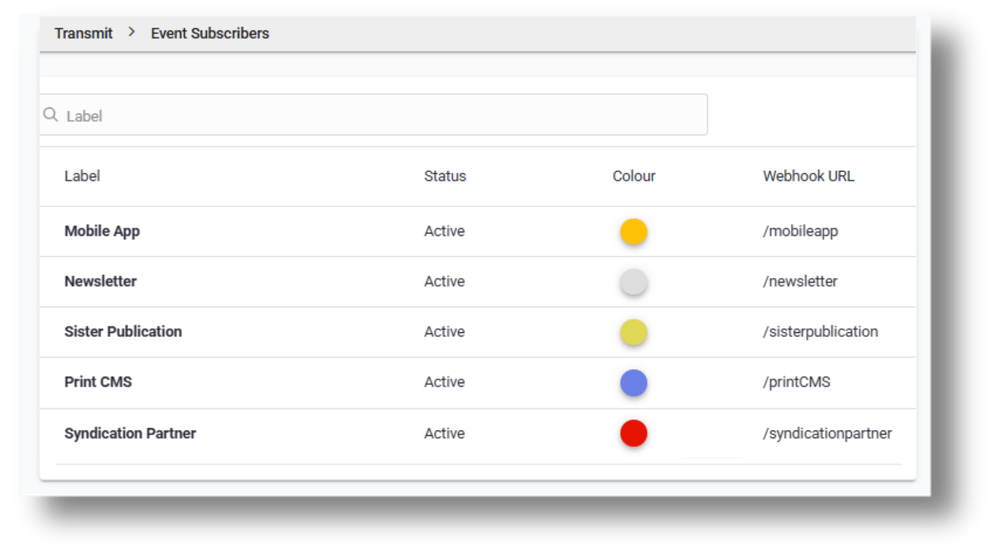
Use Glide Transmit to set up your system and third-party subscription channels to route content everywhere you need it to go
It manages a list of system and third-party subscribed channels, routing content wherever you need it to go: the Glide Connect API for websites and apps, print systems, newsletter platforms, Slack notifications to keep your editorial team informed, sister publications, or any other system that needs to receive content or alerts.
In the world of Transmit, when talking about a subscriber, we are referring to a subscribed service, not a human subscriber of a product. Whether you’re automating distribution to all channels or manually selecting specific destinations for individual articles, Transmit will handle the routing.
Configuration is straightforward: set up your subscribed channels once, and Transmit handles the routing automatically. Subscribed channels will appear directly on each article’s Produce Tab, so editors can see exactly where content is going and make decisions without leaving the CMS.
Glide content process: writing and distributing from one workspace
Glide CMS divides the editorial workflow into two sections: Content and Produce. As their names imply, the Content section is where editors work on the creation of content, while the Produce section is for the production and distribution of your content. This is also where editors will handle categorisation, SEO, and setting up taxonomies, as well as multichannel publishing. The separation keeps the writing process clean while giving you full control over how and where the content gets distributed when it’s ready.
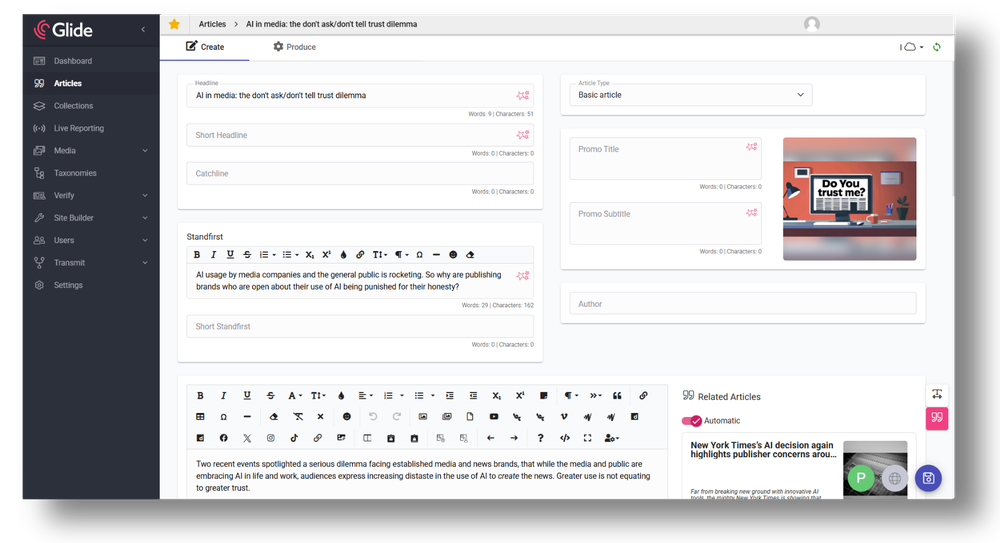
Within Glide CMS's authoring tool users can access both the article creation tools and content production capabilities.
There is no need to spend time switching between systems or logging into separate tools for different channels, as everything you need to get your content out the door is right there.
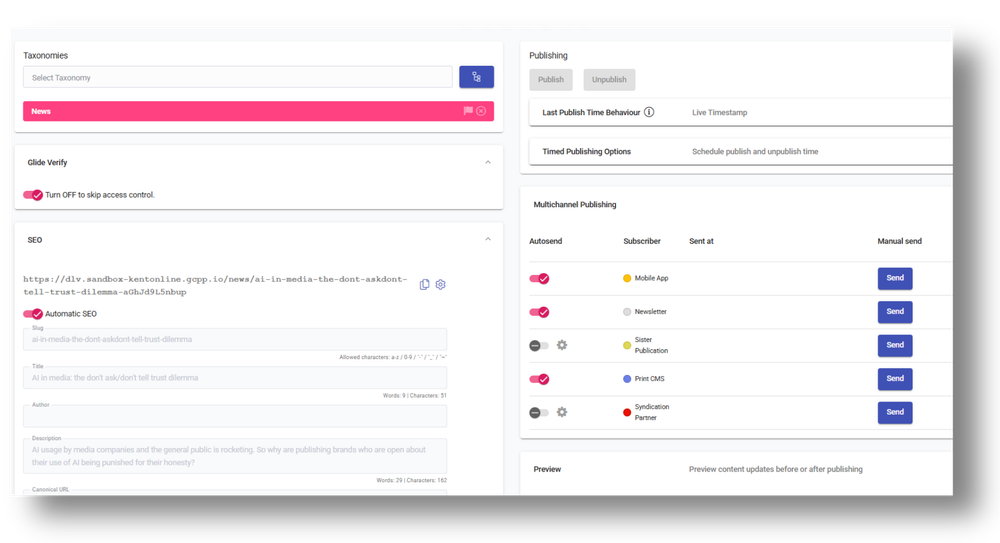
The Produce tab in Glide CMS's authoring tool is where you select taxonomies, handle SEO, and set setup you multichannel publishing options
Distribution in the Glide CMS can be triggered by article creation, publishing of the article, or by any updates - whatever fits your workflow best. It is easy to set up automation so content flows to the right channels without anyone having to think twice or double check. If any changes occur, it’s no issue to override the defaults as well.
For example, you might automatically send all your sports content to your website, apps, and sports newsletters. But when there is a premium long-form feature, you can override that rule and send it only to your subscriber app and newsletter, keeping it behind a paywall. When there is breaking news coverage, you might want to send that to all channels instantly, but exclude the sensitive investigative piece from social feeds while still pushing it to your website. All from the same workspace. And if you want to make content distribution even more straightforward, Glide Nexa can help manage subscriber access and entitlements across your premium channels.
The control for all of this is granular. Send specific articles to your print CMS while excluding others. Push content to mobile apps but hold it back from sister publications. Every article gives you the flexibility to follow the automated rules or make editorial decisions at the article level.
If you’re wondering where content can go, Glide Transmit can distribute to any system that can receive content via API or webhook. Some common channels are:
Another helpful thing users can do is check the status of which channels an article has already been sent to through content queues, and also send or re-send an article to a specific channel, which saves time and eliminates the need of going into every single article.
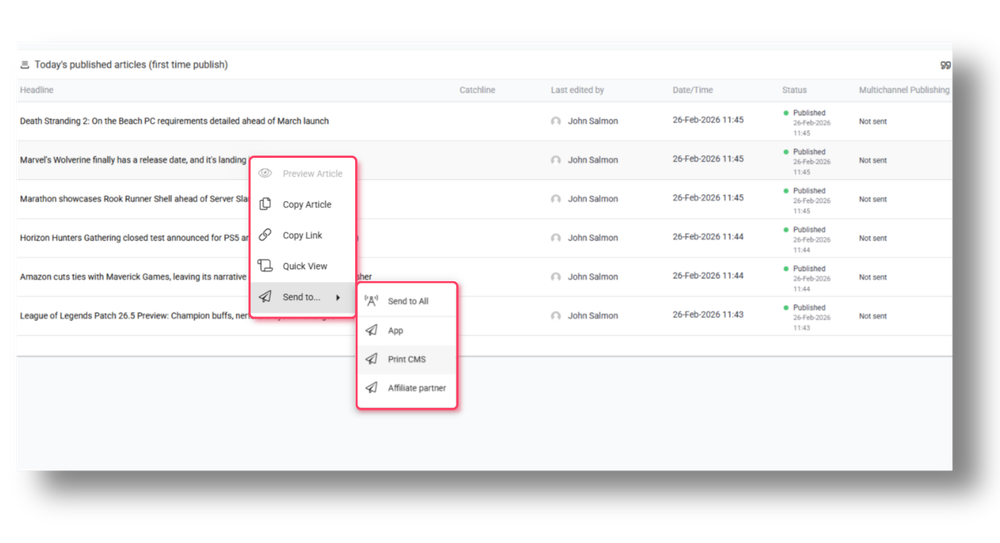
Use Glide CMS's Content Queues to confirm which channels an article has already been sent to or to re-send an article to a specific channel
The impact of multichannel publishing in Glide CMS shows up in day-to-day operations. Time savings are immediate; there is no more duplicate article entry, no more copying and pasting the same story across platforms. When you’re publishing hundreds or thousands of stories daily, eliminating those repetitive tasks adds up to hours of editorial time back in your day.
You get automation where you need it and control where it matters. Set up rules so routine distribution happens automatically, then curate content per channel when editorial judgment calls for it. Distribute a breaking news story everywhere instantly, but send your premium feature to your subscriber channels only.
The system scales with your publishing volume. Configure subscribed channels based on your specific ecosystem - whether that’s print systems, mobile apps, newsletters, sister publications, or any combination. Your workflow won’t become a bottleneck as your distribution needs grow.
Maintain consistency across channels while still optimising what content goes where. With Glide CMS, you’re not forced into a one-size-fits-all approach, and your brand integrity will stay intact across all channels your audience finds you. Different channels can get different content when that makes editorial or commercial sense.
With Glide CMS, fundamental challenges around multichannel publishing are easily solved, as getting content to audiences across every platform without burning editorial time is just a few clicks away.
Write your story once and Transmit will handle the routing, whether it’s to your website, mobile apps, newsletters, social feeds, print systems, or any other channel you’ve configured. Automate routine distribution so breaking news reaches all channels instantly, then curate granularly when editorial judgment calls for it. A premium feature goes only to subscribers, while a sensitive story will go to the website but stay off the social media.
The result? Massive time savings, full editorial control, and the flexibility to scale your publishing operation without workflow bottlenecks. Your content reaches audiences wherever they are, and your team focuses on journalism instead of copying and pasting.
Want to see how multichannel publishing works in practice? Connect with a Glide product specialist to explore how Glide CMS can streamline your content distribution and give your editorial team time back for what matters most.
Related articles:
No matter where you are on your CMS journey, we're here to help. Want more info or to see Glide Publishing Platform in action? We got you.
Book a demo
