 Products






Ready to get started?
No matter where you are on your CMS journey, we're here to help. Want more info or to see Glide Publishing Platform in action? We got you.
Book a demoEvery organisation describes its audience differently, but most audience tools assume one shape of customer. A flexible audience data model lets you define the attributes, groups and interactions that matter to your business. Here is what it includes, when you need one and how to design it.
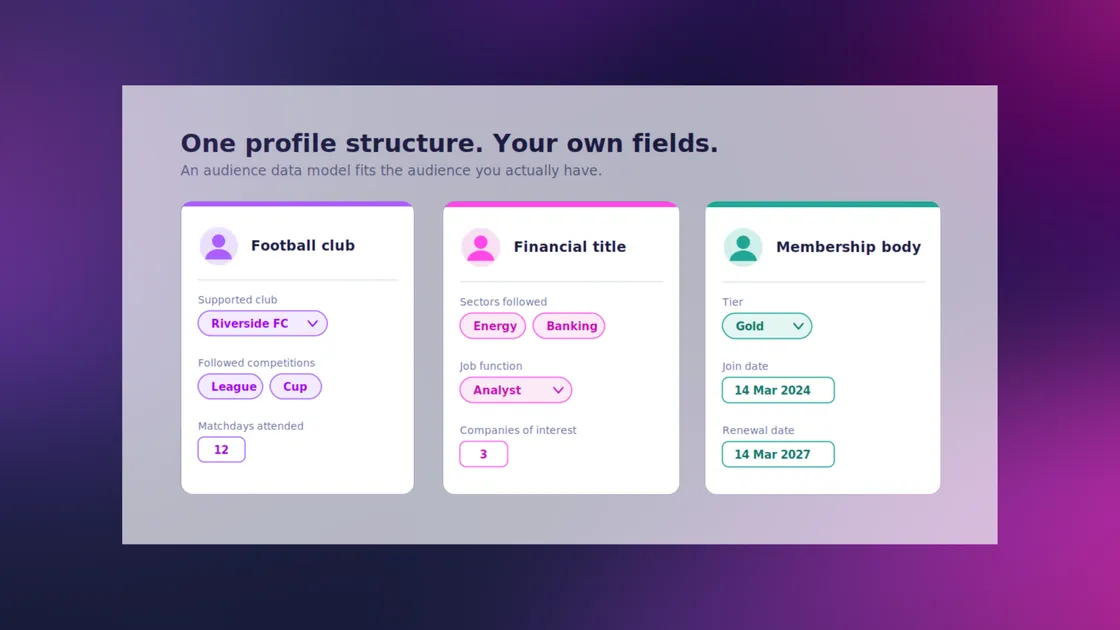
Ask a football club, a financial title and a membership body what they need to know about their audience, and you will get three different answers. The club wants to know which team someone supports. The financial title wants the sectors a reader follows. The membership body wants tiers and renewal dates. Yet many audience tools give all three the same fixed profile: a name, an email, a subscription status, and a few preference toggles.
An audience data model is the structure an organisation uses to describe its audience: the attributes it records about each person, the groups people belong to, and the interactions it tracks. It answers a simple question: what do we need to know about the people we serve, and where does that knowledge live?
Get the model right and everything built on it works better: segmentation, personalization, targeting, reporting and the single customer view that vendors call an audience 360. Get it wrong and the data ends up scattered across notes fields, spreadsheets and side databases that no one fully trusts.
Here we cover what an audience data model includes, why fixed schemas fall short, how to design a flexible one, and when it is worth the effort.
Most audience data models are built from five parts: identity, attributes, groups, interactions and commercial records.
| Building block | What it holds | Example |
| Identity | Who the person is and how they sign in | Email address, login method, consent status |
| Attributes | Descriptive facts about the person, declared by them or recorded by your team | Supported club, sectors followed, renewal date |
| Groups | Collections people belong to, often with their own data | Newsletter lists, lifecycle segments, interest cohorts |
| Interactions | What people do with your content and products | An article read, a podcast listened to, a poll vote |
| Commercial records | What people have bought or can access | Subscription tier, purchase history, access to a content bundle |
A fixed model decides these parts in advance for everyone. A flexible model fixes the structure but lets you decide the contents: which attributes exist, what type each one is, which kinds of group you keep, and which interactions count.
Frameworks group audience data in different ways. A practical split for audience businesses is:
A good audience data model holds all four against one identity, so you can ask questions that cross them. For example: which readers who declared an interest in a sector also read three articles on it this month and hold no subscription?
A fixed schema works only for the organisation it was designed around. The moment your business needs to record something the schema never anticipated, you have three poor options:
What matters differs sharply by sector:
| Organisation | What it needs to know | Example attributes |
| Sports club or federation | Who supports what, and how they take part | Supported club, followed competitions, matchday attendance |
| B2B or financial title | What professional context the reader is in | Sectors and industries followed, job function, companies of interest |
| Membership body | Where someone sits in the membership lifecycle | Tier, products held, join date, renewal date |
| Ticketing or events business | What someone has attended and might attend next | Event types, venues, ticket category |
None of these is exotic, and no single fixed profile serves them all. Forcing them into one template has predictable costs:
Design the model backwards from the decisions it has to support, then add only the fields that earn their place. A workable process:
Start with the questions, not the fields
List what your teams need to do with audience data: target an offer, personalize a newsletter, chase a renewal, report engagement to advertisers. Each use points to the data you need.
Anchor everything to one identity
Every attribute, group membership and interaction should hang off a single authenticated profile. Data tied to anonymous sessions or separate systems is hard to combine later.
Choose attributes and give each a type
Use a select list for a fixed set of options, a multi-select for several, a date for anything you will schedule against, a boolean for yes-or-no flags and a number for balances and counts. Keep free text for the few things that are truly free.
Decide what is required and what is optional
Require only what you need on day one. Ask for the rest gradually, when the reader gets something back for telling you.
Give each kind of group its own schema
A newsletter list, a lifecycle segment, and a community do not need the same metadata. Defining a type per kind keeps groups consistent and quick to create.
Define the interactions worth tracking
Decide which content types and which actions matter, and record only the combinations that mean something. An audio-first publisher tracks listens; a video brand tracks views.
Plan how the data leaves
Decide up front how the data reaches other systems, whether by API, export or event, and who is allowed to see which fields.
Two rules of thumb help throughout. Name fields in your business's own language, so a colleague can tell what "renewal date" means without a data dictionary. And review the model regularly: a field no one uses is clutter, and a question no one can answer is a gap.
You need a flexible audience data model when the questions your business asks about its audience are no longer answered by the standard profile. Common signals include:
You may not need one yet if a standard profile with a handful of tags already answers every question your teams ask. Start simple, and add structure when a real question goes unanswered. The mistake is waiting until the workarounds have piled up.
Most problems come from making the model either too rigid or too loose.
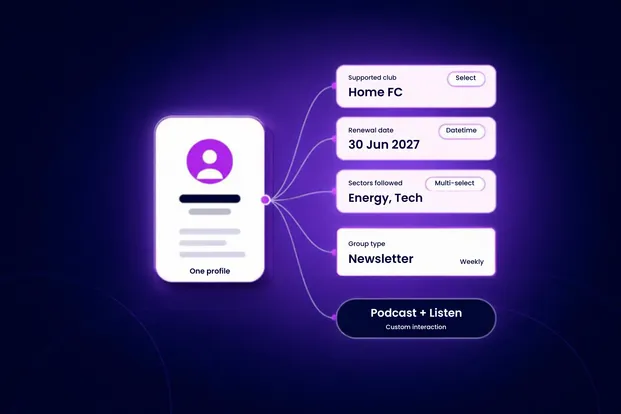
Glide Nexa, the audience interaction platform from Glide Publishing Platform, lets you define the model yourself and holds it on one first-party profile. Three features cover the building blocks described above:
Those sit on the same profile as identity, subscriptions, entitlements and engagement history. The data is first-party, owned by you, and available through the API and configurable exports. Nexa deploys independently of any CMS, so the approach works whether or not you use Glide CMS.
For the full walkthrough, with a worked example, see How Glide Nexa lets you model audience data the way you want] [link to be added once published. For the wider platform, read Glide Nexa explained.
What is an audience data model?
An audience data model is the structure an organisation uses to describe its audience: the attributes it records about each person, the groups people belong to and the interactions it tracks. It defines what you know about people and where that knowledge is stored.
What is an example of an audience data model?
A football club might record each fan's supported club and followed competitions as attributes, keep newsletter lists as groups with a send-frequency field, and track interactions such as reading a match report or listening to a podcast. A membership body would model tiers, products and renewal dates instead.
What are the main types of audience data?
A practical split is declared data (what people tell you), behavioural data (what they do), transactional data (what they have paid for or been granted) and profile data (who they are). A good model holds all four against one identity.
What is a flexible data model?
A flexible data model fixes the structure but lets you define the contents. You choose which attributes exist, what type each one is, which kinds of group you keep and which interactions you track, instead of accepting one profile designed for everyone.
How is an audience data model different from an audience 360?
An audience 360 is the goal: a single view of each audience across every system. The data model is what makes it possible, because it defines which facts make up that view and how they are structured.
How is a custom attribute different from a tag?
A tag is a simple label. A custom attribute has a defined type and validation, so a renewal date is a real date and a sector field holds only values from your list. That structure makes the data dependable when you segment or target it.
To see how Glide Nexa lets you model audience data your way, connect with a Glide product specialist.
No matter where you are on your CMS journey, we're here to help. Want more info or to see Glide Publishing Platform in action? We got you.
Book a demo
