 Products







Ready to get started?
No matter where you are on your CMS journey, we're here to help. Want more info or to see Glide Publishing Platform in action? We got you.
Book a demoNo two organisations describe audiences the same way. A sports brand thinks in terms of favourite teams, a financial title in sectors and industries, and a membership body by tiers and renewal dates. With custom fields, Glide Nexa lets you define your own attributes on readers and groups, so the audience data model fits your business.
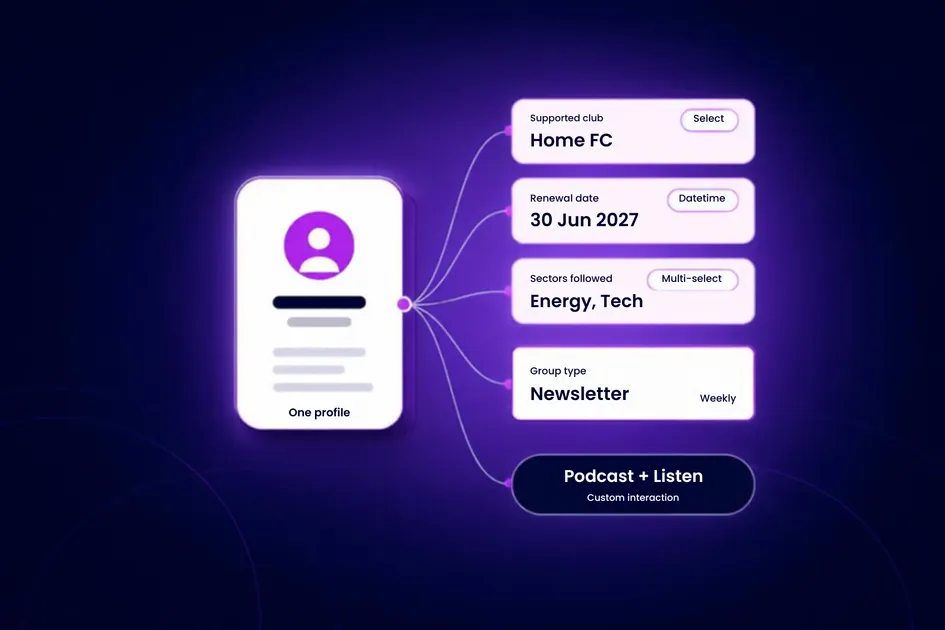
Most audience tools ship with a fixed idea of what a reader is: name, email, subscription or membership status, purchase history, and maybe a handful of preset preference toggles. That works until your business needs to record something the schema never anticipated, at which point, real information ends up in a "notes" field, or in a separate database built to hold the data you actually need.
Audience data is not generic. What you need to know about your audience depends on what kind of organisation you are. A football brand cares which club someone supports, while a B2B title cares which sector a reader follows. A membership body cares about tiers, products, and renewal dates and a ticketing platform or an events business cares about something different again.
A single fixed schema cannot serve all of them, so it ends up serving none of them well.
With Glide Nexa, the audience interaction platform from Glide Publishing Platform, the audience data model - the set of attributes, groups, and interactions an organisation defines to describe its audience - bends to your business rather than forcing your business into a template. You decide what an audience member is, and Nexa holds that definition on the same profiles that already carry identity, subscriptions, entitlements, and engagement history.
Three features do the work:
A Custom Field is an attribute you define on a reader profile or a group, rather than one the platform fixes in advance. Each field has a type that sets what it can hold and validation rules that keep the data clean. Once defined, it becomes part of the profile like any built-in attribute, stored on the same record and available wherever you use that person's data.
In the platform's data model settings, you define the attributes a user profile or a group holds. Those attributes then drive two things: the admin forms your team fills in, and the validation applied at registration.A field you define as “required” stays required at sign-up, and a field with a fixed set of options only accepts those options. The data you bring in is the data you want, in the shape you want it.
Six field types cover the common shapes of audience data:
| Field type | Holds | Example |
|---|---|---|
| Text | Free or constrainted text | A membership reference |
| Number | Numberic values | A loyalty point balance, a seat count |
| Boolean | A true or false flag | "Press accreditation" |
| Datetime | Dates and times | A renewal date, a join date |
| Select | One value from a defined list | A single home region, a plan tier |
| Multi-select | Several values from a defined list | Sectors of interest, followed sports |
These attributes sit on the same profile as identity, subscriptions and engagement. Someone's supported club and their subscription tier live on one record, so you can use them together, for targeting, for personalisation, or for analysis, without reconciling across tools. When a custom field value changes, Nexa’s event system can send a “user updated” event to connect systems through webhooks.
The fields you define are the questions your business actually asks about its audience. That’s what separates an audience platform from a generic contact list.
Modelling your audience is not limited to individual people: groups carry their own custom fields through Group Types.Groups are the collections Nexa uses to organise users.A Group Type defines the schema for every group in that category, and each group created as that type inherits its fields.
A "Newsletter" type might carry fields for send frequency and an external list identifier. A "Weekly Digest" group and a "Breaking News" group then share a consistent structure, without having to be configured from scratch. A "Community" type or a "Segment" type can define entirely different fields suited to their purpose, but the principle remains that new internal data “products” can be set up rapidly.
This matters because groups represent many different real-world relationships:
Giving each category its own schema means a group carries the right metadata for its job, rather than being forced into one generic shape.
Group membership carries structure too. Membership can hold expiry dates and expire automatically through a background process, and users can be added in bulk. A group is a living, structured object that changes over time.
The same flexibility extends to engagement data: you define which content types and actions Glide Nexa records. Interactions are built from three layers:
You are not tied to a fixed vocabulary of engagement. An organisation decides which content types and actions are meaningful for their audience, and only the combinations it defines get tracked. An audio-first publisher can record podcast listens and a video brand can record watchers, and neither is forced through a one-size-fits-all “engagement” event.
Each interaction is recorded with its type, intent, timestamp, and the content item it relates to Interactions feed the same profiles and the same insight reporting, including per-user summaries for the current week, the last 30 days, and all time, so the model you define at the interaction level flows straight into per-user summaries and audience segmentation. Defining your own interaction types also keeps the engagement data clean, because you only ever record actions that mean something to your content.
Here is how a football club might model its audience in Nexa. The example is illustrative: the club defines every field, type and action itself.
| Layer | What the club defines | Example values |
|---|---|---|
| Custom Fields on users | Supported club (Select), followed competitions (Multi-select), renewal date (Datetime), press accreditation (Boolean), loyalty points (Number), membership reference (Text) | Home club, Premier League and Cup, 30 June, false, 1,250, M-20417 |
| Group Type: Newsletter | Send frequency (Select), external list identifier (Text) | Weekly, list-4821 |
| Group Type: Segment | Fields suited to the segment's purpose | Lapsed season-ticket holders |
| Interaction definitions | Podcast + Listen, Article + Read, Video + Like | A reader listens to a post-match podcast |
At sign-up, the required fields are validated, so every new profile has a supported club chosen from the club's own list. The renewal date is a real date, so it can be used to target renewal campaigns and to report on renewals. Because the supported club is a structured field, not a free-text note, the commercial team can target a newsletter or an offer at the fans of one club, and the data team can compare engagement across clubs. Everything sits on one profile, next to the reader's subscription and entitlements.
The same base platform serves a sports and gaming brand, a financial title or a membership organisation. Each defines its own attributes, group types and interactions, and Glide Nexa does not impose a single notion of what a user or customer is.
Custom Field values are usable wherever Glide Nexa uses profile data, and they can be taken out again.
Glide Nexa deploys independently of any CMS and connects through its API, so the data model works whether you run Glide CMS or another platform. It integrates with Glide CMS, but that is not a requirement. For the wider picture, read Glide Nexa explained.
Use Custom Fields when the standard profile can no longer answer the questions your business asks about its audience. Typical signs are launching a new product or bundle that needs attributes the profile lacks, or finding important data in a notes field or a separate database. Start with the few fields that matter at sign-up, and add more as readers get something back for declaring them.
A flexible data model keeps business-specific data on one profile and keeps it dependable. Because custom data lives alongside identity, subscriptions, entitlements, and user engagement, there is no separate database to build, sync, and maintain.
The effect is to turn audience data from something you store and have difficulty using, into something you can tailor with incredible precision, and use easily and powerfully.
To see how Nexa’s data model can fit your audience, connect with a Glide specialist.
__________________________________________________________________
What types of custom fields can I create? Six field types cover the common shapes of audience data: text, number, boolean, datetime, select (one value from a defined list), and multi-select (several values from a list). You choose the type that fits each attribute you want to record.
Where do custom fields apply? On user profiles and on groups. Groups get their fields through Group Types, where the type defines a schema that every group in that category inherits.
Do Custom Fields work at sign-up? Yes. The data model drives both the admin forms your team uses and the validation applied at registration. A field set as required stays required at sign-up, and a field with a fixed set of options only accepts those values.
Is this the same as tagging readers? No. A tag is a simple label. Custom Fields are structured attributes with a defined type and validation, so a renewal date is a real date and a sectors of interest field holds only values from your defined list. That structure makes the data dependable when you segment or target it.
Can I track engagement actions specific to my content? Yes. Interactions are built from three layers you define: Types (such as articles, video, podcasts), Actions (such as read, like, bookmark), and Definitions (the valid combinations). You only track the combinations that mean something for your content.
Can I get the data back out? Yes. Custom Field data is first-party, tied to your authenticated users. It is available through Glide Nexa’s REST API and configurable exports in CSV, JSON, and XLSX, with field selection and permission-controlled access, and Glide Nexa’s event system can push changes to other systems..
Does this work if we are not on Glide CMS? Yes. Glide CMS and Glide Nexa are fully separate. Glide Nexa deploys independently of any CMS and connects through its API, so the data model works whether you run Glide CMS or another platform. It of course integrates with Glide CMS, but that is not a requirement.
No matter where you are on your CMS journey, we're here to help. Want more info or to see Glide Publishing Platform in action? We got you.
Book a demo
