 Products





Ready to get started?
No matter where you are on your CMS journey, we're here to help. Want more info or to see Glide Publishing Platform in action? We got you.
Book a demoWhen a subscription expires or a reader joins a group, every system in your stack needs to know, fast. Glide Nexa's event system dispatches real-time webhooks, chat alerts, and emails the moment audience data changes, so payment providers, CRMs, and teams stay in sync without manual exports, cron jobs, or polling scripts.
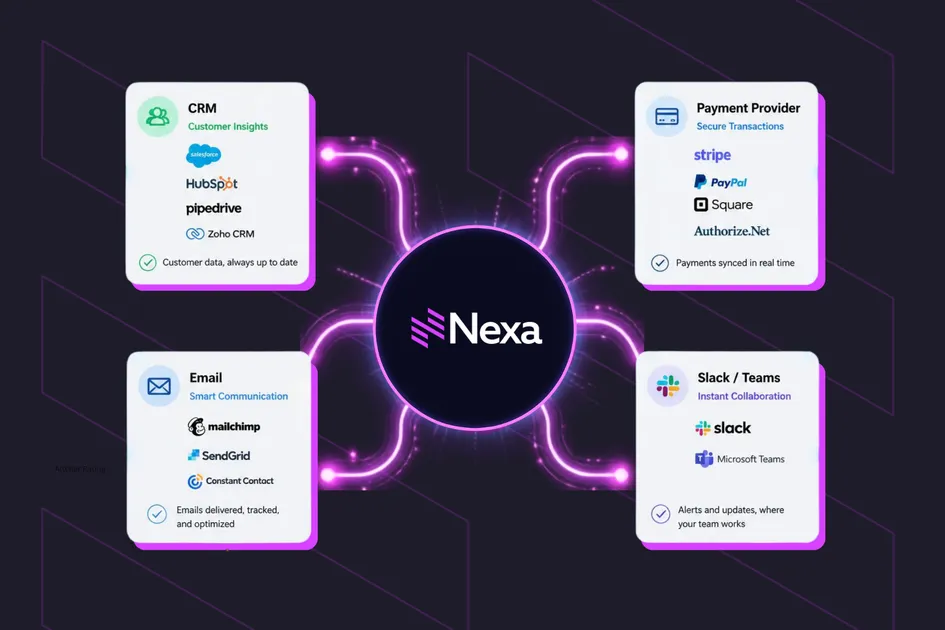
Glide Nexa's event system dispatches real-time webhooks, Slack messages, and email alerts when audience data changes, replacing manual exports and batch syncs with instant, configurable notifications across your publishing tech stack.Publisher tech stacks are rarely simple. Payment providers, CRMs, email platforms, team messaging platforms like Microsoft Teams or Slack, analytics systems, and custom internal services each handle different parts of the audience lifecycle. The challenge is keeping them all in sync.
If a user's subscription expires at 2am and the various platforms find out at different times, that delay creates support overhead, missed re-engagement windows, and operational confusion about which system holds the truth. Nexa's event system addresses this with real-time event notifications, dispatching events the moment audiences data changes. When something changes in Nexa, such as a user registers, a subscription expires, or a group membership is revoked, the system immediately notifies external services through webhooks, and on to comms system like Slack, Trello, or Microsoft Teams, or email alerts.
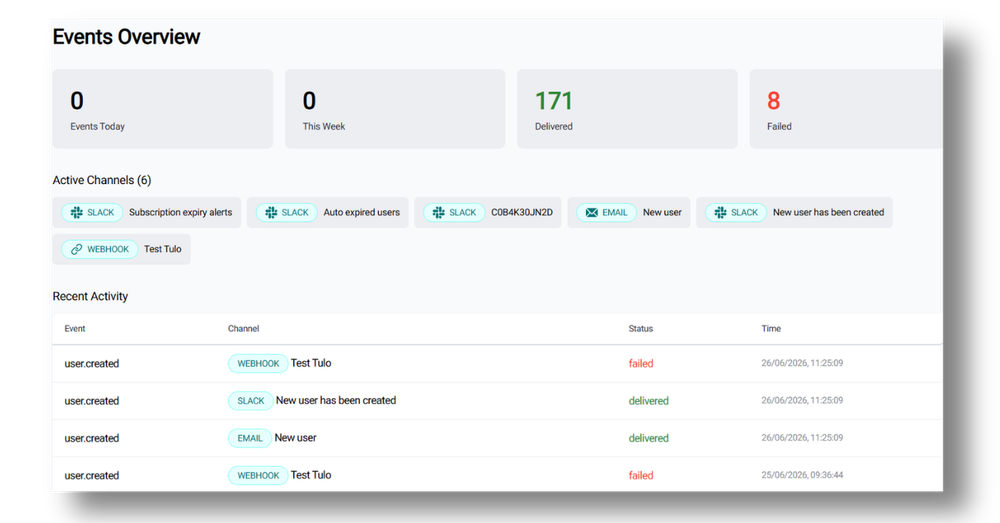
Nexa events overview
The event system has three components: Event Types, Channels, and Templates.
Event types
When Nexa resources change state, events fire automatically. There is no need for manual triggering or scheduled polling. Examples include:
All of these are system-level events which fire the moment the state change occurs in Nexa, regardless of whether an admin is logged in or if it's 3am on a Sunday: global audiences don’t follow your work patterns.
Channels
Channels define where notifications go. Three types are available, each serving a different layer of the publisher's operation.
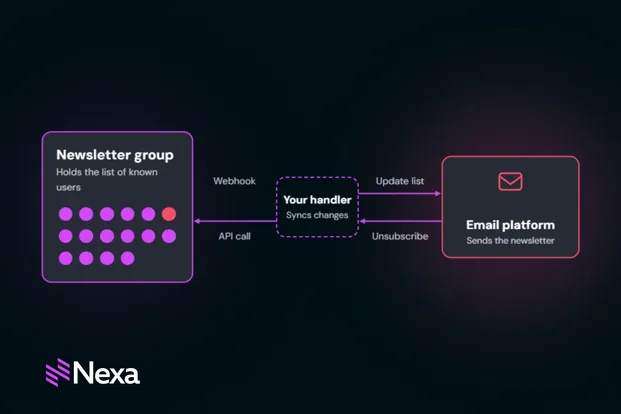
Multiple channels can listen to the same event. A "subscription expired" event can simultaneously fire a webhook to the payment provider, post a Slack or chat notification to the support channel, and send an email to the account manager. Each responds independently.
Channels can also be configured with resource-level filters, so a webhook doesn't fire on "subscription expired" generically but only when a specific subscription or group is involved. A channel pointed at your premium payment provider receives only events about premium subscriptions, not every subscription change across the platform.
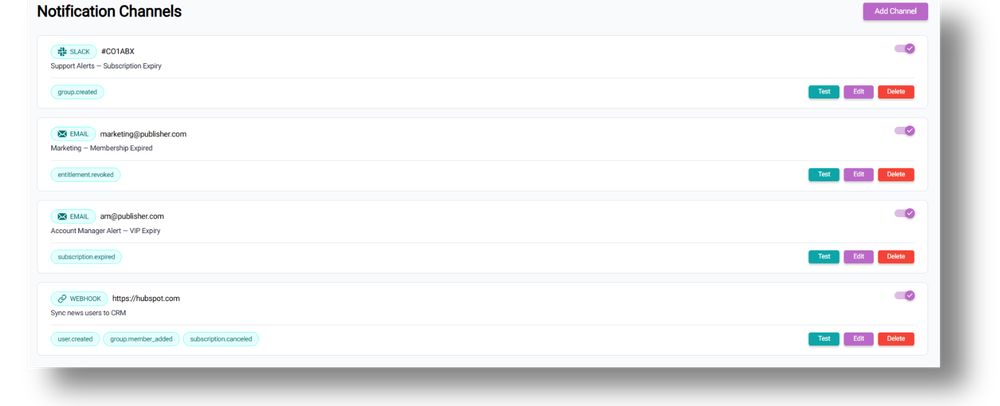
Nexa events notification channels
Templates
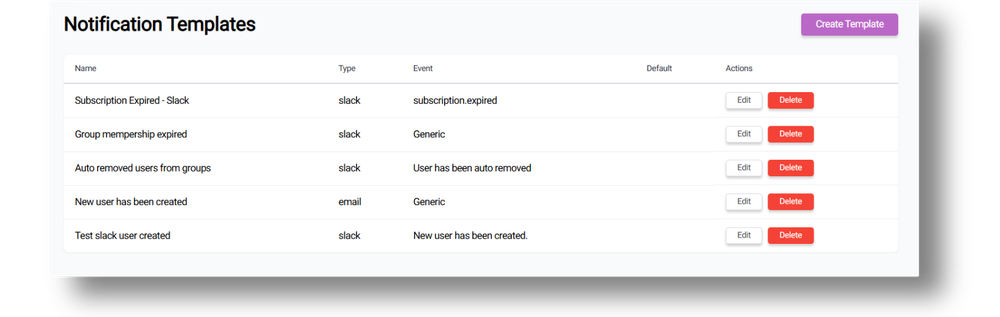
Each channel has its own template to format its output. These templates support variables (user email, event type, timestamp, subscription name, group name) that populate automatically when the event fires.
For Slack and email channels, templates can include formatting for readable, branded messages rather than raw data dumps. The template editor shows which variables are available for the selected event type, so admins know exactly what data can be included without having to guess field names.
If you need your payment platform kept in sync with Nexa and polling or scheduled exports aren't fast enough, that's where the Events feature comes in.
Take a media org using Nexa for identity and subscriptions alongside an external payment provider for billing. Their requirement is that when Nexa assigns or expires a subscription, the payment provider must know immediately to keep access rights and billing in sync.
The setup here would be:
From that point, every subscription change fires a real-time webhook, so there’s no need for batch exports or cron jobs. When a change occurs, the payment provider receives the event within seconds.
Keeping audience data in sync isn’t only a technical job. Not every event notification needs to feed an API and for non-technical teams, chat channels like Slack or Microsoft Teams, or email channels, all provide visibility without any integration work.
A marketing manager can receive an instant notification when a high-value user's subscription ends and take action through the Nexa dashboard. Or, an editorial team can see an instant notification about a user being removed from the premium content group.
In one example a Nexa user configured email alerts for subscription expiry, using a webhook to trigger a re-engagement offer with the appropriate messaging and branding. In such a case, the Events system provides the trigger and it is up to you what steps to then take.
Every dispatch is logged with full visibility, so you get to see:
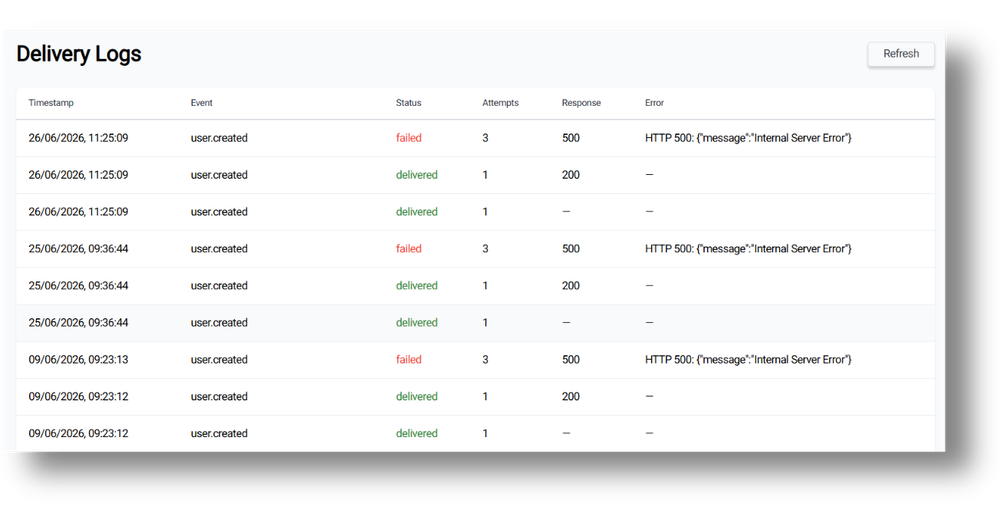
Failed deliveries surface immediately in the log rather than disappearing silently. If an endpoint is down, a Slack webhook is misconfigured, or an email bounces, the problem is visible without anyone needing to wonder why data stopped flowing.
Delivery logs are archived to S3 weekly and retained for 30 days. For publishers with compliance or audit requirements, this provides a defined retention window. If you need longer retention, webhook data can be forwarded to your own logging infrastructure as part of the integration.
Each channel has a test endpoint (POST/channels/:id/test) that sends a sample event to the configured destination without waiting for a real state change. A developer setting up a webhook integration can verify the payload format, confirm the endpoint responds correctly, and validate the HMAC signature handling before any real user data flows through.
For chat support and comms channels like Slack or Microsoft Teams, or email channels, the test sends a sample message so the team can confirm formatting and delivery without triggering a real event.
The Events feature can help teams relying on:
Every approach that Events replaces involves either delay, manual effort, or custom engineering that has to be maintained. Events move notification logic into configuration rather than code.
To set up Events notifications takes a few basic steps.
An admin with the right permissions can have a new notification channel live in minutes, with no deployment or code changes required.
Channels can be filtered by Type and Event, making it straightforward to audit which notifications are active across systems. As the number of channels grows and there are different events going to different destinations and different webhooks for different external services, the filtering keeps configuration manageable.
Channels can be deactivated without deletion, useful for pausing a notification during maintenance windows or while debugging an integration without losing the configuration.
Events are now available in Glide Nexa, included in the standard pricing. Connect with a Glide product specialist to learn more.
Is this real-time? Yes. Events fire the moment the state change occurs in Nexa. There's no batching or queue delay.
How many channels can listen to one event? No fixed limit. A single event can trigger webhooks, chat or support platform messages, and emails simultaneously to different destinations.
Can I notify end users, not just admins? Not directly from the Events system, which notifies systems and teams. To notify end users, configure a webhook that your own application consumes, then trigger user-facing emails or notifications from your side with your own branding and messaging.
What happens if a webhook endpoint is down? The system retries delivery three times with increasing delays (1s, 5s, 30s). If all attempts fail, the failure is logged with the error message and is visible in the delivery logs.
Do I need engineering support to set it up? For chat and support and email channels, no. An admin can configure them through the dashboard. For webhook channels, you'll need a developer to set up the receiving endpoint on the external system, but the Nexa side is configurable only.
Can I use this to integrate Nexa with my CRM or email platform? Yes. Create a webhook channel that fires on the relevant event (for example, "user created" or "subscription assigned") and point it at your CRM or email platform's API endpoint. The webhook delivers structured data about the event, which the receiving system uses to update records, trigger automations, or enrol users in sequences. Your internal messaging systems cover internal awareness; webhooks cover system-to-system integration, from CRM sync to email-platform enrollment.
How do I verify webhook payloads are genuine? Every webhook includes an HMAC signature in the X-Nexa-Signature header. Your recieving endpoint validates this signature against your shared secret to confirm the payload originated from Nexa and hasn't been modified.
Can I test a channel without waiting for a real event? Yes. Each channel has a test endpoint that sends a sample payload to the configured destination, letting you verify formatting, endpoint connectivity, and signature handling before real events flow through.
Related articles:
No matter where you are on your CMS journey, we're here to help. Want more info or to see Glide Publishing Platform in action? We got you.
Book a demo
