 Products






Ready to get started?
No matter where you are on your CMS journey, we're here to help. Want more info or to see Glide Publishing Platform in action? We got you.
Book a demoMost people who visit a site never log in, and many platforms offer them nothing until they register. In Glide Nexa, offers, polls, and comments each have their own settings for how much an anonymous visitor can do, and what they must give first. Admins set each one separately.
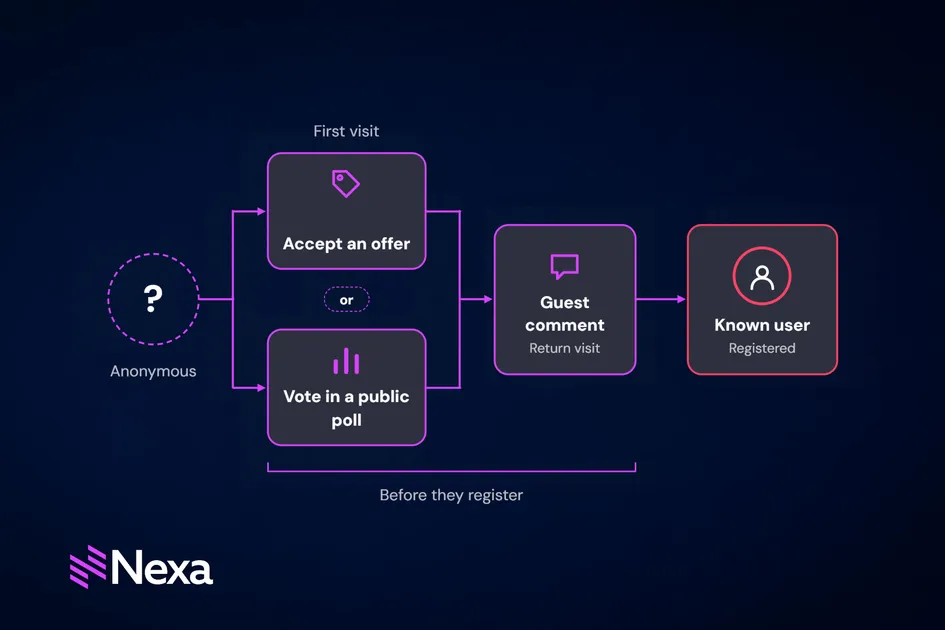
On many sites and apps, a visitor who isn’t logged in can do little apart from read. Comments and polls need an account, and offers can’t tell one visitor from the next.
Asking for an account too early loses visitors, while asking too late misses the moment they wanted to take part.
Glide Nexa is an audience interaction platform that ties each user’s identity, interactions, preferences and access to a single profile the organisation owns. It lets each feature draw its own line. Use the offer conversion engine to reach visitors who have never registered. Nexa polls accept anonymous votes while comments can open to guests on some sections and stay members-only on others. That makes the step from anonymous to known something an organisation designs, one feature at a time.
This Glide Nexa expert guide is for audience, community, membership and product teams who want visitors to take part on a first visit without forcing registration up front.
Nexa recognises a returning anonymous visitor through device fingerprinting to target and count visitors before they have an account.
Offers before login
Glide Nexa's offer conversion engine can target visitors who aren’t logged in, with a newsletter sign-up or a registration prompt on content pages, for example.
When an anonymous visitor accepts, the offer’s actions run in order. They can create the visitor’s account silently, with no welcome email, then add the new user to a group and record the conversion. A consent checkbox can gate any of those actions, and the consent state is stored against the new profile.
Silent accounts suit a light first step like a newsletter sign-up. If the visitor later wants to log in, they reset their password and find their profile already in place.
An offer conversion is often the first point where an anonymous visitor becomes a known one.
Polls before login
Polls in Nexa can be set to public, where they can accept anonymous votes, or limited to where logged-in users who match the set targeting rules are reached.
For a public poll, a toggle decides whether anonymous voters must give an email address before submitting. The organisation also decides what happens to that email. By default, it's stored with the response only. With silent registration switched on for the poll, and the visitor's consent, it creates a contact who can then be added to groups or tagged.
Fully anonymous voting suits a quick reaction poll on a breaking story, where the number of responses matters most. Asking for an email suits a survey the organisation plans to follow up, where knowing who answered is worth the extra step.
Consent handling stays on the organisation’s site or app, and poll data stays within the organisation’s own Nexa instance.
For more on Glide Nexa polls, read Audience polls for media site: How Glide Nexa turns reader responses into first-party data.
Comments before login
Nexa’s commenting system is members-only by default. Every comment links to a known user record, so moderators can see each author’s history before they act.
This can however be set by Comment Type. The 'allow anonymous users' setting lets unregistered visitors comment, each shown as "Anonymous" plus a number so readers can tell them apart. A community recipes section might accept anonymous comments, while a members' forum stays open to registered users only.
Moderation rules can treat the two groups differently. With Auto-approve members switched on, registered users with established accounts skip the moderation queue, while anonymous comments and those from brand-new users wait for approval. On a busy thread, moderators then spend their time on the comments most likely to need it.
Opening comments to guests on chosen sections widens the conversation without giving up moderation.
Side by side, the three features compare like this:
| Offer conversion | Polls | Comments | |
|---|---|---|---|
| Open to anonymous visitors | Yes | Public polls only | Where the Comment Type allows it |
| Email address required | When the offer creates an account | Not required | Not required |
| Moderation | Not applicable | Not applicable | Anonymous comments can wait for approval |
Registration turns a visitor into a known user with a persistent profile. From then on, every like, save, vote, comment and purchase ties to that profile.
Registration itself can be light. A registration wall can ask for as little as an email address and a confirmation, or a social sign-in with Google, Apple, or Facebook. Further details can come later through progressive profiling, at points where the visitor has a reason to share them.
| State | What a visitor can do | Features involved |
|---|---|---|
| First visit | Read, vote in a public poll, accept an offer | Offers, public polls |
| Return visit | Be recognised through device fingerprinting, comment where the Comment Type allows guests, accept further offers | Offers, polls, comments |
| Registration | Become a known user. Earlier activity joins the profile on sites that use Nexa's own sign-in | Registration wall, progressive profiling |
Each feature’s settings decide how much a visitor can do before they’re asked for anything. A few principles help set them:
The right settings let a visitor take part on their first visit and give a little more each time they come back.
Offers, polls and comments are part of the standard Glide Nexa licence. For organisations running Glide CMS, Nexa integrates natively. On other platforms, it deploys standalone and connects through its SDK and REST APIs.
To see how Glide Nexa can turn your anonymous visitors into known users, connect with a Glide Nexa product specialist.
Can anonymous visitors vote in polls? Yes, in public polls.
Can anonymous visitors comment? Yes, where a Comment Type allows it. Comments are members-only by default.
Can offers reach visitors who haven’t registered? Yes. Offers can target anonymous visitors, and an offer’s actions can create an account silently when a visitor accepts.
What happens to a visitor’s activity when they register? From then on, everything they do ties to their new profile.
Do anonymous comments need moderating? That’s set per Comment Type. With Auto-approve members switched on, registered users with established accounts skip the queue, while anonymous comments and those from brand-new users wait for approval.
Related articles:
No matter where you are on your CMS journey, we're here to help. Want more info or to see Glide Publishing Platform in action? We got you.
Book a demo
