 Products






Ready to get started?
No matter where you are on your CMS journey, we're here to help. Want more info or to see Glide Publishing Platform in action? We got you.
Book a demoNexa brings commenting into the same master identity record as subscriptions, groups, and entitlements, so you can do more with audience data and don't have to scrabble across systems to try and build a picture of your users.
Comments sections are one of the most direct ways a publisher can turn passive readers into active participants. When they work well, they increase time on site, build communities around content, and tell you what readers care about in ways no analytics dashboard can replicate. Even better, they fit where publishers are heading: away from broadcasting at an audience and towards being part of the conversations audiences are already having.
The question has never been about if comments add value, it was that integrating them properly has been harder to do than it should be. Most tools treat commenting as a standalone concern on a site or app, useful enough on its own but disconnected from everything else the publisher knows about that reader, and a moderation concern to boot. A user who comments on an article is still a stranger to your subs or customer engagement tools, even if they are a paying subscriber.
Publishers have typically responded in a couple of ways: disable comments entirely or accept the chopped up nature of the data and having to enter other systems to manage moderation as the cost of doing business. In either case, publishers and media site owners were giving up the engagement without fixing the underlying problem.
Glide Nexa’s commenting system is built on a different premise. Comments are tied to registered user identities, governed by configurable moderation rules, and stored in the same first-party data layer that powers subscriptions, groups, interactions, and audience segmentation.
Every comment a reader posts can become part of their profile, not an isolated entry in a third-party database but a contribution to a richer picture of who that reader is and what they care about.
When comments are part of your audience platform, they add to what you already know about each reader. Someone who comments frequently on football articles, holds a premium subscription, and belongs to three team-specific groups tells you a lot more than a username in a comment thread. That fuller picture can feed personalised offers, targeted content like newsletters and notifications, and content recommendations without any exports or system-stitching required.
Moderation benefits too. If a user is leaving problematic comments, you're not looking at a username in isolation, you have much more insight into their connection to you and previous comments, things which helps moderators make better calls and spot patterns that per-comment tools can’t see.
With standalone commenting systems, you get a widget that collects text. The comments live in that separate vendor's system, and connecting them to your subscriber data or newsletter platform means exports, syncs, or middleware, which is work most publishers never get around to and thus the comment data stays separate from everything else.
With Nexa, comments are part of the same audience record from the moment they're written. The same user ID connected to subscriptions, group memberships, poll responses, and content interactions, is also connectable to comments. What this means is that for publishers already on Nexa, adding commenting doesn't mean a new vendor, database, or a moderation layer, as all three are already contained within Nexa.
Rather than a single global commenting configuration, Nexa uses Comment Types. Each type carries its own rule set, so the moderation rules for a live match thread don’t have to be the same for an opinion column or audience research piece.
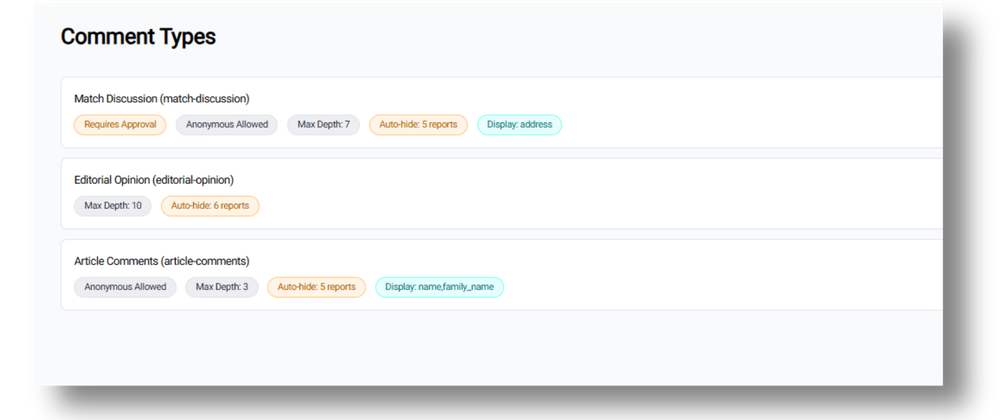
A publisher or site owner might setup:
Each type is configured independently. When a new content section launches or a new use case emerges, admins create a new Comment Type with the appropriate rules rather than trying to stretch a single configuration across different or conflicting requirements.
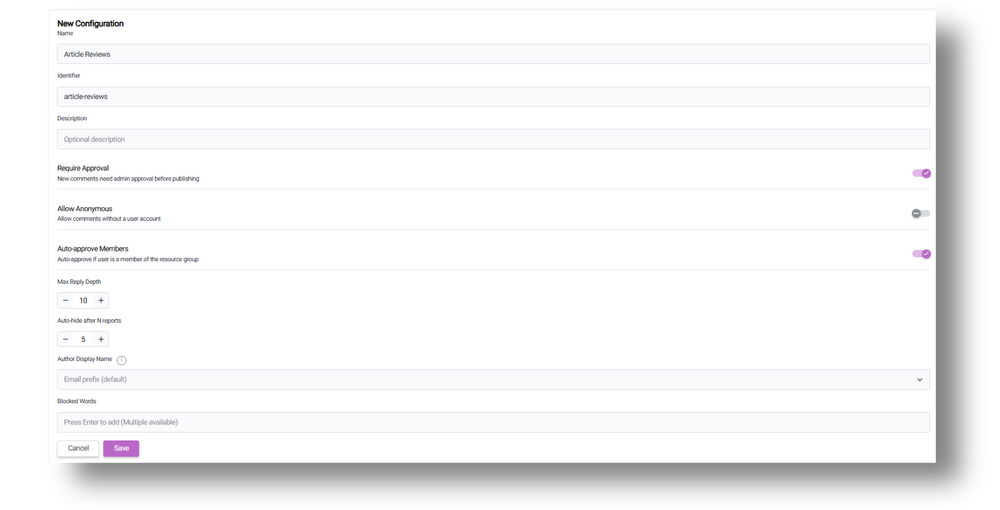
For each Comment Type, admins control:
The auto-approve setting is particularly relevant for high-volume use cases like live sports. If a match generates hundreds of comments in 90 minutes, having trusted registered users bypass the queue means moderators focus only on new or anonymous accounts rather than reviewing every message manually.
The blocked words list is a starting point for content safety. Publishers extend it as needed for their audience and language context. There's no generic profanity dictionary imposed from above, because what you would want to block varies by market, language, and editorial tone. A bulk import option for word lists will be available such as for publishers managing multiple languages.
One of the first live use cases was with a large sports media publisher running live match reports. Their requirement was to support comments at two distinct levels: fans needed to comment on the live report itself (the overall match or event), and separately on individual posts within that report (say, a goal, a substitution, or other key moment).
Previously this publisher was using a basic form-based commenting system powered by their CMS, but it had no identity connection, no moderation rules, and no way to separate report-level discussion from post-level reactions.
Nexa handles the two-level structure through its group system. A group type called "Live Report" is created with comments enabled. Each new live report becomes a group instance. Comments attach to the group (report-level discussion) and to individual items within the group (post-level reactions). It means two conversation layers in a single system with no additional tooling required.
This pattern isn't limited to sports. Any publisher with structured content (a rolling news blog, a multi-part investigation, a live product launch) can use the same two-level approach.
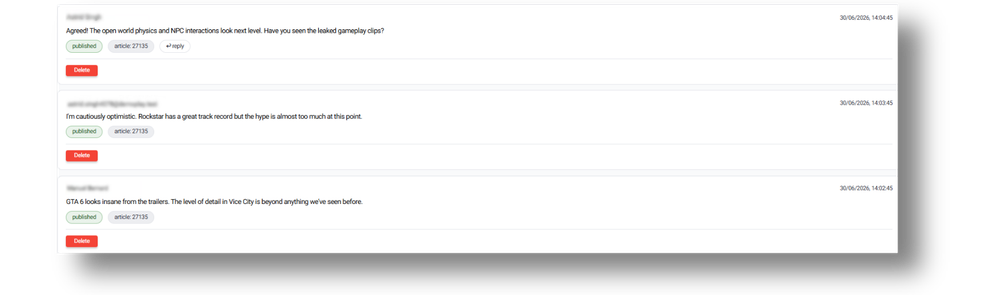
Nexa doesn't require a direct CMS integration to associate comments with articles. Each comment carries the external ID of the content item it relates to (the article ID from the CMS, the live report ID, any external reference).
The publisher's website or app connects the dots at render time: fetch the article from the CMS, fetich its comments from Nexa by external ID, and render them together. This means publishers can add Nexa commenting to existing sites without replacing their CMS or having to build a tight integration between systems. The connection happens through shared IDs, not coupled APIs. It also means commenting is CMS-agnostic: it works the same way regardless of whether your content comes from Glide CMS, WordPress, or event a custom build.
For publishers not ready to rip out their current commenting system in one fell swoop, Nexa comments can run in parallel. You might enable Nexa comments on new content types or sections (live reports, a new community forum) while keeping the existing tool on legacy article pages.
This lets teams evaluate the moderation workflow, test the identity connection, and transition at their own pace rather than committing to a full migration on day one.
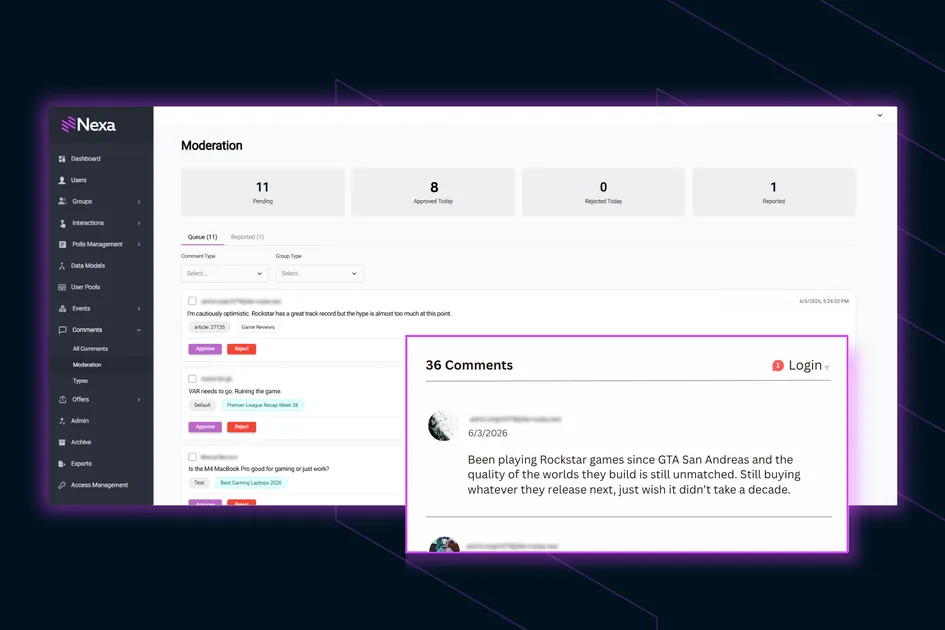
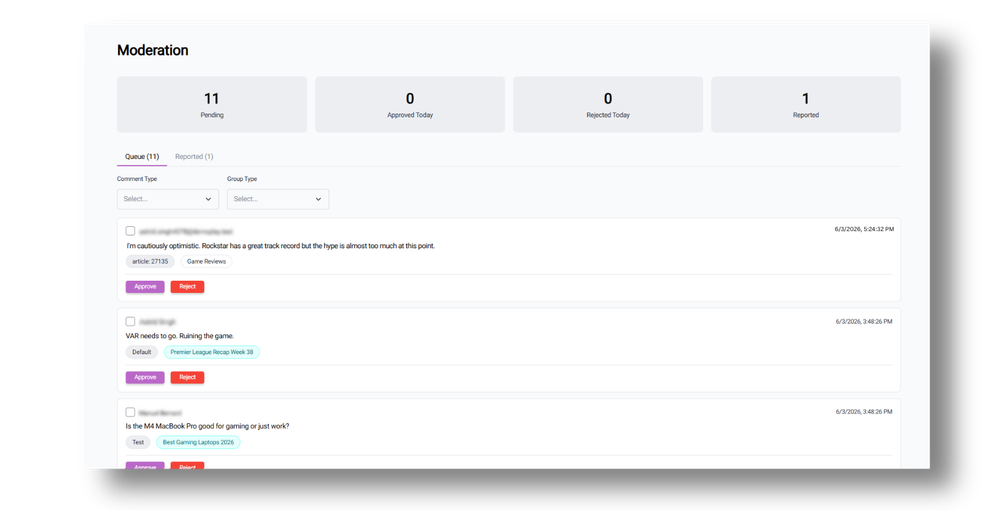
All comments across all types and content appear in a single moderation screen, where each entry shows the comment text, the type it belongs to, the associated group or content reference, and the author's identity.
From this view, moderators can approve or reject individual comments, bulk-select for batch actions, click through to the user's full profile to see their complete comment history, or click through to the group the comment belongs to.
One team member can therefore manage comments across all content types without switching across systems or contexts.
For publishers who previously split moderation across multiple third-party platforms (one for articles, another for live blogs, a third for community forums), this consolidation hugely saves operational time and gives moderators the full picture before they act.
Because comments require registration by default, every comment links to a known user record. This connection flows in both directions:
Admin view: On any user's profile page in Nexa, admins see all their comments alongside subscriptions, group memberships, entitlements, and interaction history. A forthcoming addition will add a dedicated "Comments" tab to the user detail screen, matching the existing tabs for access management, subscriptions, and groups.
Reader view: Logged-in users see their own comment history in their account area on the publisher's site, and can revisit conversations they've participated in, and duly get notification of comments on their comments.
For publishers migrating from third-party commenting tools with separate user databases, this gets rid of the identity fragmentation which makes audience data incomplete.
Comments can be enabled or disabled at a group type level. So for example you can enable comments for live reports and discussion threads, and disable them for newsletter subscriber groups or internal segments. When enabled, each group instance automatically supports commenting, and when disabled, the comment UI simply doesn't render for that content.
This granularity means comments exist only where they add value, and you are not trapped by a blanket on/off switch for the entire platform.
Commenting is included in the standard Glide Nexa licence, not an extra. Connect with a Glide product specialist to get started.
How does Glide Nexa Commenting compare to Disqus or Coral? The main difference is identity. Disqus and Coral maintain their own user databases separate from your audience platform, while Nexa comments live inside the same system that manages subscriptions, entitlements, groups, and interactions. It means there is no need for a data export or sync to connect comment activity to subscriber profiles.
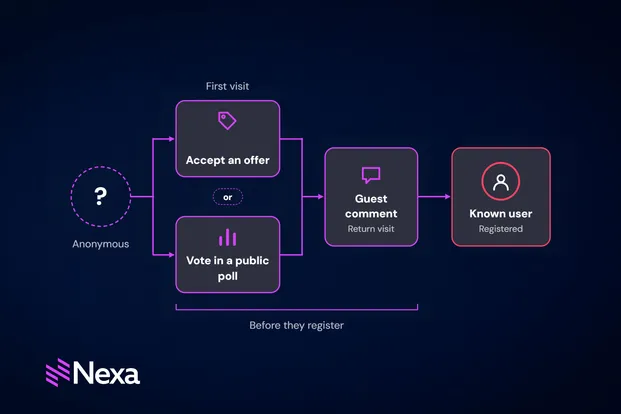
Can anonymous users comment? Optionally. Each Comment Type can be configured to allow or block anonymous participation. If allowed, an email address can be required as a lightweight identity capture.
Does every comment need manual approval? Only if the Comment Type is configured that way. Auto-approve can be enabled for registered members, so trusted users post immediately while new or anonymous commenters go through the queue. We think this is essential for high-volume scenarios like live sports.
How does this all connect to articles in Glide CMS? Through external IDs. Comments in Nexa carry the ID of the content they relate to. Your site or app fetches comments by that ID and renders them alongside the content. It means no direct CMS-to-Nexa integration is required, and in fact this is the case with any CMS, Nexa is not Glide-specific.
What about spam and high-volume moderation? Blocked word lists, approval queues, auto-approval rules, reply depth limits, and the ability to view a user's full history from their profile all contribute to moderation control. Auto-approve is the key feature for high-volume scenarios: trusted users post freely so moderation effort focuses only on the unknowns.
Is this included in the Nexa licence? Yes. Commenting is part of the standard Nexa platform with no per-comment charges.
Related articles:
No matter where you are on your CMS journey, we're here to help. Want more info or to see Glide Publishing Platform in action? We got you.
Book a demo
