 Products







Ready to get started?
No matter where you are on your CMS journey, we're here to help. Want more info or to see Glide Publishing Platform in action? We got you.
Book a demoGlide Nexa group ownership lets trusted members run a group, sharing a join code and adding or removing members. Nesting arranges groups into parent and child structures up to 10 levels deep. Every league, chapter, or cohort becomes a know audience, and everyone who joins by code is a signed-in user.
Fans set up prediction leagues with friends, supporters run local chapters, and readers form book clubs. Most of this happens in group chats, Discord servers and social communities, where the organisation behind the content can’t see who is involved or reach them.
With group ownership and nesting, a league organiser shares a join code, everyone who joins is a signed-in Nexa user, and the organisation can poll, target offers, and reach the whole league.
Glide Nexa is an audience interaction platform that ties each user’s identity, interactions, preferences and access to a single profile the organisation owns. It already lets organisations add people to groups through offers, the admin panel, or the SDK. Each of those routes depends on the organisation doing the work. Group ownership hands part of it to the people already organising: a trusted member runs a self-service group, shares its join code and adds or removes members. Group nesting then places those groups in a structure so a fan league can sit under the competition it belongs to.
This guide is for community, membership, engagement, and product teams at organisations whose audience already forms smaller groups, such as leagues, chapters, clubs, cohorts, and events.
Both features are built on Nexa’s existing groups. A league, chapter or team created this way works with the offers, polls, comments, and events already in place. Everyone who joins by code is a signed-in user with a Nexa profile.
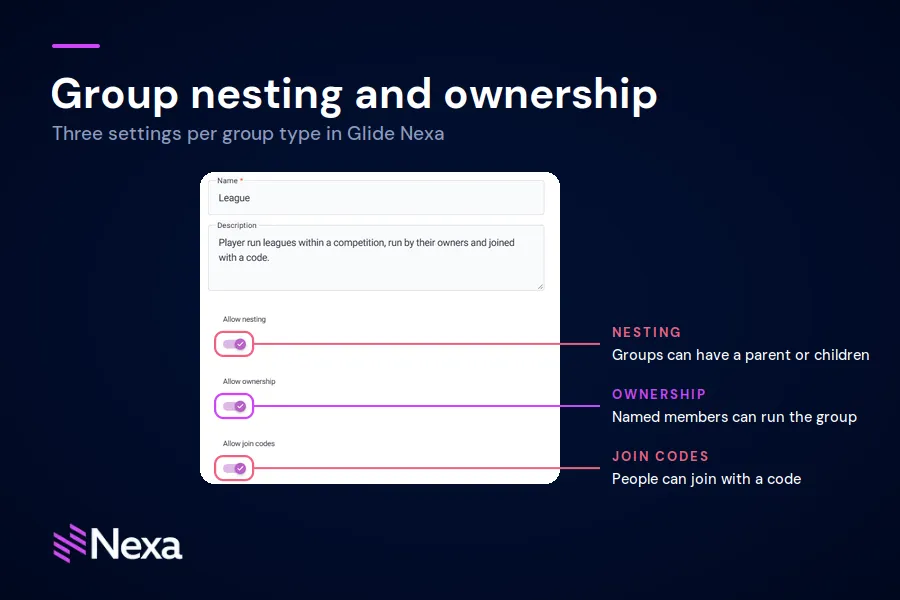
Group ownership lets named users manage a group’s members and join code. Nesting, ownership, and join codes are separate settings, usually used together.
Admins switch each one on for a group type, and every group of that type can then use it. A type can allow nesting without ownership, ownership without join codes, all three, or none. Groups of types without nesting carry on as regular groups and can’t be a parent or sit under another group.
Admins switch on these settings and assign and manage owners in the Nexa admin panel. Owners work on screens built into the organisation’s own site or app, which need some front-end work. Developers reach the same functions through the Nexa SDK and client endpoints.
Nesting gives a group a parent. A league can sit under a competition, a team under a company account, or a local chapter under a national supporter’s club. In the admin panel, the groups list shows the hierarchy as a tree that expands one level at a time. Developers can also pull a whole branch, or trace a group back up to the top, through the API.
Ownership lets named users manage a group without access to the Nexa admin panel. An owner can:
Owners can’t rename, delete or reconfigure the group, move it within a hierarchy, or add other owners, so structure stays with admins.
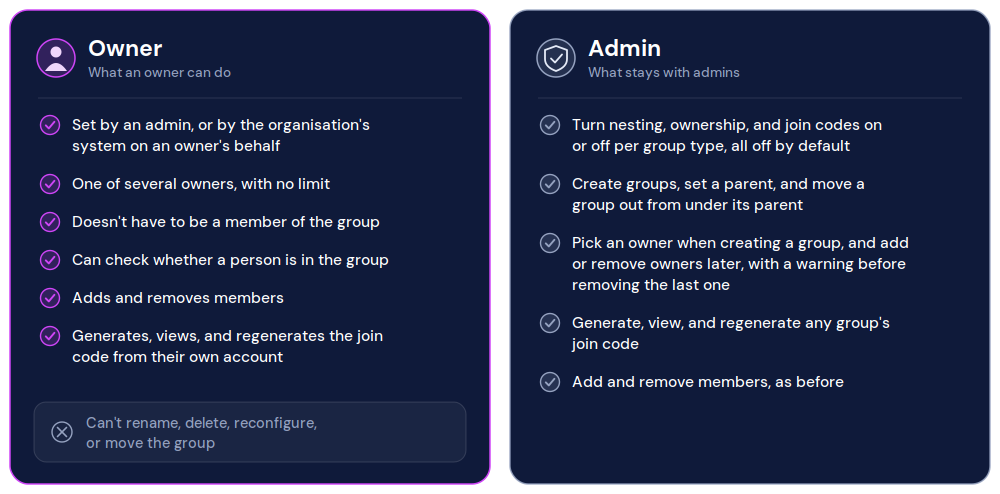
Two-column comparison of group owner permissions and admin-only permissions in Glide Nexa.
A join code works like an invite code: an owner shares it so other people can join the group themselves. Anyone with the code and a Nexa account can join, and once a group has a code, joining it requires the code.
Nesting follows a short set of rules:
Membership stays with each group. A group’s member list shows its direct members only, and joining a child group doesn’t add someone to its parent.
Custom fields work differently from membership: each group carries the fields defined on its own group type, as with any Nexa group, and a child group doesn’t inherit its parent’s fields.
To report on a whole branch, a developer lists its child groups first, then the members of each. Targeting works the same way.
Because membership never passes up or down the tree, adding a level to a hierarchy never changes who belongs to which group.
Codes don’t expire and have no usage limit. Only one code works for a group at a time, and join attempts are limited to 10 every 10 minutes per person, which stops people guessing codes. Someone who’s already a member and enters the code again isn’t added twice. If a code is shared more widely than intended, the owner regenerates it, and the old code stops working immediately. Regenerating also stops a removed member rejoining with the code they already have.
The owner tools live on the organisation's own site or app. The Nexa SDK and client endpoints cover codes (setPasscode, getPasscode) and joining (joinByPasscode). Owners can also add and remove members through the public API, and anyone else trying to change another person’s membership is refused.
Because a code join fires group.member_added like any other join, an admin can point a channel in Glide Nexa Events at it. An email channel filtered to one league, for example, can alert its organiser whenever someone joins.
Nesting and ownership organise people. Access, targeting, and reporting work the way they do for any Nexa group.
Access
Joining a group, by code or any other route, doesn’t give anyone access to content or features. Access comes from the subscriptions and entitlements assigned to each user. Entitlement management for content: How Glide Nexa unifies subscriptions, access, and content gating attached to a group work as labels only, and they don’t pass down a hierarchy. Nexa’s entitlement groups, which bundle access rights, are a separate feature, covered in entitlement management with Glide Nexa.
Targeting
Offer and audience polls targeting match people who are direct members of the groups a rule names. Child groups aren’t included automatically, so a poll for every league in a competition lists each league group in its rule.
Reporting
A group’s member list shows its direct members. To see everyone in a branch, list its child groups, then the members of each. The tree, ancestor, and descendant views show how the groups fit together.
Rules of joining
A join code doesn’t check any rules on the group. Nexa also doesn’t filter group names, so if owners suggest names for their groups, any moderation needs to happen on the organisation’s site.
The right approach depends on how your audience is already organised and how open the group should be.
| Situation | Use | Why |
| Groups sit inside larger groups, such as leagues in a competition or chapters in a national club | Nesting | Gives admins and developers a tree to navigate and report on by branch |
| Groups have no parent-child relationship | Regular groups, with nesting left off for that group type | Groups of other types carry on as regular groups |
| An open community should grow through its own members | Ownership and a join code | Owners recruit with a code and manage members |
| A group should stay restricted, such as speakers or press at an event | Admin panel or a targeted offer | A join code doesn't check any rules on the group |
| Joining a group should unlock something | Listen for group.member_added and assign a subscription | Joining a group doesn't grant access by itself |
| Access should end on a date, such as a course or event pass | A time-bound subscription | Group membership doesn't expire access |
| An organiser should hear when someone joins | A Glide Nexa Events channel filtered to that group | Code joins fire the same event as any other join |
Nesting and ownership suit any audience that already organises itself into smaller groups, from player-run leagues inside a competition to local chapters of a national club. The organisation sets up the structure, and owners bring people in without an admin handling each membership.
Leagues, clubs and competitions
Prediction games, fantasy leagues, quiz competitions and card-game or esports clubs all share this shape. The organisation runs the competition, while its most engaged players grow the leagues inside it. Each league is a group the organisation can poll, target with offers or open to comments.
Support clubs, chapters and branches
Sports clubs, rights holders, and membership organisations often run these networks offline already. A chapter organiser recruits locally with a join code, and and an admin can make a successor an owner when they step down.
Interest communities
Communities like these often start in a group chat. A join code gives an existing circle a way into Nexa, where the organisation can poll and reach its members.
Events and courses
An organiser shares a code at registration or on day one, and follow-up polls and offers can target each group. Restricted groups such as speakers or press are better added by an admin, since anyone with a code can join.
A weekly competition where players run their own leagues would work like this:
The organisation sets up the competition once, and the players do the recruiting from there. Each league an owner fills is another group of known users the organisation didn’t have to recruit itself.
Group nesting and ownership are included in the standard Nexa licence. For organisations already running Glide CMS, Nexa integrates natively. For those on other platforms, Nexa deploys standalone and connects through its SDK and REST APIs. The owner screens are built into the organisation’s own site or app, so they need some front-end work.
To explore how group nesting and ownership can fit your audience, connect with a Glide Nexa product specialist.
What can a group owner do? An owner can view and regenerate the group’s join code and add or remove members. Owners can’t change the group’s settings, its place in a hierarchy, or who else owns it.
What is a join code? A join code works like an invite code for a single group. An owner shares it, and anyone with a Nexa account can use it to join. Codes don’t expire and have no usage limits.
How do I let members invite others to a group? Enable ownership and join codes on the group’s type and make the member an owner. They can then share the group’s join code and add or remove members.
What happens if a join code is shared too widely? The owner regenerates it. The old code stops working straight away, and the owner shares the new one with the people who should have it.
Do child groups inherit members from their parents? No. Each group’s member list shows its direct members, and offer and poll targeting match direct members of the groups named in a rule.
How deep can a hierarchy go? Up to 10 levels below a top-level group. Each group has one parent, and Nexa blocks any change that would create a loop or go deeper.
No matter where you are on your CMS journey, we're here to help. Want more info or to see Glide Publishing Platform in action? We got you.
Book a demo
