 Products







Ready to get started?
No matter where you are on your CMS journey, we're here to help. Want more info or to see Glide Publishing Platform in action? We got you.
Book a demoContent changes all day, and your caches, search indexes, and apps need to keep up. Glide Transmit, the event system in Glide CMS, sends a webhook to each connected system within seconds of a content change.
Picture a story that was corrected five minutes ago. The CDN still serves the old version, the search index waits for its next scheduled job, .and the app shows yesterday’s headline. Readers see stale content until something catches up.
Glide Transmit, the event system in Glide CMS, closes that gap. When content changes, Transmit sends a CMS webhook to each connected system within seconds, and editors choose where each article goes.
Without an event system like Glide Transmit, teams usually manually check the CMS on a schedule, run timed re-indexing jobs, or build a separate integration for each system. With Transmit, Glide CMS pushes each change to every subscribed system as it happens, so there are no polling jobs to schedule and nothing to build inside the CMS when a new system is added.
This guide is for developers, product teams, and editors who want to connect Glide CMS to the caches, search, apps, and partner systems that publish or use their content.
An editor publishes an article, a photographer uploads an image, or an admin renames a taxonomy term. The service that made the change sends an event to Transmit, such as an article published. The event carries the full content of the item.
Transmit then looks up every subscriber on that account that asked for this event, and checks which ones should receive it. A subscriber can be switched off, or an editor can exclude it for a given article. Each subscriber gets its own delivery, so a slow or failing system never holds up the others.
All of this takes seconds, and the system that made the change never needs to know who is listening.
A subscriber is anything that wants to hear about content changes. Two are set up automatically for every account:
Everything else is a webhook that you add yourself: an endpoint in your own system or a partner’s. Any service with a web endpoint can be one, so you can use webhooks for jobs such as:
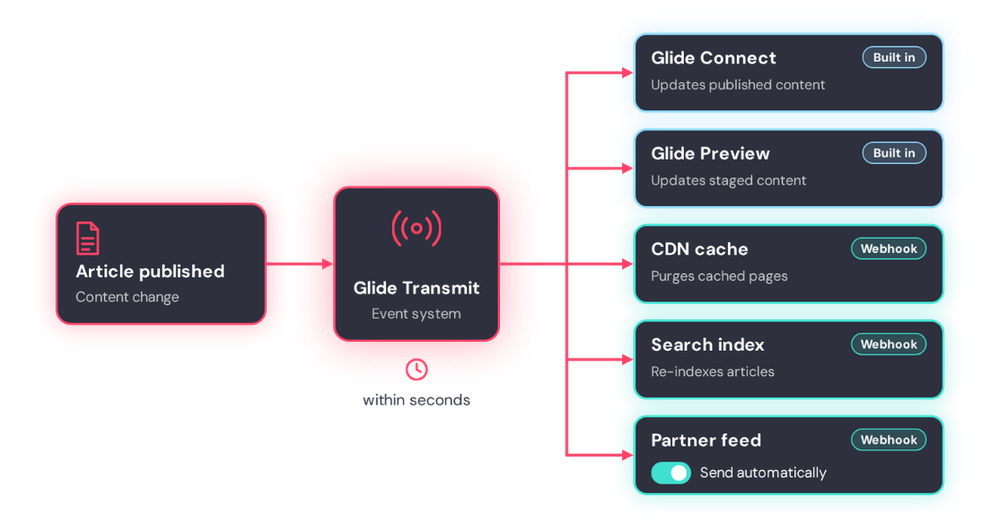
When a content change happens in Glide CMS, Glide Transmit sends it to every subscriber within seconds, each delivered on its own.
Each webhook listens only for the events it needs. Events cover nearly everything an editor can do, from articles, collections and live reports to images, taxonomies, redirects and content queues. A search indexer can follow articles published, updated and deleted, while a partner feed follows articles published alone.
Admins add webhooks in Publisher under Transmit, then Subscribers, and developers can also create them through the CMS SDK. Each delivery carries the account, the event name and the full content of the item changed. The receiving system never has to call back into the CMS.
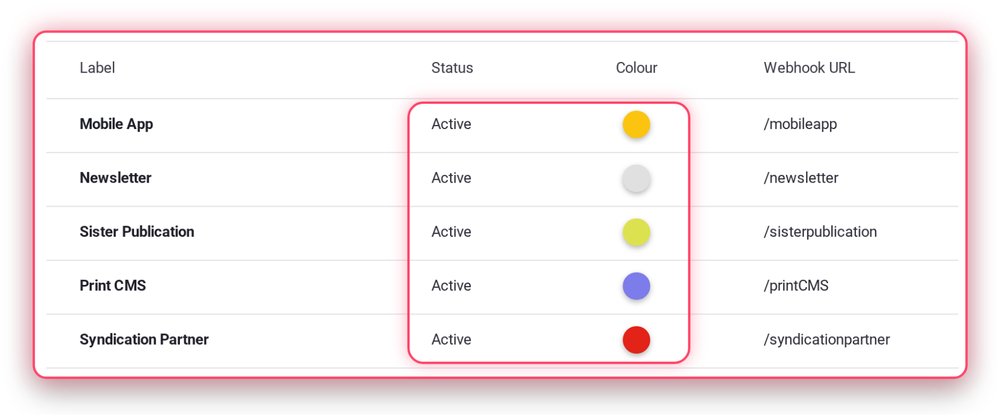
Glide Transmit Subscribers screen in Publisher showing a CMS webhook subscriber.
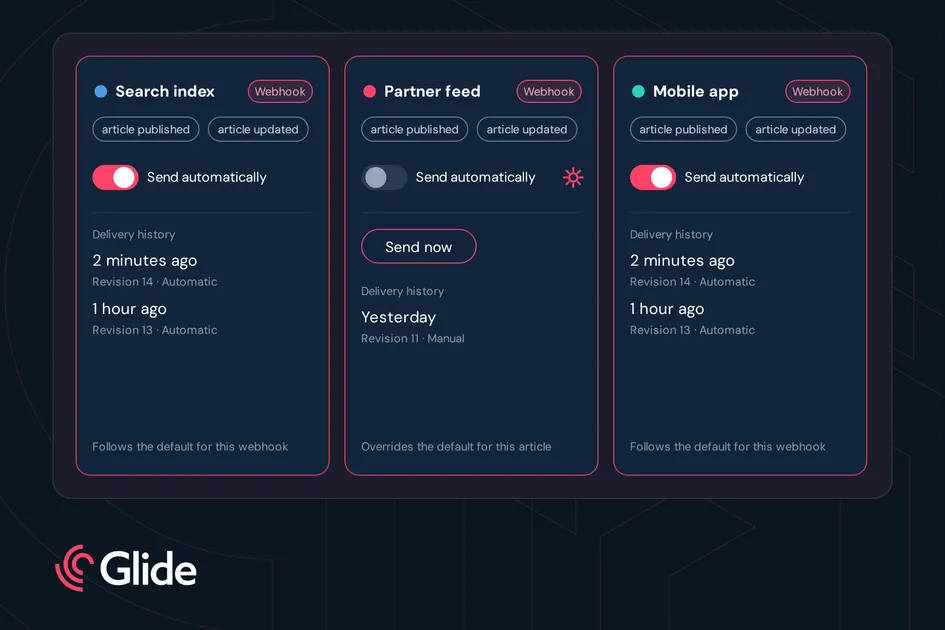
Webhooks can also be channels that editors choose for each piece of content. Switch on multichannel publishing for a webhook, and it appears on the article and collection publish page with a “Send automatically” toggle. By default the toggle follows the webhook’s global setting. An editor can switch it on or off for a single article, and a gear icon shows that the article overrides the default. Editors can also send an article to a channel manually, at any time.
Transmit keeps a delivery history for each article and collection, showing which channels received it, when, which revision, and who triggered it. The publish page uses this history to show when content was last sent to each channel.
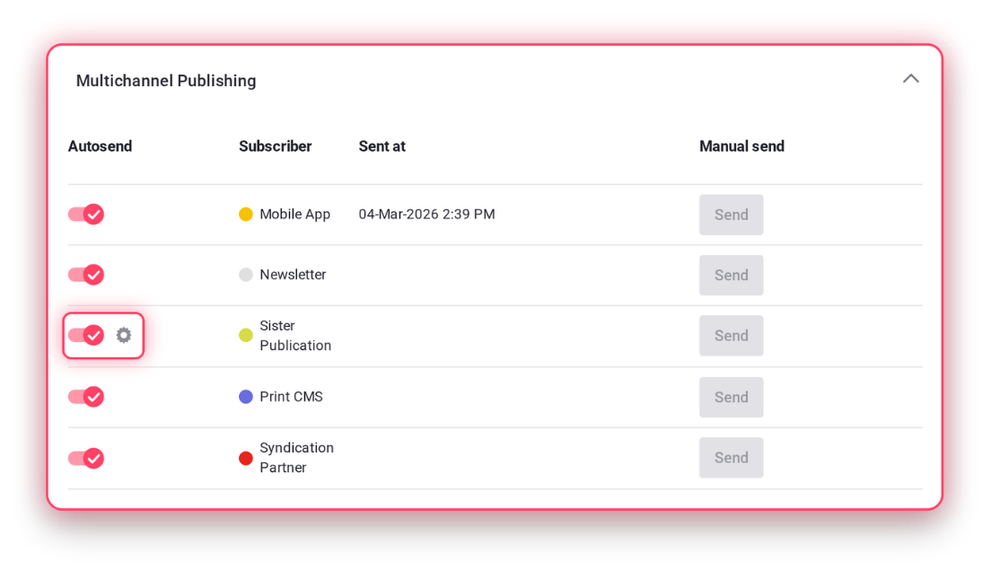
Glide CMS article publish page showing multichannel publishing channels with a Send automatically toggle.
Four habits keep a webhook endpoint reliable:
Let’s go back to the story discussed at the top of this article. Say an editor needs to make a correction. They publish it once, and the subscribed systems make the update within seconds, without anyone having to ask. Editors use the Send automatically toggle on the publish page to decide per article which channels receive it. Developers connect each system by adding a webhook in Publisher or through the Glide CMS SDK, and every delivery carries the full content of the item, so the receiving system never calls back into the CMS. Product teams can add a partner feed or a new app the same way, and the delivery history shows what each channel received, when, and who triggered it.
Want to see how Glide CMS and Glide Transmit fit your publishing stack? Connect with a Glide product specialist.
What is Glide Transmit? The event system in Glide CMS. It sends a CMS webhook to each connected system when content changes.
Do I need to change the CMS to add a new system? No. Add a webhook subscriber with your endpoint and the events you want.
What happens if my endpoint is down? The delivery fails and is logged, and Transmit doesn't resend it, so keep endpoints highly available.
Can I choose which articles go to which system? Yes. Multichannel publishing lets editors switch each channel on or off per article or collection.
Which events can trigger a CMS webhook? Events cover articles, collections, live reports, images, taxonomies, redirects and content queues. Each webhook listens only for the events you choose, for example articles published, updated, and deleted.
Related articles:
No matter where you are on your CMS journey, we're here to help. Want more info or to see Glide Publishing Platform in action? We got you.
Book a demo
