 Products






Ready to get started?
No matter where you are on your CMS journey, we're here to help. Want more info or to see Glide Publishing Platform in action? We got you.
Book a demoGlide Nexa recognises anonymous visitors, records their interactions, and automatically links that history to their account when they register or sign in. Organisations see the full journey from the first anonymous visit through to conversion.
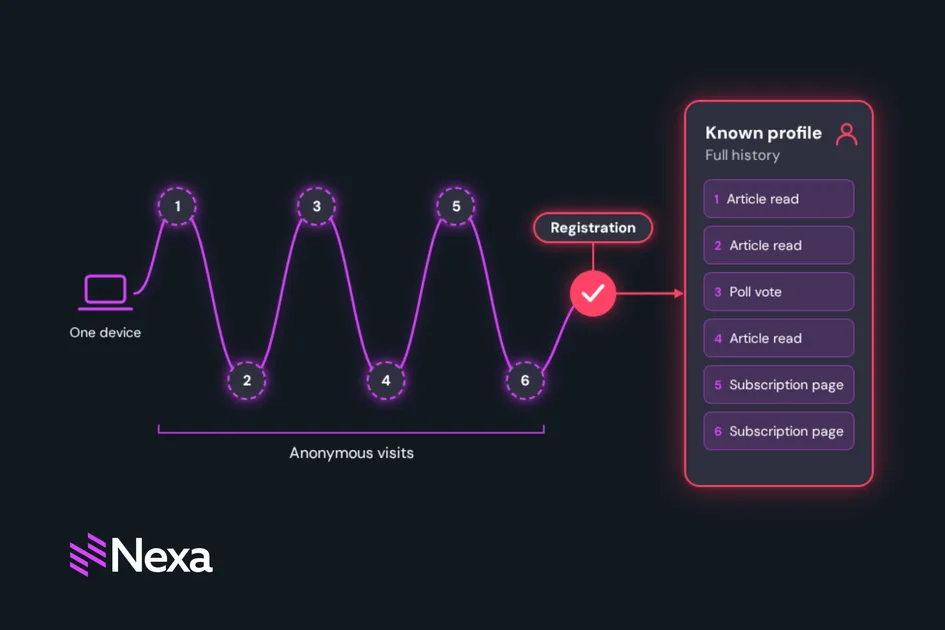
Someone visits your site six times over two weeks, and spends their time reading articles, voting in a poll and browsing your subscription page twice. Then they register.
In many audience platforms, that registration is day one. Everything before it is gone, or at best disconnected analytics data that nobody can tie to the person who just signed up. The organisation knows this person converted, but not what drove the conversion or how long the journey actually took.
Glide Nexa, Glide’s audience interaction platform, keeps that history through pseudo users. It recognises anonymous visitors, records their interactions against a lightweight record, and links that entire history to the person’s account when they register, or when they sign in on a device they used anonymously if that option is turned on.
This guide is for audience, product, privacy, and development teams who want to understand how Glide Nexa can help them understand what a visitor did before they registered.
A pseudo user is an anonymous visitor that Nexa recognises before they register or sign in. Nexa creates a lightweight record for each unique fingerprint, recording what the visitor does: interactions, poll, survey, and quiz responses, offer impressions, page views, and visit counts. A fingerprint is the identifier Nexa uses to recognise the same visitor when they come back. It comes from an identifier the tracking script stores on the visitor’s device once they’ve agreed to it, and Nexa records connection, device, and location details alongside it.
The record persists across sessions on the same device or browser. When the visitor eventually registers, or signs in where that’s enabled, their anonymous history is automatically linked to the new account.
Nexa recognizes a returning anonymous visitor using a device identifier supplied by the Nexa tracking script, which only supplies it once the visitor has agreed to storage on their device. Alongside it, Nexa records details already available at the edge: TLS and connection characteristics, device type, operating system, network, and location. Ordinary browser updates no longer cause a returning visitor to be treated as a new one.
Nexa Recognition is most precise when a device identifier is available. Without one, people using the same browser and device type may be treated as one visitor until one of them registers. For mobile and server-side integrations, browser-level characteristics belong to the calling system rather than the person, so connection details only reflect the visitor if the calling application forwards the original viewer headers.
Limitations
For email and notification tracking, many mail clients (Gmail, Apple Mail Privacy Protection) proxy or pre-fetch image and link requests through their own infrastructure, so the details captured often belong to the mail provider’s proxy.
Link clicks are more reliable than pixel opens for this reason. When the TLS fingerprint and the reported HTTP version contradict each other, the system flags the request as suspicious, records the reason, and increments a risk score, but does not currently block anything automatically.
When pseudo user tracking is enabled for an account, each unique fingerprint gets one record. It stores:
| Field | What it captures |
|---|---|
| Fingerprint | The identifier Nexa uses to recognise the visitor |
| Status | Active, linked, or expired |
| Device type | Device type and operating system: desktop, mobile, tablet, smart TV, or unknown, plus the operating system |
| Network and connection | Current network (ASN), with a history of previous networks seen for this visitor, plus TLS and HTTP version details from CloudFront viewer headers when forwarded |
| Geo information | Country or region (full names), city, postal or metro code, timezone, and coordinates |
| Risk score | 0 normally, incremented when a request is flagged suspicious, with the reason recorded |
| First seen and last seen | Timestamps |
| Total visits and page views | Counters, incremented in every anonymous interaction |
| Linked user ID | Set once linked to a registered user, NULL until then |
This record updates on every anonymous interaction: the visits and page view counters increment, geo and network information refreshes, and the last-seen timestamp moves forward.
Linking is automatic and entirely server-side.
When a visitor registers, Nexa finds their pseudo user record, moves the anonymous activity onto their new account and marks the record as linked.
Here is what that looks like on a linked profile. The visitor from the opening appears as one timeline, in the order it happened, from the first anonymous visit to registration. Across six visits over two weeks it shows the articles they read, the poll they voted in and two views of the subscription page, followed by the registration itself. Because the earlier activity moves onto the new account, the organisation can see which content and touchpoints came before registration, how many visits it took, and how long the journey ran from first seen to signed up.
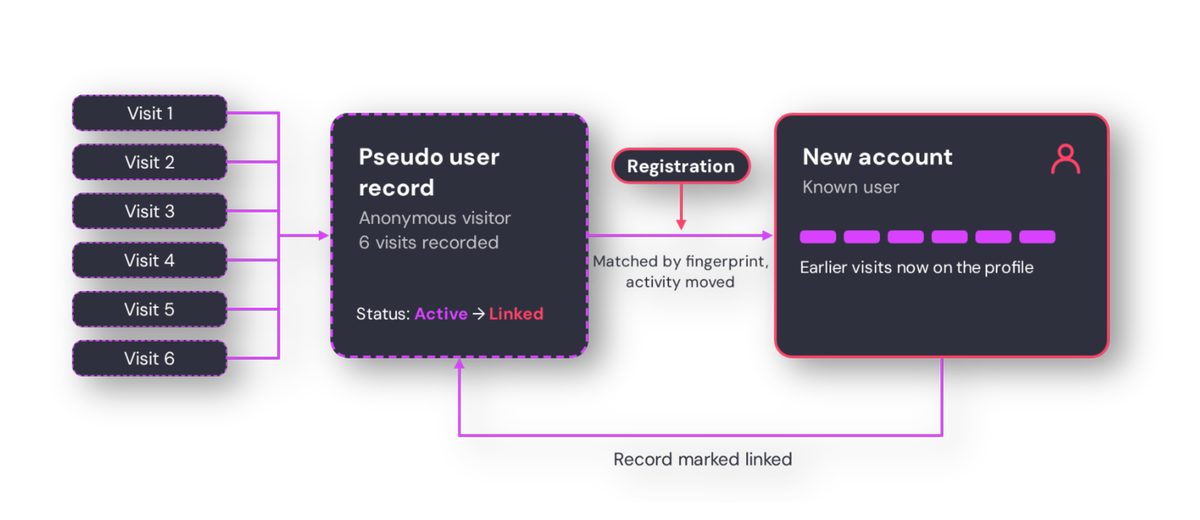
When a visitor registers on an account that uses Nexa’s own sign-in and has linking enabled, the registration handler calls the linking function internally using that request’s details. It looks up the pseudo user record matching the fingerprint, de-duplicates any anonymous interaction rows that would collide with the registered user’s existing interactions inside a database transaction, reassigns the remaining anonymous interaction rows to the new user ID, and sets the pseudo user status to linked with the linked user ID recorded. On accounts using the AWS-managed sign-in option, the account is still created, but earlier anonymous activity isn’t merged.
If no matching pseudo user record exists, linking fails silently and the registration proceeds normally.
There is also a manual admin endpoint for support-triggered linking outside the registration flow, using the same underlying function.
A separate, optional setting also links anonymous history when someone signs in on a device they previously used anonymously, which helps when a person registered on one device or browser and later signs in on another.
Linking also applies to contacts created through silent registration. This happens when a poll, survey or quiz asks a visitor for an email address and they agree to give it, and Nexa creates a contact for them. On accounts using Nexa’s own sign-in, their earlier anonymous activity is linked to the new contact automatically.
Linking is one-directional and permanent. Once a device has been linked to an account, browsing on that device continues to be recorded under the same linked record even after the person signs out, rather than being reset to anonymous. A user’s profile shows every device or browser linked to their account, since one person can build up several over time.
An organisation that can see the full journey from first anonymous visit to registration knows which content, which touchpoints, and which timing patterns drive conversion.
Pseudo user tracking is configured per account through the admin UI (Account Settings, then Pseudo Users):
| Setting | What it controls |
|---|---|
| Enabled | Master toggle for persisting pseudo user records. Fingerprint computation itself always runs regardless of this setting. |
| Consent mode | Server-only (default) or full hybrid. A device identifier supplied by the tracking script is used in either mode. |
| Auto-expire days | Days of inactivity before an active record flips to expired. Set to 0 or leave unset to disable expiry entirely. |
| Link on registration | Controls whether anonymous history is automatically linked when a visitor registers. |
By default, Nexa interactions require a logged-in user. o track anonymous visitor behaviour, you need to enable “Allow anonymous tracking” on each interaction type individually. When it is enabled, anonymous interactions are stored with a NULL user ID and the request’s computed fingerprint.
The pseudo user record updates on each interaction, but only if the account-level pseudo users toggle is also enabled. The interaction row itself is recorded either way, and on linking, matching interactions get their user ID reassigned to the newly registered account.
Polls, surveys, and quizzes can all be answered anonymously, and those responses are recorded against the pseudo user rather than creating a placeholder contact.
This gives organisations granular control over which interaction types generate anonymous data. A team might enable anonymous tracking for article reads and poll votes but leave it disabled for saves or follows, which only make sense for logged-in users.
The list view uses the same advanced filtering panel as the rest of the Nexa admin, so records can be filtered by fingerprint, device, location, and status, with several conditions combined, saved for reuse, or shared as a link. Records flagged as suspicious show a Suspicious indicator alongside the reason.
The detail view for a single fingerprint shows identity, network, and geo metadata alongside a paginated activity timeline.
For linked records, there is a button that opens the associated registered user’s profile. A GDPR erasure action is also available, hard-deleting the pseudo user record and all associated interaction rows immediately, with no soft delete or retention grace period.
The dashboard shows total tracked pseudo users, breakdowns by status, device type and location, average visits and page views per user, the linked-conversion rate, and a daily trend of new-pseudo-users over a selectable date range. Performance is maintained regardless of table size through a trigger-maintained running totals table that updates incrementally rather than running live aggregate queries.
Access to pseudo user data is gated by two permissions under Admin > Permissions. One grants access to the list, detail view, activity timeline, and dashboard, and the other to the GDPR erasure action.
All admin endpoints sit under Accounts and then Pseudo users, and require the permissions described above.
There is no dedicated “create pseudo user” endpoint. Pseudo user records are a side effect of anonymous interaction tracking. If an anonymous interaction is created on the public tier and pseudo user tracking enabled, a pseudo user is recorded.
A newsletter or push campaign can record opens and clicks against a known person when the sending platform passes an identifying value for each recipient. Without one, the open or click stays anonymous.
Tracking links cover content delivered outside the website, such as newsletters and push notifications. Each template needs one tracking link and one tracking image, embedded once.
By default, a click or open stays anonymous. To attribute it to a known person, the sending platform passes an identifying value for each recipient. That value can be an email address, an account ID or the reference number Nexa issues for this purpose. When it matches an existing account, Nexa attributes the click or open to that person.
Use the reference number rather than an email address. Anyone the email is forwarded to can read the link, and Nexa can reissue the number if a link leaks.
For developers:
A daily cron job (running at 4am per account) flips active pseudo user records to expired once their last-seen date exceeds the configured auto-expire threshold. This is a soft status change, as expired records remain visible and queryable until explicitly deleted. The threshold is the Auto-expire days setting. Setting it to 0, or leaving it unset, switches expiry off.
Linked records are excluded from this cron entirely, so once linked to a registered user, a pseudo user record never auto-expires.
The only hard delete is the explicit GDPR erasure action, which removes the pseudo user row and cascades to all associated interaction rows immediately, with no retention grace period.
Pseudo users are pseudonymous data. Under GDPR they are treated as personal data because a fingerprint can in principle be used to re-identify a person. Once the linked user ID is set, the record is directly identifiable. Fingerprint and pseudo user data is first-party data, stored per-account, and schema-isolated.
Organisations should disclose anonymous visitor tracking, including the device identifier stored by the tracking script, in their privacy policy and consent notice. Browsing after logout on a linked device continues to accumulate under the same identifiable record, so ‘anonymous tracking’ stops being anonymous once linked, which is worth factoring into consent and disclosure language.
To see how Nexa's pseudo user tracking fits your audience strategy, connect with a Glide Nexa product specialist.
Does Nexa store anything on the visitor’s device? Only once the visitor has agreed to it. The Nexa tracking script supplies a device identifier after the visitor consents to storage on their device, and other connection details are recorded server-side.
What happens if two people share the same device? Recognition is most precise when a device identifier is available.
What happens after a linked user signs out? Activity on that device continues to be recorded under the same linked record. It doesn’t revert to anonymous.
Can anonymous history link to an account if someone registered on a different device? Yes, if the optional sign-in linking setting is turned on. Their anonymous history on a device is linked when they sign in on it.
Is anonymous visitor data covered by GDPR? Yes. Pseudo user records are pseudonymous data, treated as personal data under GDPR, and become directly identifiable once linked to an account. Records can be erased immediately, along with all their interaction history.
Related articles:
No matter where you are on your CMS journey, we're here to help. Want more info or to see Glide Publishing Platform in action? We got you.
Book a demo
