 Products







Ready to get started?
No matter where you are on your CMS journey, we're here to help. Want more info or to see Glide Publishing Platform in action? We got you.
Book a demoFrom sign-in forms on a network of sites to ticket ballots for a member-based organisation, four real deployments show how one Glide Nexa user profile can run different audience experiences.
Glide Nexa is Glide’s audience interaction platform which holds your audience accounts, profiles, access rights, and preferences, and connects them to other services on your site.
Because Nexa is a multi-faceted platform, it adapts to your needs as they change. It can start with basic sign-in, grow into subscriptions and entitlements management, and support your team building entire products on top of it. It also works as a membership management platform for any organisation that needs to manage accounts, access, and member data.
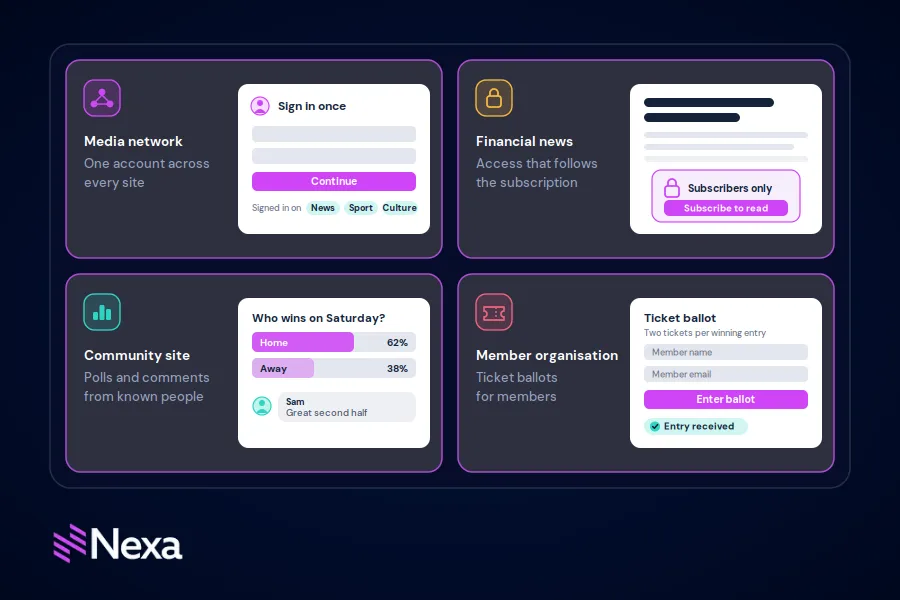
Here we highlight four live Nexa deployments: a multi-site media group, a financial news publisher, a fan and enthusiast community site, and a member organisation in the event space.
A large digital media group runs sites around the world in multiple languages and topics, using Nexa to store account information for front-end features and subscription status and entitlements.
On the shared sites, Nexa powers the login, sign-up, and password reminder forms. Once readers are logged in, the site knows who they are, so they can:
The benefit: The group can run shared and standalone sites on the same account platform, and member status feeds straight into its analytics.
A global financial news publisher uses Nexa for the whole "account" side of its sites: who each reader is, what they can see, and what they follow.
| Reader feature | What Nexa does | What readers get |
| Accounts and sin-in | Holds each reader's profile and keeps their session active across visits; handles password resets | A personalised experience without logging in on every page |
| Subscriptions and content access | Knows which subscription each reader holds and whether it's active, so the site shows full articles to subscribers and a preview to everyone else | Everything their plan covers, with no extra steps |
| Alerts | Stores the topics, articles and searches each reader follows, plus their contract detail | An email when something new is published on what they track |
| Email briefings and newsletters | Manages who is on each mailing list, keeps preferences up to date, including one-click unsubscribe, and checks each subscriber's access before a briefing is sent | A curated digest on a schedule that suits them |
| Bookmarks | Remembers each reader's saved articles | A reading list that follows them from device to device |
| Saved searches | Stores searches against the reader's profile | One-tap access to the deals, topics, or data they track |
| Personalised dashboards | Keeps the list of topics and feeds each reader follows | A personal home view, like their own news desk |
| Account settings | Saves changes to contact details, passwords, and communication preferences | Control over user profiles and how they are contacted |
The publisher’s editors also create and send these briefings directly from Glide CMS, with Nexa subscriber groups deciding who receives each one. Read how it works in How a global financial markets data provider creates and sends subscriber briefings directly from Glide CMS.
The benefit: One account connects reading, alerts, bookmarks and newsletters, so readers use one account for all of them. Subscribers get the premium content they pay for, and alerts and briefings reach those who asked for them.
A gaming news and community site runs every signed-in feature on one Nexa profile, using Nexa in two ways: as its member account system and as the engine for interactive group-based products.
Member accounts
Nexa handles the full user lifecycle, so the site runs no authentication of its own.
Interactive products built on groups and custom data
The site builds interactive products on Nexa groups and custom data, all attached to the same member profile.
| Product | How Nexa is used |
| Fantasy game | Each contest is a Nexa group. A player's team (roster, team name, budget, score, favourite players) is stored as custom data on their membership. Nexa also checks for duplicate team names and feeds per-player "times drafted" stat |
| Giveaways and opt-ins | Opting in adds the member to a Nexa group, and pages check group membership to show "already entered" |
| Event access | Members get an encrypted QR code. At the door it is scanned, and Nexa validates the user and confirms they are in the event group. |
| Community Q&A | Members suggest questions. Questions they comment on their profile and inform a personal feed, and author avatars come from Nexa profiles |
Connecting the site's other tools
The member profile also links the site’s other tools back to one identified user:
The benefit: Login security, password rules and an audited user record all come from Nexa, so the team can focus on content and products. Each new product reuses the existing member base, so every interaction is tied to a known member.
The benefit: Login security, password rules and an audited user record all come from Nexa, so the team can focus on content and products. Each new product reuses the existing member base, so every interaction is tied to a known member.
How it works today
Member accounts and eligibility. Every member account lives in Nexa, including eligibility details, membership status and expiry, and flags such as "no longer eligible" or "bad user". Nexa uses this information to decide who can see and claim tickets.
Ballots for high-demand events. Ballots run on Nexa groups:
The ticket listings themselves currently come from an external ticketing partner.
The benefit: the team works in a familiar, purpose-built screen, while Nexa manages eligibility, entries and winners underneath.
What's next: payments and a second ticket provider
Nexa has a new payments feature that connects to a client's own payment provider, starting with Stripe. It adds paying customers to the right membership or access group automatically and records every transaction against their account.
In this case, payments will let us connect a secont ticket provider, increasing the number and variety of tickets available to members.
All four clients build on the same foundation: a single Nexa profile for each person.
| Nexa capability | Media group | Financial publisher | Poker site | Member organisation |
| Sign-in and account management | Yes | Yes | Yes | Yes |
| Subscription or membership access | Yes | Yes | Yes | Yes |
| Groups | - | - | Yes | Yes |
| Extra data stored on profiles (follows, saved items, status flags) | - | Yes | Yes | Yes |
| Newsletters, alerts and email | - | Yes | Yes | - |
| Links to analytics and other tools | Yes | - | Yes | - |
| Client-specific admin built on Nexa | - | - | - | Yes |
What changes from client to client is how much they build on top. An organisation can start with sign-in and subscriptions, then add groups, custom data and other features as its products grow.
See how Glide Nexa can fit your audience or membership strategy. Connect with a Glide Nexa product specialist.
Is Glide Nexa only for publishers? No. The clients in this guide include media and news sites, and also a members' organization that runs eligibility checks and ticket ballots. Nexa suits any organization that needs to manage accounts, access and member data for its audience.
Do we need to use Glide CMS to use Nexa? No. Glide Nexa deploys independently of any CMS and connects via API, so it works with Glide CMS, WordPress or a bespoke platform. It integrates more tightly with Glide CMS, but you don't need to migrate your CMS to use it.
Can we keep our own admin screens? Yes. One client in this guide works in its own purpose-built admin area, while Nexa manages eligibility, entries and winners underneath.
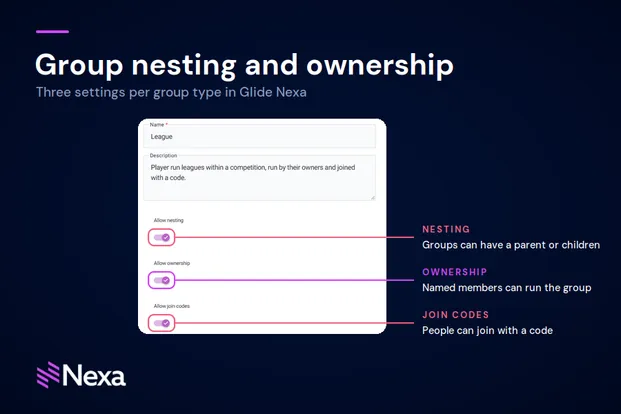
What are Nexa groups used for? Groups hold a set of members for a specific purpose. In this guide, clients use them for fantasy contests, giveaways, event entry and ticket ballots. Joining or leaving a group is a single action, and pages can check group membership to decide what each member sees.
Can Nexa connect to the tools we already use? Yes. One client syncs newsletter preferences to Mailchimp, links GA4 analytics and Disqus comments to the Nexa profile, and sends transactional emails through Nexa.
Can we get our data out of Nexa? Yes. The data is first-party and yours. User data exports are configurable in CSV, JSON and XLSX, with field selection and permission controls.
No matter where you are on your CMS journey, we're here to help. Want more info or to see Glide Publishing Platform in action? We got you.
Book a demo
