 Products







Ready to get started?
No matter where you are on your CMS journey, we're here to help. Want more info or to see Glide Publishing Platform in action? We got you.
Book a demoArticle Types in Glide CMS give each content type its own structured content model, fields, workflows, and API output. Learn how content modelling at the architecture layer fixes what flat CMS can't.
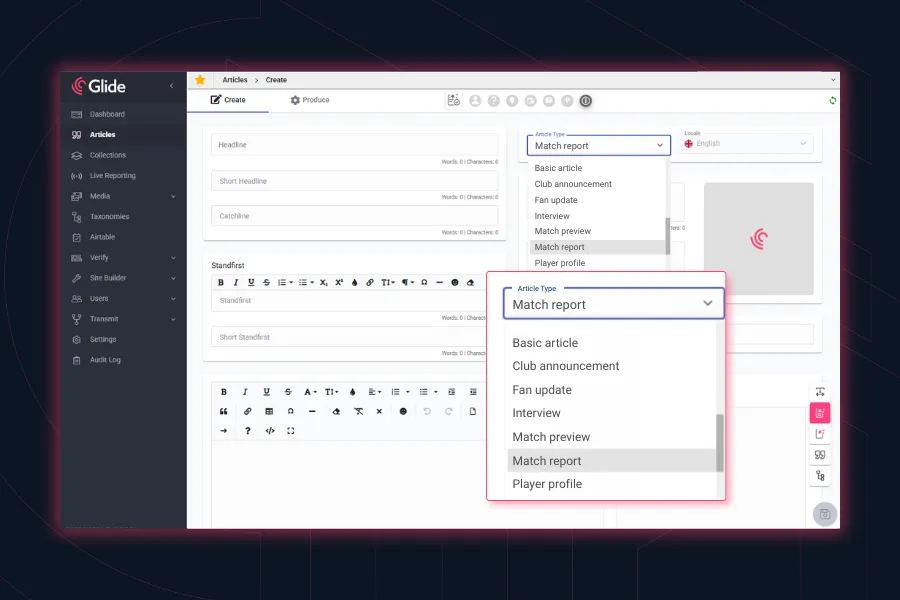
A sports editor is writing a match report. Her CMS has headline, standfirst, and body, and that's it. So she enters the final score and team line-ups into the body, and the scorers, venue, competition stage are all buried in paragraphs, formatted to look structured even though the system treats it as undifferentiated text.
On the other side of that article, a reader wants to find all Premier League matches where a specific player scored, perhaps filtered by home games this season. There's no filter for that, and there can't be, because the data that would power it is sitting inside paragraphs and invisible to the system. The reader sees a list of articles and scrolls, and the editor's care in formatting that information counts for nothing from a technical perspective.
Both problems have the same cause: the CMS doesn't understand what it's publishing. It has a single structure for every article, so the editor adapts to the system instead of the other way around, and the front end can only do what undifferentiated text allows: display it.
This is a content modelling problem. A CMS that does not or cannot treat content type as a first-class concept can't fix it with workarounds: adding a custom field here, a taxonomy there, a template adjustment somewhere else doesn't change the underlying fact that the system is guessing at the shape of your content, and every team downstream pays a price for that.
There is a solution in Glide CMS which fixes this issue at source: Article Types.
Article Types are Glide CMS's implementation of structured content modelling at the content type level. Each Article Type defines its own data model: the fields it carries, the editorial workflow it follows, the form editors see, the taxonomy it applies, the AI features it enables, and the URL structure it generates. When an editor creates or switches to a specific Article Type, the entire CMS experience adapts to that content type automatically.
In practice, that means legwork or workarounds. Teams format body text to mimic structured data, rely on editorial checklists to catch missing fields the system can't enforce, file tickets when a new content vertical needs a different layout, and apply the same editorial workflow to everything then override it manually when something needs to move faster or slower. They end up with fragmentation, using special or custom taxonomies to fake structure, or applying oddball naming conventions. The CMS ends up with multiple different ways of trying to handle the same content type, none of them consistent, and no technical sources of truth for how that content should behave.
All these problems trace back to the same architectural gap. The CMS doesn't have a concept of content types at the data level, so structure gets bolted on wherever each team can manage it. And because the data was never structured in the first place, the front end inherits the same limitations: filters that require typed values can't be built, layouts that depend on specific fields can't be triggered automatically, and the reader experience is constrained by what the data model allows, not design choices.
Developers close the loop by compensating in code: writing parsers to extract meaning from freeform text, building and maintaining data models which should live in the CMS, handling content behaviour changes with releases because there's no other way to change what the system does. The accumulated cost of all this compensation, by workarounds, tickets, manual overrides, and code maintenance, is what a flat content architecture actually costs, and it shows up in editorial velocity, output consistency, and the gap between what the operation does and what it could.
The same logic applies to a sponsored content team managing commercial or legal compliance requirements - perhaps a sponsors product is not allowed to be shown in some territories, a live blog editor working at a breaking news event, a product reviews site that needs lots of comparison data, or any publisher running content types with genuinely different editorial, workflow, and reader needs. The things which become achievable when a content type gets its own definitions touch every layer of the publishing operation.
Every Article Type in Glide CMS carries a default set of fields: headline, standfirst, byline, body, promo details. Beyond that, each Article Type has its own data model, extended through Custom Data with fields specific to that content type.
A match report is able to be defined to always attach home team, away team, final score, scorers, venue, competition, player ratings, and other pieces of data you choose. A restaurant recommendation gets contact details, location data, pricing, specialities or restrictions, and a perhaps widget field for reservation or review data.
Other pieces of information can control workflows. For example, required disclosure fields could be applied to a sponsored content article which need to be populated before the article can move through a workflow. Each of these targeted fields only exist on the specific Article Type to which you want them to apply: reporters working on a match report never see meal calorie count fields, and so on.
The types of data those enforced fields can hold go well beyond simple text inputs. Custom fields can reference other Glide content directly: an editor building a 'You May Like' panel can browse and select related articles directly from within the article form without leaving it, while a product review can pull in a structured collection of detailed specification data from an external system or PIM.
Fields can also connect to external systems, pulling data from third-party APIs such as live scores, product catalogues, or results from an external database, and surface them directly in the article editor with the same ease as if it is already in the CMS. When an editor selects entries from that external source, the data populates on the front end automatically. Related fields can be grouped into structured fragments that appear once or repeat as many times as the article needs.
Required fields, default values, and validation rules work across all of this, so the system enforces completeness rather than leaving it to convention. The article data model for that content type is specific, typed, and queried through the API in ways a body field can't be.
The article form editors see when working on content is easily configured per Article Type using Glide CMS's Form Builder.
Each Article Type starts with the standard fields and gets trimmed or expanded from there: fields which don't apply can be turned off, the remainder are grouped into a layout matching how editors actually work with that content type. Custom fields sit where they need to be in whichever panel and position makes sense rather than buried at the bottom of a generic form.
This is where the editorial workflow gains compound value. A match report form surfaces team and score fields at the top because that's what the editor reaches for first. A long-form investigation form leads with source notes and fact-check staut. A product review form groups specifications and rating criteria into their own panel. The form relfects the job, not the database schema.
Changes at the Article Type level apply to every article of that type going forward without touching anything already published, and nothing is irreversible. It means for example if you change your review rating metrics down the line, they can be applied to all previous examples.
The editorial workflow runs automatically based on what's being published. Match reports need speed, so quick publish is enabled, the confirmation step skipped, and the button always visible. Investigative features need sign-off before they go anywhere, and sponsored content needs stakeholder approval before publication.
Each Article Type carries its own workflow, so the right process runs for writers and contributors when they open the form to start writing, and editors don't need to walk them through any odd steps or workarounds.
Specific default taxonomies are pre-applied per content type and restricted to only what's relevant, so writers don't need to second-guess which taxonomies to apply. Editors working on a match report see sport and competition taxonomies rather than the full tree. The baseline classification is automatic, which means articles don't proceed miscategorised because someone was in a hurry.
For a sponsored content type, disclosure and compliance tags can be required fields; the system enforces classification without adding steps editors need to remember.
Each GAIA feature (Summaries, Drafting Assistant, Preflight checks, Translation, Voice, Headline tools) can be enabled or disabled per Article Type, so a match report or a long-form investigation have what they need and none of the things they don't. A breaking news article can have enforced GAIA Preflight checks which can flag missing attributions, while a live blog type can have everything turned off if they are not needed.
When Article Types carry custom fields, those fields travel through the headless CMS API as structured data: competition as a string the front end can filter on, final score as a number it can sort by, match date as a time value it can query against. This is API-first content delivery: predictable, typed fields in known positions with consistent types.
A filterable match results page showing all home wins for a club in the league this season becomes a straightforward front-end query when the data is typed. When it lives in a body field, it simply can't be built.
A match report Article Type with fields for team lineups, scores, and player ratings lets the front end render a match data card alongside the article automatically. When an editor changes the Article Type from News to Results, the site responds: the data card appears, the layout shifts to match the content type, without a developer needing to get involved. Developers built the Results template once, and editors invoke it by selecting the right Article Type. URL structures follow the content type, each defined once at the Article Type level and inherited by every article of that type.
The maintenance burden changes too. Where a flat CMS forces front-end code to parse freeform text and guess at structure, Article Types give the API predictable, typed fields in known positions with consistent types and consistent locations in the response. A match result page doesn't grep a body field for a score; it receives the score as a dedicated field because the Article Type defined it. And when editorial needs a new content type, they configure it in the CMS without a ticket or a release, and developers build front-end templates against infrastructure that's already there rather than designing and maintaining the underlying data model themselves.
There is a direct line between structured content models and search performance that flat CMS architectures can't replicate.
When content types carry typed, queryable fields, those fields can automatically generate structured data markup (schema.org) for search engines: SportsEvent schema for match reports with home team, away team, score, and date; Review schema for product reviews with ratings and specifications; Article schema with correct author, publisher, and datePublished for every content type. This structured data is what powers rich results in Google: match score cards, star ratings, recipe cards, FAQ accordions. A body field can't generate any of this without manual intervention or brittle parsing.
Article Types also enable clean, type-specific URL structures. Match reports live at /results/team-a-vs-team-b, product reviews at /reviews/product-name, opinion pieces at /comment/headline-slug. Each pattern is defined once at the Article Type level and inherited automatically. Clean, predictable URL hierarchies are a foundational SEO signal, and they're impossible to maintain consistently when every piece of content shares a single generic path structure.
Typed fields enable faceted navigation that creates indexable filter pages: all results for a club this season, all reviews above a certain rating, all articles from a specific competition. Each filter combination can be a crawlable, indexable page with its own search presence, expanding the site's footprint without manual page creation. This is content reuse at the structural level: one piece of content serves its primary purpose and simultaneously contributes to dozens of aggregation pages.
Internal linking benefits too. When relationships between content types are defined (a match report references a competition, teams, and players as typed entities), automated contextual links between related content become trivial. Internal link architecture built on typed relationships is more consistent and more comprehensive than anything maintained by hand.
The same architectural principles that improve search engine performance also determine how AI systems read and cite content. Large language models and AI answer engines favour content that is clearly structured, consistently typed, and semantically labelled. When a match report carries its data as typed fields with explicit relationships rather than burying facts in prose, AI crawlers can extract and attribute that information with confidence.
Article Types produce clean API output with predictable field names and consistent data types. This is exactly the format AI systems need to index content accurately, cite sources, and surface information in AI-generated answers. Publishers whose content is structurally ambiguous are harder for these systems to parse, which means less visibility in AI-driven discovery channels. This is an emerging factor, but the architectural decision is the same one that improves SEO today.
For teams currently working with a flat CMS architecture, the transition to structured content modelling doesn't require a full content migration on day one.
Article Types in Glide CMS can be introduced incrementally. A common approach: start with the highest-value content type (often the one causing the most workarounds or developer tickets), configure its Article Type with the right fields and workflow, and begin using it for new content. Existing content of that type can be retrospectively assigned and enriched as capacity allows, or left as-is until a natural editorial cycle brings it back for update.
New Article Types coexist with existing content without conflict. There is no requirement to restructure everything before the system becomes useful. The value is immediate for the content type you configure first, and it compounds as more types are added.
For multi-brand publishing operations running dozens of properties (common in sports media, where a group may operate sites across multiple markets and sports), Article Types provide the shared infrastructure that preserves each brand's editorial identity while standardising the underlying content model. A match report Article Type works the same way whether it's serving a Swedish hockey audience or a Brazilian football audience; the fields, workflow, and API output are consistent, while the editorial voice and front-end design remain distinct.
For editorial teams, product teams, and developers, Article Types change what the system can do automatically without their needing to get under the hood.
Editorial teams stop maintaining structure themselves. Required fields enforce completeness at the point of creation, editorial workflows run automatically, and taxonomy is pre-applied. Time currently spent on checklists, manual overrides, and formatting workarounds shifts to editorial work that actually reaches readers.
Product teams move faster. Creating a new content vertical means configuring an Article Type, not commissioning development work. The fields, workflow, publishing behaviour, AI features, and URL structure are all defined in one place and inherited by every article of that type going forward. A new event format or product category is now a config session, not weeks of development. Teams using Glide CMS report up to 50% increased content and development productivity.
Developers build against structured data from a headless CMS API. Typed custom fields travel through the API in known positions with consistent types. Front-end templates are built once and triggered by editors selecting the right Article Type. The maintenance burden of parsing freeform text and compensating for an unstructured data model goes away. Glide's no-code back-end means the suitable data model for any content type can be created and ready for front-end consumption without back-end development.
Reader experiences improve without additional effort. Filters work because the data that powers them is typed and structured. Layouts respond to content type automatically. Rich results appear in search because structured data markup can be generated from real fields rather than guessed from prose. The gap between what the data contains and what the front end can do with it disappears, not because more development was done, but because the architecture supports it from the start.
Article Types are configured once and apply to every article of that type going forward. Using match reports as an example - you will have your own ideas of how this can be used in your org - the match report form, workflow, publishing controls, AI features, taxonomy defaults, and form layout are all set in the Article Type config, and every match report inherits them automatically. Any configuration change applies to every future article of that type, which means there's no need for ongoing article-by-article maintenance and no drift between how the system is configured and how content actually behaves.
When publishing requirements change, say for a new vertical, a new event format, or a new product category, the key step is creating or updating an Article Type rather than commissioning development work.
A publisher covering a major tournament can create an Event Coverage Article Type with the fields and workflow that specific content needs, use it for the duration of the event, and retire or adapt it afterward. The cost is time simply in configuration, not extensive CMS and front-end development. Ideas become trivial to test.
The question isn't whether your content needs different structure: match reports, product reviews, live blogs, destination guides, sponsored content, and breaking news all have different editorial requirements, different data needs, and different reader expectations.
The question is whether your CMS knows the differences, and whether that knowledge is built into how every team works or compensated for by all of them separately.
If it's the latter, you're not running a publishing operation at full capacity; if a significant portion of the energy goes on working around the production phase to make for a better reader experience, you are losing out.
If the architecture of your CMS is worth examining, start with a conversation about what your content types actually need, and whether your current system knows the difference. Talk to a Glide product specialist.
What are article types in Glide CMS? Article Types are Glide CMS’s way of giving each kind of content its own structured content model. Each one defines its own fields, editorial workflow, editor form, taxonomy, AI features, and URL structure, so a match report, a product review, and a sponsored piece each behave the way that content needs.
Do I need a developer to create a new article type? No. Editorial and product teams configure Article Types in the CMS without a ticket or a release. Developers build the front-end template for a content type once, and editors trigger it by selecting the right Article Type.
Can article type fields pull in data from outside the CMS? Yes. Custom fields can connect to third-party APIs such as live scores, product catalogues, or external databases, and show that data in the article editor. Fields can also reference other Glide content directly, so editors can select related articles without leaving the form.
How do article types help with SEO? Typed fields can automatically generate schema.org structured data, which powers rich results such as match score cards and star ratings. Article Types also give each content type a clean, consistent URL structure and make it possible to build indexable filter pages from typed data.
Do I have to restructure all my existing content to start using article types? No. Teams can start with one high-value content type, use it for new content, and assign or enrich existing articles as capacity allows. New Article Types work alongside existing content without conflict.
Related articles:
No matter where you are on your CMS journey, we're here to help. Want more info or to see Glide Publishing Platform in action? We got you.
Book a demo
