 Products






Ready to get started?
No matter where you are on your CMS journey, we're here to help. Want more info or to see Glide Publishing Platform in action? We got you.
Book a demoNot every publish action deserves the same fanfare of notifications and Google alerts. Your content team needs tight control over whether an update for a typo triggers the same notifications a new article can, or simply updates the content in place unheralded. Glide CMS offers just that, through a feature set called Publish Time Behaviour.
Content rarely stays still after it goes live. Articles get corrected, stats get refreshed, headlines get optimised, and images get changed - all routine acts of editorial housekeeping countless times a day across any busy content operation.
The problem is when content management systems treat each of these updates as if they were a new article or piece of content, and firing the same chain of notifications, webhooks, and timestamp resets regardless of whether the change is newsworthy or not.
For publishers operating at scale, across dozens of channels and millions of readers, the lack of difference between “breaking news” and “we fixed a typo” creates operational problems. Glide CMS addresses this through a feature set called Publish Time Behaviour, which gives editorial teams control over what happens downstream when content changes.
When an article is published or updated in Glide CMS, the platform’s pub/sub event system fires signals to every subscribed service listening for changes. That includes front-end caches waiting to be invalidated, webhook endpoints connected to partner feeds, multi-channel publishing destinations distributing content to apps and syndication partners, and push notification services.
For breaking news, that chain of events is exactly what you want. A story goes live and within seconds it reaches every channel, every device, every reader.
But that same chain becomes a liability when the “event” is an updated byline or timestamp, an improved caption, or a refreshed statistic in an evergreen guide. The downstream consequences are tangible:
Consider a sports publisher updating a match report with final stats after the game. Fans who followed the live version don’t need a second alert that tells them the article exists, they just need the content to be updated when they return to it.
Glide CMS provides three distinct Publish Time Behaviours, configurable per Article Type. Each one determines how the platform handles timestamps and downstream events when content is updated.
Live Timestamp
Live timestamp is the standard behaviour. When Live Timestamp is chosen, the publish time updates to that very moment, all associated downstream events fire, webhook subscribed services are notified, and RSS feeds reflect the new timestamp.
It’s best used for breaking news, genuinely new articles, and content being intentionally re-promoted with a new angle.
Silent Update
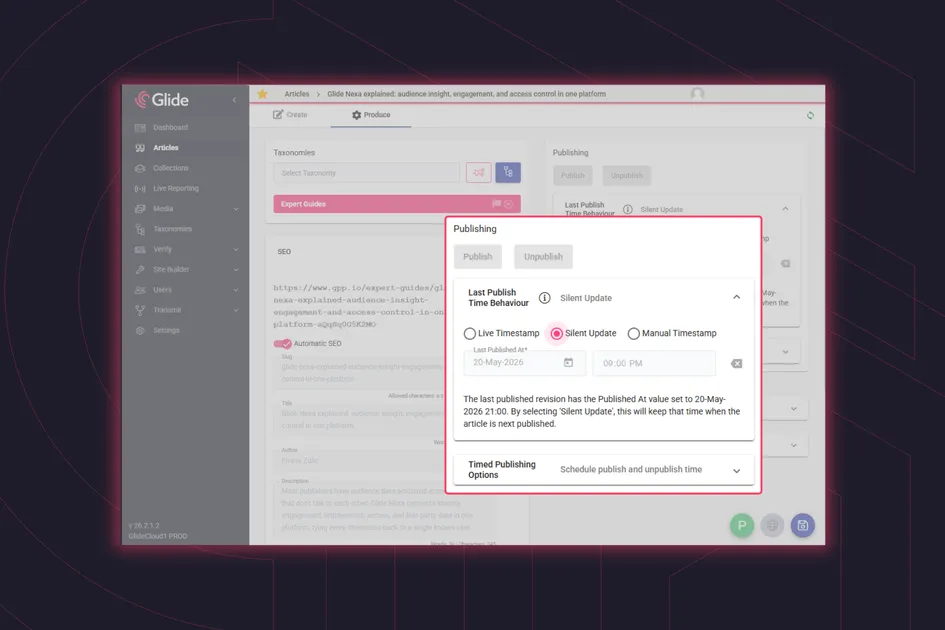
Silent updates are used when an editor wants to update an article but wants the publishing timestamp to stay unchanged. With the silent update, readers visiting the page see the updated content but no signals fire to search engines, no notifications go out, and no RSS entries are updated.
Because Glide CMS uses a fully referential architecture, any linked references to the article (collections, related content panels, or topic pages) also reflect the updated content automatically, without generating their own cascade of repeated events.
Silent update is the right choice for typo corrections, metadata tweaks, image swaps, byline updates, or any change where the content is edited but the audience doesn’t need to know about it as a thing in its own right.
Manual Timestamp
Using the manual timestamp, editors set the publish timestamp independently of when they actually clicked publish.
Editorial teams know their content better than anyone, and whether an update is newsworthy or is just simple housekeeping. A CMS should respect that, and allow them to decide on when their update should be.
Manual timestamps can be used for right-dating migrated content during a platform move, aligning publish time with its real-world event rather than the CMS entry, or scheduling content that was prepared in advance.
For publishers managing content at scale, having the option to choose between these three behaviours on every update is the difference between a platform that works with editorial intent and one that works against it.
The workflow is deliberately simple. An editor will open a published article, make their change, and select the appropriate Publish Time Behaviour from the publishing options panel before hitting publish. There is no need for a developer ticket or configuration file edit.
The platform handles everything downstream. If a silent update is selected, the event system stays quiet. The CDN updates the content, but nothing upstream signals that a change occurred.
Publish Time Behaviour is configurable at the Article Type level, which means being able to set defaults without requiring editors to think about it on every save. For example, breaking news articles can default to live timestamps for maximum distribution speed. Evergreen content types can default to silent update. Editors retain the ability to override any article setting when the situation demands it.
Putting these decisions into the hands of the editors, rather than burying them in a developer config file, means content maintenance happens quicker and more often. Teams that trust their CMS to behave predictably are teams that keep their content accurate.
Publish Time Behaviour isn’t about suppressing updates by default. There are clear situations where the full event chain is exactly what you want, and live timestamp is there for those moments. The point is to make the choice conscious and editorially-driven.
This level of control is possible because Glide CMS is built on an event-driven architecture where publishing and distribution are separate concerns. The decision whether to fire downstream events happens at the platform level, before anything reaches the CDN, feed, or consumer endpoint.
In platforms where “publish” is a single binary action, adding this kind of control means retrofitting logic into every downstream system individually. In Glide CMS, it’s a single configuration choice that the entire event pipeline respects.
Want to see how Publish Time Behaviour works in your workflow? Connect with a Glide product specialist.
What is Publish Time Behaviour? Publish Time Behaviour is a Glide CMS feature set that lets editors decide what happens downstream when they publish or update content. Editors choose between three options: Live Timestamp, Silent Update, and Manual Timestamp.
When should I use a silent update? Silent update suits changes where the content is edited but the audience doesn’t need to be told about it, such as typo corrections, metadata tweaks, image swaps, or byline updates. The publish timestamp stays the same, and no notifications, RSS entries, or search engine signals are triggered.
Do people still see the changes made with a silent update? Yes. Anyone visiting the page sees the updated content straight away. Because Glide CMS uses a fully referential architecture, collections, related content panels, and topic pages that link to the article also reflect the change automatically.
How does silent update affect SEO? It lets SEO teams refresh statistics, improve headlines, or add internal links without signalling to search engines that the article is new. When a meaningful refresh does warrant re-indexing, switching to Live Timestamp takes one click.
Can I set a default behaviour for different types of content? Yes. Publish Time Behaviour is configurable at the Article Type level, so breaking news can default to Live Timestamp and evergreen content to Silent Update, with no developer ticket needed. Editors can still override the default on any article.
Related articles:
No matter where you are on your CMS journey, we're here to help. Want more info or to see Glide Publishing Platform in action? We got you.
Book a demo
