 Products






Ready to get started?
No matter where you are on your CMS journey, we're here to help. Want more info or to see Glide Publishing Platform in action? We got you.
Book a demoProspect wanted audio across its written content without the usual complexity. With GAIA Voice in Glide CMS, its team generates natural-sounding narration automatically, and subscriber audio engagement now outpaces its peer set.
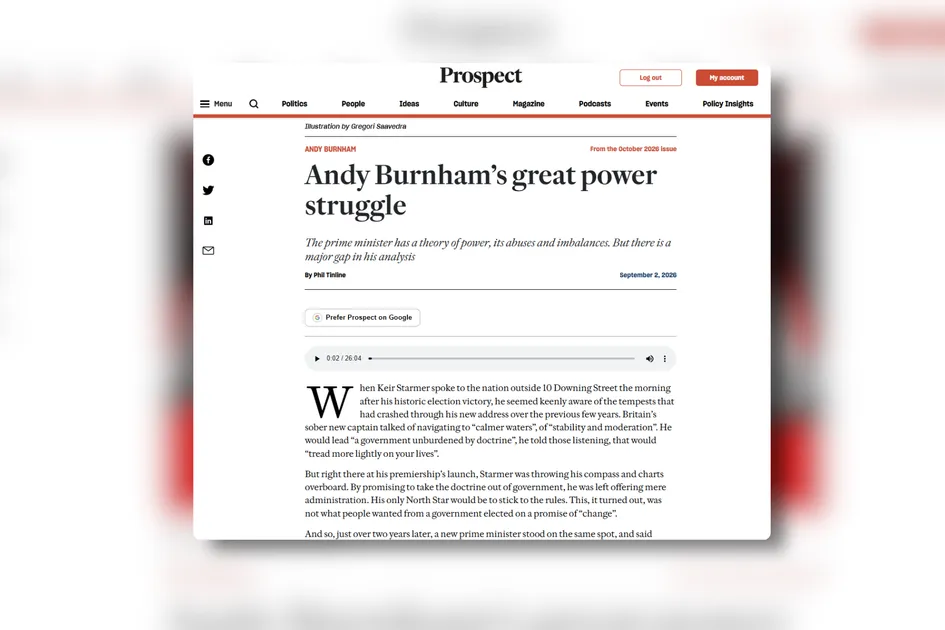
Several years after embarking on a digital transformation that included migrating to Glide CMS and the launch of a newly designed website, Prospect, the UK's leading monthly current affairs magazine, continued to develop its product range to enhance the user experience and increase the value of a subscription.
Building on the success of its newly launched website and digital app, Prospect identified a growing opportunity to expand content beyond text, particularly as audio consumption continued to rise across its audience and podcast engagement showed strong momentum.
The opportunity: make high-quality audio available across written content, without introducing complexity for Prospect's editorial or digital teams. Specifically, Prospect sought to avoid editors having to work across multiple systems to generate audio files, and for managing the files to be much less troubling than traditional means.
As exisiting users of Glide CMS, Prospect could activate audio generation of files with a simple toggle - no need for additional infrastructure or custom development. A suite of AI and ML features built on Amazon Bedrock, GAIA includes a text-to-speech service, GAIA Voice, that can automatically generate audio files from article text. Interacting directly with Amazon Polly, GAIA Voice removes workflow and admin steps while enabling content creators to instantly create audio versions of its content in a wide range of preferred languages and specific dialects.
Having the connections to the audio service, as well as the ability to manage the files associated with the article available in Glide CMS out of the box, removes a significant amount of the development work in the setup phase and eliminates the need for editors to move and append files or regenerate files when an article is updated, all things that can make audio narration complex and tricky to handle.
Depending on editorial configuration, Prospect's team can:
For Prospect's small digital team, GAIA Voice proved to be an ideal solution. "The fact that audio generation happens alongside text content in one place, the CMS, was a big win," noted Chris Tilbury, Prospect's Head of Product.
Management of the text-to-voice structure within the Glide CMS infrastructure meant Prospect's product team and development partner could focus wholly on the audience experience, including where to place the player as well as other aesthetic and user-targeted work.
In addition to workflow efficiency, audio quality was another non-negotiable for Prospect.
Of interest to Prospect was the range of voices, tones, and genders available in GAIA Voice allowing for narration to be aligned with article tone and type, creating the right user experience for different article types from serious analysis and commentary through to lighter columns,.
Having looked at multiple approaches, and already familiar with Amazon Polly, the editorial team quickly noticed a tangible improvement with GAIA Voice versus the standard Polly option.
"There was a noticeable diffrence in quality," said Tilbury. "The editorial team was happy with how natural GAIA Voice feels, and that continues to be important."
Presently, audio narration is availalbe on the Prospect website for subscribers only, reinforcing the subscription value proposition and giving paying readers the option to engage with content in the way that best suits them. The audio player is placed prominently at the top of articles, ensuring visibility and access without disrupting the reading experience.
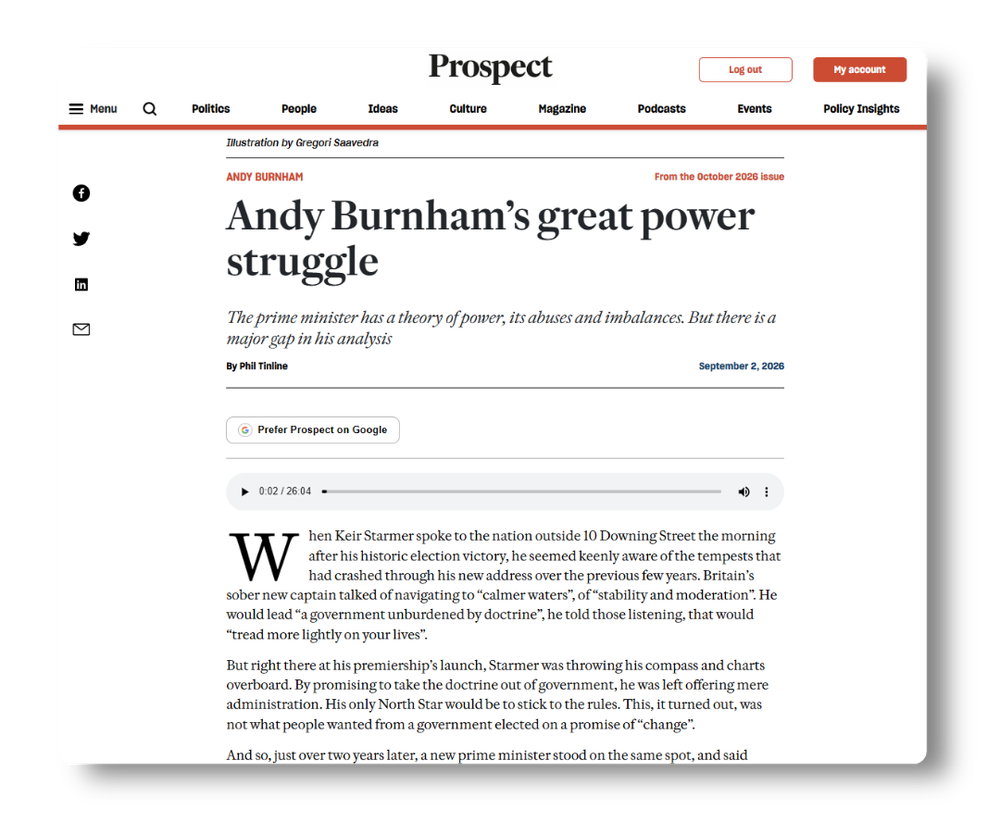
"Narrated articles form a key part of our digital product range and data suggests that engagement with our audio is greater than amongst other publications in our peer set," said Tilbury.
As Prospect's brand continues to grow, meeting their audience's needs means being able to deliver content in every type of channel, an expectation that is easily met for audio listening with GAIA Voice.
"If someone came to me and said, we're thinking about giving audio a go, I would definitely say for us it's been worth it," said Tilbury. "GAIA Voice achieved what we wanted: quick, reliable, high quality audio without making life harder for the team."
See how GAIA Voice can work for your content. Speak to a Glide product specialist.
What is GAIA Voice? GAIA Voice is the text-to-speech feature in Glide CMS. It automatically creates audio versions of articles from the written text, ready to publish on a page, in an app, or as a separate audio feed. It's part of the GAIA suite of AI features built on Amazon Bedrock.
How do editors turn on audio? There's no separate system or custom development. Editors activate the feature in settings and generate audio inside the CMS, alongside the text.
What languages does GAIA Voice support? It can generate audio in more than 40 languages and dialects, with control over gender and speaking style, and can handle regional variations within a language.
Can the audio differ from the written article? Yes. Audio templates let teams change the reading order, leave out parts like the standfirst or data tables, or add lines that aren't in the text version, without editing audio files by hand.
Does GAIA Voice keep our data private? Yes. Like the rest of GAIA, your content stays out of AI training sets.
Do we need developers to set it up? No bespoke integration is needed for standard use. Front-end placement of the player, like Prospect positioning it at the top of the article, is design work your team or development partner controls.
Related articles:
No matter where you are on your CMS journey, we're here to help. Want more info or to see Glide Publishing Platform in action? We got you.
Book a demo
