 Products





Ready to get started?
No matter where you are on your CMS journey, we're here to help. Want more info or to see Glide Publishing Platform in action? We got you.
Book a demoWith WoodWing Assets connected directly to Glide CMS, editors can search, select, and import assets with full metadata, ready to publish without switching platforms.
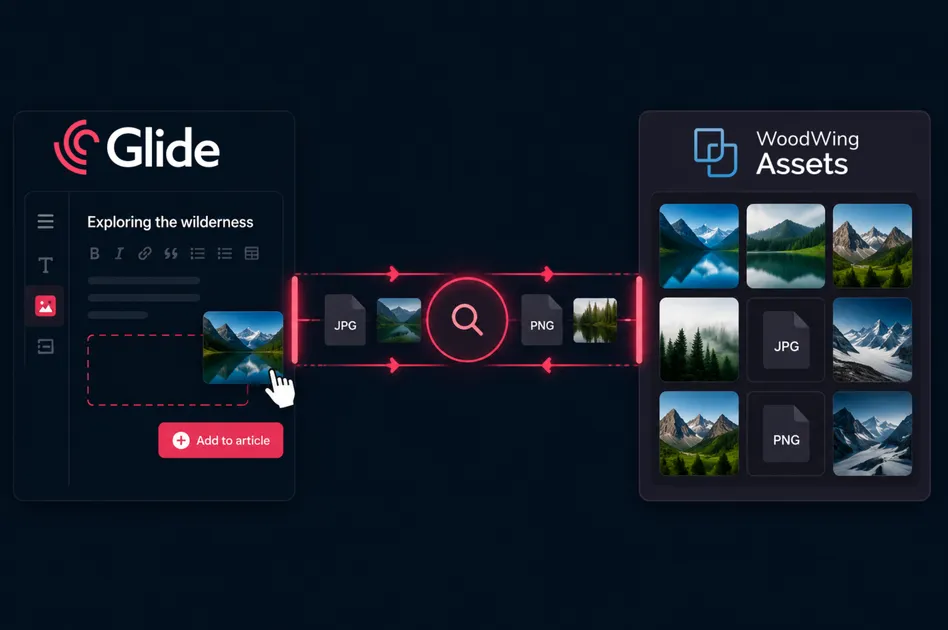
Large media operations run on a lot of moving parts. Articles, images, video, audio, rights clearances, version histories, deadlines, and multiple publishing platforms all need to stay in sync, and doing so is hard because the systems managing them are rarely built to talk to each other.
A lot of publishers rely on specialised DAM (Digital Asset Management) systems for good reason. WoodWing Assets, which is created by Glide partner WoodWing, handles the hard end of the digital assets problem well, such as enterprise rights management, multi-brand asset governance, and complex approval workflows, which is why large publishers and media organisations choose it and why we think it is one of the best solutions for such needs.
But a DAM that sits outside the CMS creates its own workflow friction. Editors can end up downloading and re-uploading assets manually, metadata often gets lost in the journey, crucial things like licences and rights information get separated from the assets they refer to, and the CMS<>DAM gap becomes just another problem rather than making problems go away.
The same workflow problems surface repeatedly, and get worse over time:
Glide CMS and WoodWing Assets address this by connecting asset management with where your publishing operations actually happen. Assets managed in WoodWing are available directly inside Glide, with metadata, rights information, and version control intact.
The Glide CMS + WoodWing Assets integration connects the WoodWing Assets DAM directly to Glide CMS and Glide's built-in DAM, Glide Media, using the powerful Glide External Apps feature.
In practical terms, this means editors can browse, search, and select WoodWing assets from within Glide CMS without even leaving the CMS screen. Selected assets get automatically pulled into Glide Media, where they are stored with the associated WoodWing metadata, ready to enter Glide's image optimisation pipeline.
WoodWing Assets remains the foundational system for storage, rights, versioning, and metadata. Glide Media handles publishing-speed image optimisation and editorial workflow integration. The integration lets you use both for what they do best, while users work in a single system.
The metadata flow is configurable based on your publishing workflow. Assets imported from WoodWing into Glide Media bring their metadata with them such as IPTC/EXIF, which is retained within Glide Media. Once in Glide, editors can make publishing-specific changes like article-specific captions, crops, or alt text without affecting the source asset in WoodWing. This approach works well for publishers where the DAM is the system of record for master assets, while Glide handles the various renditions.
For publishers operating digital-first workflows where the CMS is the primary content source, the relationship can work differently.
Setting up the integration
Configuring the WoodWing Assets app through Glide's External Apps feature is straightforward:
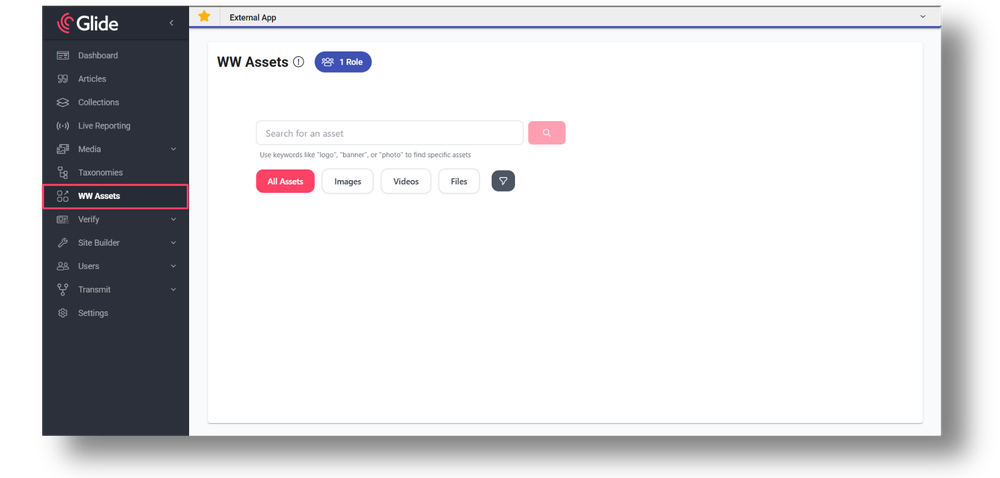
Once configured, the WW Assets app appears in the Glide CMS sidebar alongside other publishing tools. No separate login required. No browser tab switching. The integration uses Glide's existing authentication, so access is controlled through the same role-based permissions that govern everything else in the CMS.
Searching and importing assets
When an editor needs an image, they select WW Assets from the sidebar. The interface is clean and purpose-built for editorial use:
The image is pulled from WoodWing Assets with all its metadata intact: IPTC norms such as title, description, rights information, keywords, and any custom fields your organisation uses. Once in Glide Media, the image behaves like any other in the system. It follows Glide's image handling rules, goes through automatic optimisation, and is ready to be placed into articles, galleries, or collections.
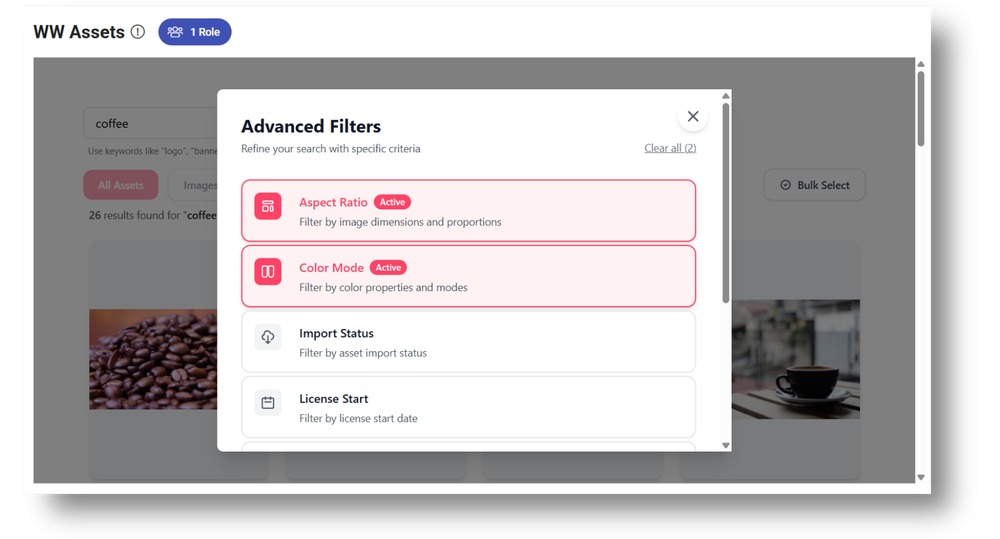
Imported assets maintain their connection to the source system, but operate independently in Glide Media. This means editors can make publishing-specific adjustments without affecting the master asset in WoodWing. If an asset is updated in WoodWing after import, editors can re-import it as needed, giving control over when and how updates flow into published content.
Bulk import capabilities
For larger projects or content migrations, the integration supports bulk import. Editors can select multiple assets at once and bring them into Glide Media in a single operation, so sseful to organisations with complex rights management or where different teams have different levels of DAM access.
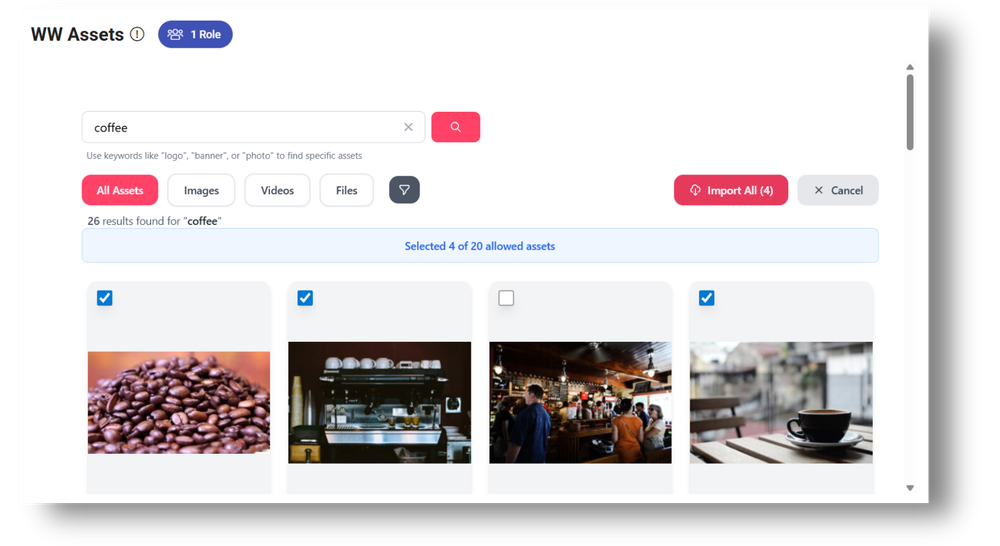
Once everything is connected, editors get direct in-CMS access to WoodWing Assets and can treat it as a dependable upstream source rather than another system to deal with.
Metadata preservation
When an image is imported from WoodWing Assets, all metadata travels with it. Title, description, copyright information, keywords, and custom fields are automatically populated in Glide Media. This eliminates the manual re-entry that typically happens when assets move between systems, and ensures that rights information and attribution remain accurate across publishing operations.
Glide Media integration
Once assets are in Glide Media, they are indistinguishable from any other image, which keeps the editorial experience predictable. Editors can reuse images across the site, knowing they are working with the right metadata and the same image behaviour everywhere it appears.
Glide Media handles automatic cropping with focal point control, format conversions and renditions, watermarking, and responsive image delivery. The images imported from WoodWing become part of Glide's optimisation pipeline, so images load fast and look right on every device.
Role-based access control (RBAC)
The same permission model that governs access to articles, collections, and taxonomies in Glide CMS extends to the WoodWing Assets app. Administrators can control which roles can access the app, ensuring that only authorised team members can import assets. This is particularly useful for organisations with complex rights management or where different teams have different levels of access to the DAM.
Real-time asset availability
The integration queries WoodWing Assets in real time, so editors always see the current state of the DAM. When new assets are added to WoodWing, they're immediately searchable from within Glide CMS. When metadata is updated in WoodWing, those changes are reflected the next time an editor searches. There's no syncing delay and no stale snapshots.
Reduced editorial friction
Editors stay in the CMS without downloading files to their desktop, renaming them, and uploading them somewhere else. No copying metadata from one system and pasting it into another. The time saved on each image compounds across dozens of articles, hundreds of editors, and thousands of publishing actions per month.
Cleaner collaboration
When everyone works from the same asset source, there's no confusion about which version is current or where the authoritative metadata lives. WoodWing Assets remains the single source of truth for media governance, while Glide CMS remains the single source of truth for publishing. The integration connects them without creating duplication or drift.
Faster content turnaround
Breaking news doesn't wait for someone to log into a separate system, find an image, download it, and upload it somewhere else. With WoodWing assets accessible directly in the CMS, editors can find and place images in seconds. For newsrooms operating under tight deadlines, that speed matters.
Improved asset discoverability and management
WoodWing Assets' search and filtering capabilities are available from within Glide CMS, so editors benefit from the DAM's organisational structure without needing to learn a separate interface. Keywords, categories, and custom metadata fields all work as expected, making it easier to find the right asset at the right time.
A better editorial experience
As publishing operations grow more complex, the number of systems involved tends to increase. This integration prevents that complexity from spilling over into editorial workflows. Editors get a unified interface while the underlying systems remain specialised.
Good asset management requires systems that talk to each other, not fragmented platforms that force editors and developers to invent workarounds and pay the price in lost time and duplicated effort.
Connecting WoodWing Assets with Glide CMS avoids that trap. WoodWing remains at the heart of asset management, and Glide CMS at the centre of publishing. Assets are trustworthy, metadata travels intact, and editors stay in flow.
For publishers already using WoodWing Assets, this integration removes one of the most persistent sources of friction in daily editorial life. For those considering a specialised DAM, it demonstrates how Glide CMS connects to best-in-class systems without forcing you to abandon tools that already work.
Ready to see how pairing WoodWing Assets with Glide CMS can help your newsroom? Request a WoodWing Assets demo or connect with a Glide product specialist to learn more.
Related articles:
No matter where you are on your CMS journey, we're here to help. Want more info or to see Glide Publishing Platform in action? We got you.
Book a demo
