 Products







Ready to get started?
No matter where you are on your CMS journey, we're here to help. Want more info or to see Glide Publishing Platform in action? We got you.
Book a demoIn Glide CMS, live reporting gives every event a shared template, locks posts while they are edited, and keeps every saved version, so a team can run one live blog without the chaos.
Picture election night. Five editors are filing updates to one live blog while a sixth tries to write a summary. Two editors open the same post, both save, and the earlier update is gone.
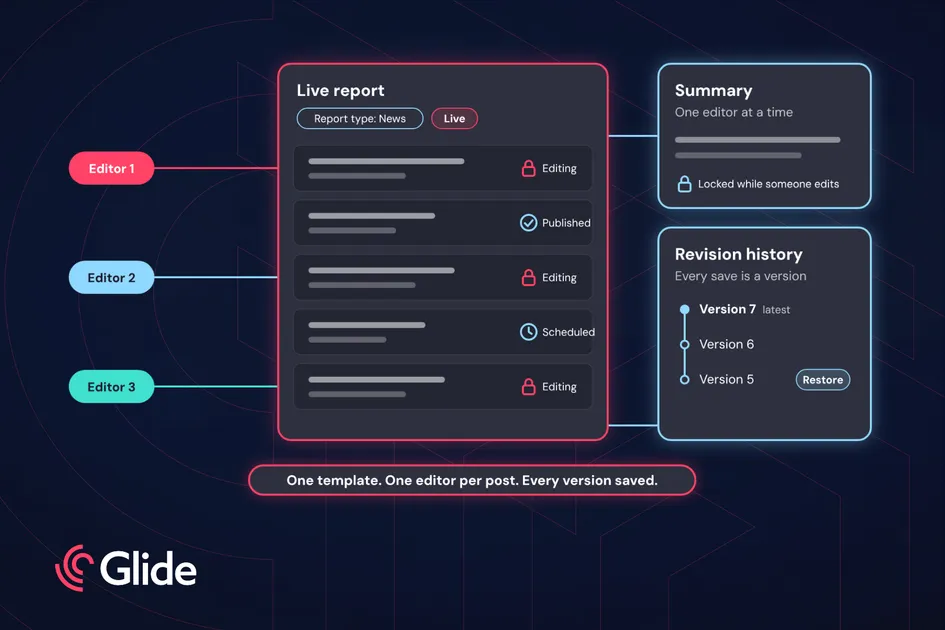
With live reporting in Glide CMS, those same five editors work on different posts at once. Each post locks while it is edited, and the summary has one editor at a time.
Glide CMS is a headless, API-first content management system for media, entertainment and sports. Live reporting, the live blog tool in Glide CMS, is built into it, so live coverage runs in the same place as the rest of your content (Read: why native beats a separate live blog tool)
This guide is for editors-in-chief, desk and managing editors, and the admins who set up report types and roles.
Before a live report exists, an admin or a senior editor sets up a report type, which works as a live blog template. It decides which fields editors fill in, which tools appear in the post editor and which taxonomies apply by default.
A sports report type might carry match statistics, player highlights and embedded scorecards. A news report type might carry verified sources, breaking updates and related background articles. Admins can make some fields mandatory, so every report starts with the information it needs.
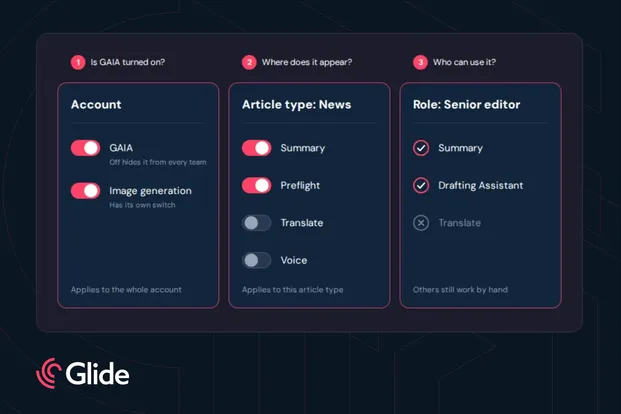
The same report type also holds the prompts for GAIA, Glide CMS’s native AI toolset. A sports report can ask for short, energetic post headlines, while a news report asks for more formal phrasing. Editors review every suggestion, and can adjust it or ignore it.
Report types also control audiences, ads, and subscriptions. That commercial side is covered in Glide CMS Live Reporting tools to boost engagement and revenue.
Each post in the list shows its status, which is Draft, Published, or Scheduled, and an icon flags what needs attention:
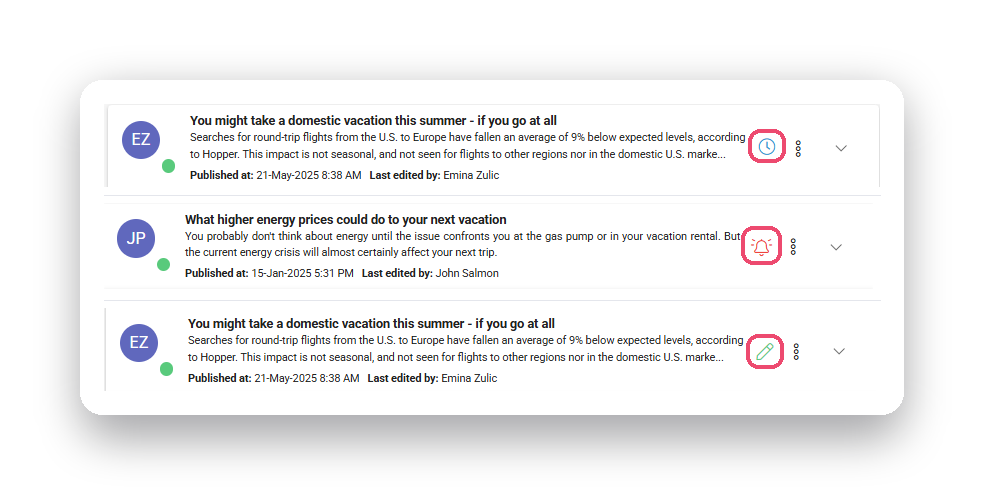
Posts are locked automatically while someone edits them, which prevents overwrite conflicts. If a lock is accidentally left in place, authorised users can Kick User to reclaim editing access.
Roles control the following actions:
| Action | What it allows |
| Create report types | Sets up the templates every report starts from |
| Use GAIA | Access to AI suggestions for headlines, wrap-ups and summaries |
| Kick user | Takes over editing a post another user left locked |
| Publish or unpublish a report | Puts a report live or takes it down |
In larger teams, one editor can handle the report setup and the summary while the others focus on posts.
Stories change quickly, and mistakes happen. Every time an editor saves a report or a post, Glide CMS creates a new version. Editors can view earlier versions and restore them, so a wrong turn can be rolled back.
Every live event also benefits from a recap. The summary block gives editors a space for a high-level overview, so readers get the story so far without scrolling through every post. It works like a mini-article inside the report, with internal links to specific posts so readers can jump to the moments that matter.
Only one editor can edit the summary at a time, and every change is tracked in revision history, so it can be restored if needed.
Live coverage has a beginning and an end. A report can be set as Live or Finished: a live report keeps accepting posts, and a finished one is static. Finishing can be manual, when an editor ends the report, or automatic, when the system ends it after a set period of inactivity.
Posts can be scheduled in advance, so a result announcement or a planned update goes out at the right moment. Posts written before a report is published stay hidden until it goes live.
For teams covering several events at once, the live reports list shows each report’s status at a glance and lets editors save filters.
Want to see live blog collaboration in Glide CMS? Talk to a Glide CMS product specialist.
What is live reporting in Glide CMS? Live reporting is the live blog tool built into Glide CMS. See Glide CMS’s Live Reporting overview.
How do I stop two editors overwriting each other in a live blog? In Glide CMS’s live reporting system posts lock automatically while someone edits them, so editors can work on different posts at once without overwriting each other.
What if an editor leaves a post locked? An authorised user can use Kick User to take over editing.
Can you restore an earlier version of a live blog post? Yes. Every save of a report or post creates a version, and editors can view earlier versions and restore them.
Can we control who publishes? Yes. Roles control who can publish or unpublish reports, create report types, use GAIA and kick other users.
How do you end a live blog automatically? An editor can end it manually, or the system can end it automatically after a set period of inactivity.
Can we schedule posts in advance? Yes. Posts can be scheduled for timed updates, such as a result announcement.
Related articles:
No matter where you are on your CMS journey, we're here to help. Want more info or to see Glide Publishing Platform in action? We got you.
Book a demo
